Unlock a world of possibilities! Login now and discover the exclusive benefits awaiting you.

- Qlik Community
- :
- All Forums
- :
- QlikView App Dev
- :
- One Date Selection Source, for multiple data sets
- Subscribe to RSS Feed
- Mark Topic as New
- Mark Topic as Read
- Float this Topic for Current User
- Bookmark
- Subscribe
- Mute
- Printer Friendly Page

- Mark as New
- Bookmark
- Subscribe
- Mute
- Subscribe to RSS Feed
- Permalink
- Report Inappropriate Content
One Date Selection Source, for multiple data sets
Hi,
How do i create one set of dates for filtering purposes that will filter both data sources.
I have one set of records that are hourly records of money made. (Datetime)
The second are automated messages that get sent out, also time stamped.
How do I get both sets of data to filter when I select dates in a List box?
- Tags:
- new_to_qlikview

 Gysbert_Wassena
- Mark as New
- Bookmark
- Subscribe
- Mute
- Subscribe to RSS Feed
- Permalink
- Report Inappropriate Content
See this tutorial. The tutorial selects in only one date field, but you can simply add the same kind of Select in Field actions for another field to make the selections in that other field too.
talk is cheap, supply exceeds demand
- Mark as New
- Bookmark
- Subscribe
- Mute
- Subscribe to RSS Feed
- Permalink
- Report Inappropriate Content
Why not just set them up to be a common key
table1:
qualify *;
unqualify date;
load
date,
sales,
employee
from sql select blah blah blah table1
table2:
qualify *;
unqualify date;
load
date,
sales,
employee
from sql select blah blah blah table2
- Mark as New
- Bookmark
- Subscribe
- Mute
- Subscribe to RSS Feed
- Permalink
- Report Inappropriate Content
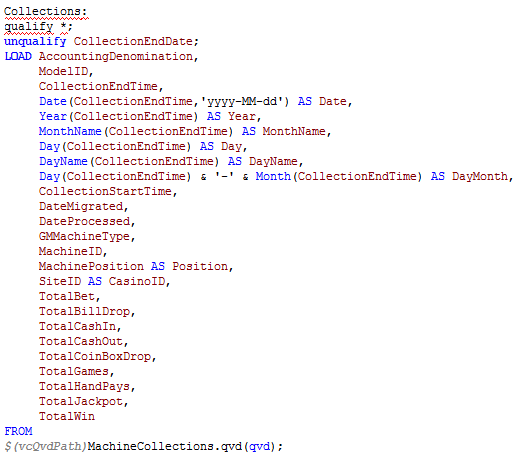
Gives me errors?
- Mark as New
- Bookmark
- Subscribe
- Mute
- Subscribe to RSS Feed
- Permalink
- Report Inappropriate Content
I think that the code before your first line above as not got a terminator ";"
change
Collections:
qualify *;
to be
;
collections:
qualify *;
Also the field you are unqualifying needs to exist as one of your load fields so
unqualify CollectionEndTime; would be fine
but because you have not done a load on CollectionEndDate then
unqualify CollectionEndDate; will fail.