Unlock a world of possibilities! Login now and discover the exclusive benefits awaiting you.

- Qlik Community
- :
- All Forums
- :
- QlikView App Dev
- :
- Re: Percentage symbol
- Subscribe to RSS Feed
- Mark Topic as New
- Mark Topic as Read
- Float this Topic for Current User
- Bookmark
- Subscribe
- Mute
- Printer Friendly Page

- Mark as New
- Bookmark
- Subscribe
- Mute
- Subscribe to RSS Feed
- Permalink
- Report Inappropriate Content
Percentage symbol
Hi All
I have a field
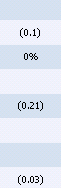
I need to show % at end of values like (0.21)%. i set it in Number properties, also used num(Expression,'#.##0,00%') but its not working ,any expression level script or properties to change?
Regards

 anlonghi2
- Mark as New
- Bookmark
- Subscribe
- Mute
- Subscribe to RSS Feed
- Permalink
- Report Inappropriate Content
Amsi,
Try this:
if([Field (%)]/100>0,if([Field (%)]/100<1, '(' & num([Field (%)]/100,'#0.00%') & ')',if([Field (%)]/100>1,num([Field (%)]/100,'#0.00%'))),'0.00%')
Best regards
- Mark as New
- Bookmark
- Subscribe
- Mute
- Subscribe to RSS Feed
- Permalink
- Report Inappropriate Content
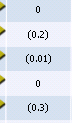
only 0% is showing and other values like (0.20) are missing.
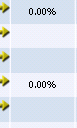
Actual fields are below

 Peter_Cammaert
- Mark as New
- Bookmark
- Subscribe
- Mute
- Subscribe to RSS Feed
- Permalink
- Report Inappropriate Content
Aside,from the QVW, there is something you're not showing/telling us.
What is the expression in column 'field'?

 PrashantSangle
- Mark as New
- Bookmark
- Subscribe
- Mute
- Subscribe to RSS Feed
- Permalink
- Report Inappropriate Content
Hi,
use Isnull() or len(trim(fieldName))>0 then perform expression given by anlonghi2.
Try like
if(not isnull(Field (%)]/100 or len(trim(Field (%)]/100))>0,
if([Field (%)]/100>0,if([Field (%)]/100<1, '(' & num([Field (%)]/100,'#0.00%') & ')',if([Field (%)]/100>1,num([Field (%)]/100,'#0.00%'))),'0.00%')
)
Regards
Please appreciate our Qlik community members by giving Kudos for sharing their time for your query. If your query is answered, please mark the topic as resolved 🙂
- Mark as New
- Bookmark
- Subscribe
- Mute
- Subscribe to RSS Feed
- Permalink
- Report Inappropriate Content
this is the full expression
=if([Competitive (%)]/100<=0,0,
if([Competitive (%)]/100<1, '(' & [Competitive (%)]/100 & ')',
if([Competitive (%)]/100>1, [Competitive (%)]/100)))
 jonathandienst
- Mark as New
- Bookmark
- Subscribe
- Mute
- Subscribe to RSS Feed
- Permalink
- Report Inappropriate Content
Change your expression to
=[Competitive (%)] / 100
And set the format to
0.00%;(0.00%)
and make sure the Decimal Separator is set to .
Or use a Num() in the expression:
=Num([Competitive (%)] / 100, '0.00%;(0.00%)', '.')
HTH
Jonathan
Peter_Cammaert
- Mark as New
- Bookmark
- Subscribe
- Mute
- Subscribe to RSS Feed
- Permalink
- Report Inappropriate Content
All our efforts will never produce your required results. Your expression does the following:
If field <= 0, then 0 (never negative results)
else if field < 1 then put parentheses around the result and the % goes outside the parentheses
else if field > 1 then display as usual.
- Contrary to what you said before, there won't be any negative values, just 0 without parentheses
- 100% (field = 1 exactly) will show as Null() (or a minus sign)
- For testing a %-value it's ok, but why do you divide a percentage by 100, just for display purposes??? See every third parameter in your if() expressions...
Indeed, this cannot be done with just the Format Pattern or any num() function parameters.
anlonghi2
- Mark as New
- Bookmark
- Subscribe
- Mute
- Subscribe to RSS Feed
- Permalink
- Report Inappropriate Content
=if(isnum([Competitive (%)]),
if([Competitive (%)]/100>0,
if([Competitive (%)]/100<1, '(' & num([Competitive (%)]/100,'#0.00%') & ')',
if([Competitive (%)]/100>1,num([Competitive (%)]/100,'#0.00%'))),'0.00%'),'0.00%')
regards

 anbu1984
- Mark as New
- Bookmark
- Subscribe
- Mute
- Subscribe to RSS Feed
- Permalink
- Report Inappropriate Content
=if([Field (%)]/100<=0,0,
if([Field(%)]/100<1, '(' &[Field(%)]/100& ')',
if([Field(%)]/100>1,[Field(%)]/100))) & If(Len(Trim([Field (%)]))>0,'%')
- Mark as New
- Bookmark
- Subscribe
- Mute
- Subscribe to RSS Feed
- Permalink
- Report Inappropriate Content
This worked for me.
=if([Field (%)]/100<=0,0,
if([Field(%)]/100<1, '(' &[Field(%)]/100 ')' & '%',
if([Field(%)]/100>1,[Field(%)]/100)))