Unlock a world of possibilities! Login now and discover the exclusive benefits awaiting you.

- Qlik Community
- :
- All Forums
- :
- QlikView App Dev
- :
- Pivot table - Display total
- Subscribe to RSS Feed
- Mark Topic as New
- Mark Topic as Read
- Float this Topic for Current User
- Bookmark
- Subscribe
- Mute
- Printer Friendly Page

- Mark as New
- Bookmark
- Subscribe
- Mute
- Subscribe to RSS Feed
- Permalink
- Report Inappropriate Content
Pivot table - Display total
Hi All,
In pivot table, i tried to replace 1 with 'Yes' and 0 with 'No' and NULL with N/A but it affecting total column also.
How to avoid this. total column should display 0% instead of No. Below is the expression used in pivot table.
if(Value=1,'Yes' , if (Value=0,'No', if(SecondaryDimensionality()=1, sum(Alt(Value,0)), num(sum (Alt(Value,0))/count (MYSTERY_SHOPPER ),'0%') ) ))
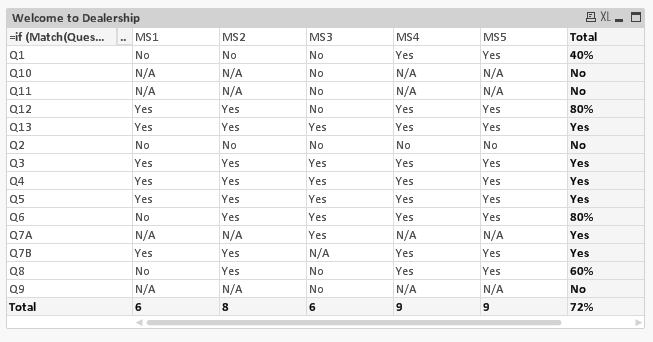
Appreciate if some one help me.
Thanks,
Selva
- Tags:
- new_to_qlikview

 MK_QSL
- Mark as New
- Bookmark
- Subscribe
- Mute
- Subscribe to RSS Feed
- Permalink
- Report Inappropriate Content
Better is this type of question posted with some sample data, which would be easier to work.
Thanks and looking forward for some sample data or sample apps.
- Mark as New
- Bookmark
- Subscribe
- Mute
- Subscribe to RSS Feed
- Permalink
- Report Inappropriate Content
Hi Manish,
Please find the attached sample.
Appreciate if you could help me on this.
Thanks,
Selva