Unlock a world of possibilities! Login now and discover the exclusive benefits awaiting you.

- Qlik Community
- :
- All Forums
- :
- QlikView App Dev
- :
- Query on straight table
- Subscribe to RSS Feed
- Mark Topic as New
- Mark Topic as Read
- Float this Topic for Current User
- Bookmark
- Subscribe
- Mute
- Printer Friendly Page

 Mahamed_Qlik
- Mark as New
- Bookmark
- Subscribe
- Mute
- Subscribe to RSS Feed
- Permalink
- Report Inappropriate Content
Query on straight table
Dear all,
I need quick help on the below requirement :
Requirement :
In straight table, I have dimension month and one expression named as sales.
Expression for sales : Sum(Sales)
So it looks like :
| Month | Sales |
|---|---|
| JAN | 1200 |
| FEB | 1000 |
| MAR | 5000 |
| APR | 2500 |
So, the requirement is user want to see any random range of sales, for example he wants to see sales >500 and <1000
or sales >1000 and <2500
And this selection he wants to done in table itself. How can this be done ?
In general, this can be achieved, if the sales is only showing in list box then we can directly search as
>500<1000 and we will get the resulted value in list box.
So how this can be done using straight table ?
Regards,
Mahamed
- « Previous Replies
-
- 1
- 2
- Next Replies »
Mahamed_Qlik
- Mark as New
- Bookmark
- Subscribe
- Mute
- Subscribe to RSS Feed
- Permalink
- Report Inappropriate Content
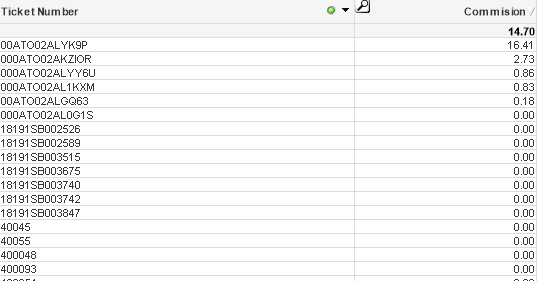
I am not getting select exclude...because I am not using single list box for tht dimension.
these are shown in straight table.
Mahamed_Qlik
- Mark as New
- Bookmark
- Subscribe
- Mute
- Subscribe to RSS Feed
- Permalink
- Report Inappropriate Content
Here is the screenshot:

 Clever_Anjos
- Mark as New
- Bookmark
- Subscribe
- Mute
- Subscribe to RSS Feed
- Permalink
- Report Inappropriate Content
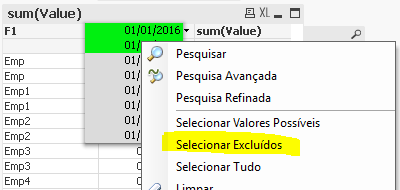
Right click into dropdown after selecting 300*
It´s in portuguese but same options
Clever_Anjos
- Mark as New
- Bookmark
- Subscribe
- Mute
- Subscribe to RSS Feed
- Permalink
- Report Inappropriate Content
Did it worked?
Mahamed_Qlik
- Mark as New
- Bookmark
- Subscribe
- Mute
- Subscribe to RSS Feed
- Permalink
- Report Inappropriate Content
Yes. Thank you so much for your hel 
Regards,
Mahamed
Clever_Anjos
- Mark as New
- Bookmark
- Subscribe
- Mute
- Subscribe to RSS Feed
- Permalink
- Report Inappropriate Content
Nice!

- « Previous Replies
-
- 1
- 2
- Next Replies »