Unlock a world of possibilities! Login now and discover the exclusive benefits awaiting you.

- Qlik Community
- :
- All Forums
- :
- QlikView App Dev
- :
- Range of weeks in Dimension
- Subscribe to RSS Feed
- Mark Topic as New
- Mark Topic as Read
- Float this Topic for Current User
- Bookmark
- Subscribe
- Mute
- Printer Friendly Page

 gr_eldred
- Mark as New
- Bookmark
- Subscribe
- Mute
- Subscribe to RSS Feed
- Permalink
- Report Inappropriate Content
Range of weeks in Dimension
I have the following Expresion
if(weekday(Today())='dom'
,sum({$<Status-={'C'}, [Semana Apple], [Año Apple], SemamaAñoApple_Numerado = {"<=$(=Max({1}SemamaAñoApple_Numerado))"} , [Año Apple]={$(=max({1} [Año Apple]))}>} Cantidad)
,sum({$<Status-={'C'}, [Semana Apple], [Año Apple], SemamaAñoApple_Numerado = {"<=$(=Max({1}SemamaAñoApple_Numerado-1))"} , [Año Apple]={$(=max({1} [Año Apple]))}>} Cantidad)
)
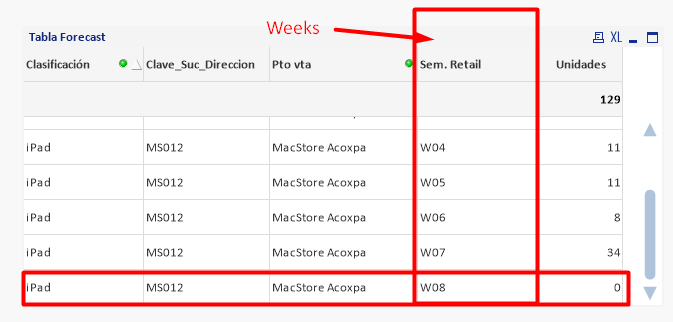
I would like to limit the dimension Week that only shows the closed weeks is to say that week 8 does not appear.
since in my expression I put a filter where it shows zeros, but I need it not to show the week record 8
Can anybody help me?

 shilpan
- Mark as New
- Bookmark
- Subscribe
- Mute
- Subscribe to RSS Feed
- Permalink
- Report Inappropriate Content
You can add a modifier to exclude week 8.. <Sem. Retail =- {'W08'}> in the Set Analysis expression.
gr_eldred
- Mark as New
- Bookmark
- Subscribe
- Mute
- Subscribe to RSS Feed
- Permalink
- Report Inappropriate Content
I need to be more automated since with form the weeks go by I would have to manually remove the week
shilpan
- Mark as New
- Bookmark
- Subscribe
- Mute
- Subscribe to RSS Feed
- Permalink
- Report Inappropriate Content
If it is a max. week then you can create a variable and use dollar-sign expansion in the modifier to exclude max week.
gr_eldred
- Mark as New
- Bookmark
- Subscribe
- Mute
- Subscribe to RSS Feed
- Permalink
- Report Inappropriate Content
I thank you for your help, look with this set I am already removing that week 8
if(weekday(Today())='dom'
,sum({$<Status-={'C'}, [Semana Apple], [Año Apple], SemamaAñoApple_Numerado = {"<=$(=Max({1}SemamaAñoApple_Numerado))"} , [Año Apple]={$(=max({1} [Año Apple]))}>} Cantidad)
,sum({$<Status-={'C'}, [Semana Apple], [Año Apple], SemamaAñoApple_Numerado = {"<=$(=Max({1}SemamaAñoApple_Numerado-1))"} , [Año Apple]={$(=max({1} [Año Apple]))}>} Cantidad)
)
only that it appears even week 8 but with zero, it is not taking away the record
