Unlock a world of possibilities! Login now and discover the exclusive benefits awaiting you.

- Qlik Community
- :
- All Forums
- :
- QlikView App Dev
- :
- Re: Rolling Rows Up To A Single Row with a Total
- Subscribe to RSS Feed
- Mark Topic as New
- Mark Topic as Read
- Float this Topic for Current User
- Bookmark
- Subscribe
- Mute
- Printer Friendly Page

 pnn44794
- Mark as New
- Bookmark
- Subscribe
- Mute
- Subscribe to RSS Feed
- Permalink
- Report Inappropriate Content
Rolling Rows Up To A Single Row with a Total
Hello:
I need to be able to roll up Orders, a single order can have multiple rows, into one row per order with a total sum amount in a straight table. Net Assets should be summed or it might be best to count ORDERS IN (I'm not sure). In other words, if Order 1 has 10 rows with a total sum of 15, it needs to be consolidated down to one row with a total of 15 for Outstanding Units. I've attached a sample output format. I should wind up with ~40 - 70 rows of data.
As always, thanks in advance for any and all replies.
pnn44794
- Mark as New
- Bookmark
- Subscribe
- Mute
- Subscribe to RSS Feed
- Permalink
- Report Inappropriate Content
Sunny:
I have to admit that I simply do not understand why I'm getting an error.

 sunny_talwar
- Mark as New
- Bookmark
- Subscribe
- Mute
- Subscribe to RSS Feed
- Permalink
- Report Inappropriate Content
what I am trying to say is that I don't see any error message saying Table Not Found... are you sure you attached the correct log file? Because the log file that is attached has ran without any errors 
pnn44794
- Mark as New
- Bookmark
- Subscribe
- Mute
- Subscribe to RSS Feed
- Permalink
- Report Inappropriate Content
Ok.

 tamilarasu
- Mark as New
- Bookmark
- Subscribe
- Mute
- Subscribe to RSS Feed
- Permalink
- Report Inappropriate Content
Hi Perry,
The reason is 0 lines fetched in the [CobiLegacyAssetChangesTempLoad] load. So you have to check why it is not fetching any data (Check whether you have any lines for the where condition).

pnn44794
- Mark as New
- Bookmark
- Subscribe
- Mute
- Subscribe to RSS Feed
- Permalink
- Report Inappropriate Content
Thanks Sunny. Sorry for the delay in replying. The last week of each month is extremely busy. I'm going to look at this now.
pnn44794
- Mark as New
- Bookmark
- Subscribe
- Mute
- Subscribe to RSS Feed
- Permalink
- Report Inappropriate Content
Hello Tamil:
Thanks for the response. Sorry for the delay in replying. The last week of each month is extremely busy. I'm going to look at this now.
pnn44794
- Mark as New
- Bookmark
- Subscribe
- Mute
- Subscribe to RSS Feed
- Permalink
- Report Inappropriate Content
Ok. I still don't understand why it's not working.
tamilarasu
- Mark as New
- Bookmark
- Subscribe
- Mute
- Subscribe to RSS Feed
- Permalink
- Report Inappropriate Content
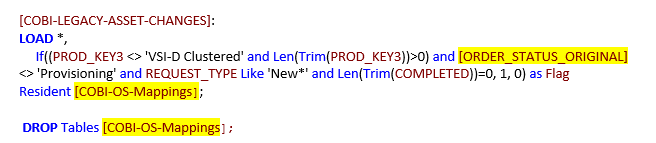
Perry - I have checked your script and found two things.
- You are using outer join to join the "CobiLegacyAssetChangesTempLoad" with "COBI-OS-Mappings". So the table name will be no more "CobiLegacyAssetChangesTempLoad " but "COBI-OS-Mappings".

2. I am not able to find the "CURRENT DETAIL STATUS" field in your script. I think you wanted to use "ORDER_STATUS_ORIGINAL" field here but forgot to rename in your previous load.

Considering above points, you have to change the original script like below.
pnn44794
- Mark as New
- Bookmark
- Subscribe
- Mute
- Subscribe to RSS Feed
- Permalink
- Report Inappropriate Content
Good catch, Tamil.
pnn44794
- Mark as New
- Bookmark
- Subscribe
- Mute
- Subscribe to RSS Feed
- Permalink
- Report Inappropriate Content
Never mind in regards to my highlight question. What I tried does indeed work. I needed to scroll down to see one. Duh! lol 
