Unlock a world of possibilities! Login now and discover the exclusive benefits awaiting you.

- Qlik Community
- :
- All Forums
- :
- QlikView App Dev
- :
- SQL select data with date filter
- Subscribe to RSS Feed
- Mark Topic as New
- Mark Topic as Read
- Float this Topic for Current User
- Bookmark
- Subscribe
- Mute
- Printer Friendly Page

- Mark as New
- Bookmark
- Subscribe
- Mute
- Subscribe to RSS Feed
- Permalink
- Report Inappropriate Content
SQL select data with date filter
Hi, everybody.
I have a QV project with data import from MS SQL via script.
I use the SQL statement for data import and I'd like to filter the date-field DATUMOBDOBI:
SQL SELECT ...., DATUMOBDOBI, ....
FROM "rsv2_stav".dbo."qryDatovySklad_QlikView"
Where DATUMOBDOBI > vUzavreneObdobi;
vUzavreneObdobi is date-variable.
Values / Formats of DATUMOBDOBI and vUzavreneObdobi look like this:
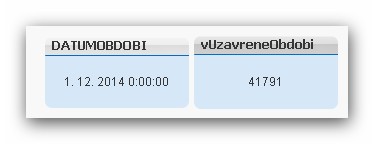
I have tried all possible syntax combinations (one of them see below), but I receive an error.
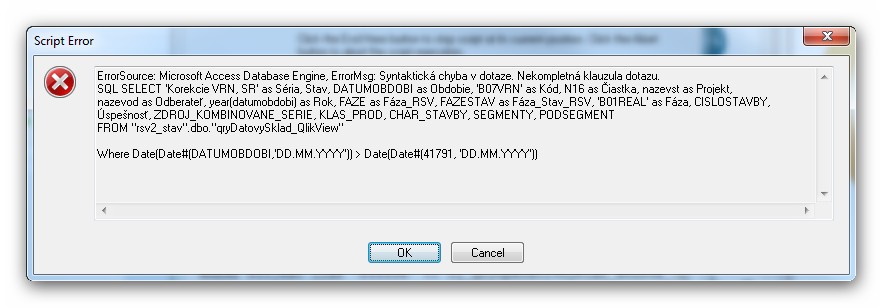
Please help.
Thanx in advance.
Duski
- Tags:
- new_to_qlikview

 PrashantSangle
- Mark as New
- Bookmark
- Subscribe
- Mute
- Subscribe to RSS Feed
- Permalink
- Report Inappropriate Content
Hi,
You are trying to use Qlikview Syntax in SQL Query.
Instead of try normal SQL Query;
Then Use Resident load and use Where clause which you are trying.
Regards
Please appreciate our Qlik community members by giving Kudos for sharing their time for your query. If your query is answered, please mark the topic as resolved 🙂
PrashantSangle
- Mark as New
- Bookmark
- Subscribe
- Mute
- Subscribe to RSS Feed
- Permalink
- Report Inappropriate Content
Hi,
Try like this
test:
SQL SELECT ...., DATUMOBDOBI, ....
FROM "rsv2_stav".dbo."qryDatovySklad_QlikView"
Where DATUMOBDOBI > vUzavreneObdobi;
Final_test:
load *
resident test
where date(date#(DATUMOBDOBI,'DD.MM.YYYY')>Date(41791)
Drop table test;
Regards,
Please appreciate our Qlik community members by giving Kudos for sharing their time for your query. If your query is answered, please mark the topic as resolved 🙂

 israrkhan
- Mark as New
- Bookmark
- Subscribe
- Mute
- Subscribe to RSS Feed
- Permalink
- Report Inappropriate Content
Because one side you have Number and other side datetime, thats y your getting error.
you need to convert Number to date, like Where DATUMOBDOBI > Date(vUzavreneObdobi);
and can you show me where you are declaring and initializing vUzavreneObdobi.
OR Initialize your variable like Date(YourDateField), than in the where clause you dont need to change anything.
Secondly you can convert your Date to number like,
try like Num(DATUMOBDOBI) > vUzavreneObdobi;
hope it helps
- Mark as New
- Bookmark
- Subscribe
- Mute
- Subscribe to RSS Feed
- Permalink
- Report Inappropriate Content
Thank you, max dreamer for your responce, but nothing worked 😞
I helped myself with this SQL statement, which after all worked:
SQL SELECT ..., DATUMOBDOBI as Obdobie, ...
FROM "rsv2_stav".dbo."qryDatovySklad_QlikView"
WHERE DATUMOBDOBI > (SELECT max(UZAVRENEOBDOBI)
FROM "rsv2_stav".dbo."qryUzavreteObdobie");
Thank you very much for your time 🙂
Duski
- Mark as New
- Bookmark
- Subscribe
- Mute
- Subscribe to RSS Feed
- Permalink
- Report Inappropriate Content
Thank you, IsrarKhan for your responce, but nothing worked 😞
I helped myself with this SQL statement, which after all worked:
SQL SELECT ..., DATUMOBDOBI as Obdobie, ...
FROM "rsv2_stav".dbo."qryDatovySklad_QlikView"
WHERE DATUMOBDOBI > (SELECT max(UZAVRENEOBDOBI)
FROM "rsv2_stav".dbo."qryUzavreteObdobie");
Thank you very much for your time 🙂
Duski