Unlock a world of possibilities! Login now and discover the exclusive benefits awaiting you.

- Qlik Community
- :
- All Forums
- :
- QlikView App Dev
- :
- Shaded colour not easy to read text of the list
- Subscribe to RSS Feed
- Mark Topic as New
- Mark Topic as Read
- Float this Topic for Current User
- Bookmark
- Subscribe
- Mute
- Printer Friendly Page

 chriscools
- Mark as New
- Bookmark
- Subscribe
- Mute
- Subscribe to RSS Feed
- Permalink
- Report Inappropriate Content
Shaded colour not easy to read text of the list
Hello,
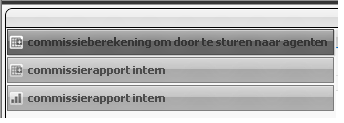
i'm wondering if it is possible to make the colour in the lower half of each box the same intensity as the upper half?
It is becoming hard to read because of the shade....
i could pick a lighter colour in the "container" , but then it becomes less obvious to see which box is selected.
thanx!
grtz,
Chris
Accepted Solutions

 flipside
- Mark as New
- Bookmark
- Subscribe
- Mute
- Subscribe to RSS Feed
- Permalink
- Report Inappropriate Content
Check your settings under Document Properties > General and in the bottom right quarter of this tab you will see drop downs for Styling Mode and Sheet Object Style. Change the latter from Glass to Plain (or Air - if mode is Simplified).
 Gysbert_Wassena
- Mark as New
- Bookmark
- Subscribe
- Mute
- Subscribe to RSS Feed
- Permalink
- Report Inappropriate Content
You can change or disable the gradient colors with the Tab Color setting on the Presentation tab. Choose Solid Color if you want only one color.
talk is cheap, supply exceeds demand
chriscools
- Mark as New
- Bookmark
- Subscribe
- Mute
- Subscribe to RSS Feed
- Permalink
- Report Inappropriate Content
hello,
thanx for you reply!
i thought that was the problem but when i checked it allready says one colour:
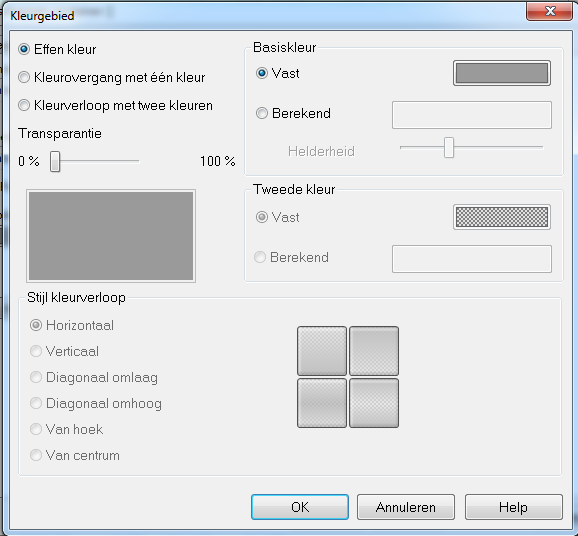
i allready tried changing it to another setting and changing it back again to perhaps see a change, but it stays the same...
Might it be a general setting somewhere i need to adapt?
grtz,
chris
flipside
- Mark as New
- Bookmark
- Subscribe
- Mute
- Subscribe to RSS Feed
- Permalink
- Report Inappropriate Content
Check your settings under Document Properties > General and in the bottom right quarter of this tab you will see drop downs for Styling Mode and Sheet Object Style. Change the latter from Glass to Plain (or Air - if mode is Simplified).
chriscools
- Mark as New
- Bookmark
- Subscribe
- Mute
- Subscribe to RSS Feed
- Permalink
- Report Inappropriate Content
Thank you, now i'ts ok and much more readable!!
grtz,
Chris
