Unlock a world of possibilities! Login now and discover the exclusive benefits awaiting you.

- Qlik Community
- :
- All Forums
- :
- QlikView App Dev
- :
- Staright table subtotals showing different color
- Subscribe to RSS Feed
- Mark Topic as New
- Mark Topic as Read
- Float this Topic for Current User
- Bookmark
- Subscribe
- Mute
- Printer Friendly Page

- Mark as New
- Bookmark
- Subscribe
- Mute
- Subscribe to RSS Feed
- Permalink
- Report Inappropriate Content
Staright table subtotals showing different color
For the expression given straight table the color is showing black for all values except subtotals.
How can I check whether any coloring condition or is given for subtotals?
I have checked in custom format cells, but in that text color is selected as black. But in chart the subtotal value is displaying as VIOLET.
Where do I go and check?
No color is given in visual cues and +sign at expression (text color , background color)
Please help...

 Chanty4u
- Mark as New
- Bookmark
- Subscribe
- Mute
- Subscribe to RSS Feed
- Permalink
- Report Inappropriate Content
can u share sample app?
or screen shot?
Chanty4u
- Mark as New
- Bookmark
- Subscribe
- Mute
- Subscribe to RSS Feed
- Permalink
- Report Inappropriate Content
i think u changed the style of tabe?
if yes plase do change the style and chk once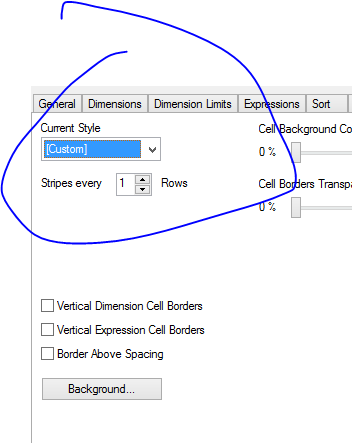

 Gysbert_Wassena
- Mark as New
- Bookmark
- Subscribe
- Mute
- Subscribe to RSS Feed
- Permalink
- Report Inappropriate Content
A straight table doesn't have subtotals. It can only have one total line, either at the top or at the bottom. Are you talking about a pivot table perhaps?
Please post a small qlikview document that shows the problem.
talk is cheap, supply exceeds demand
 stabben23
- Mark as New
- Bookmark
- Subscribe
- Mute
- Subscribe to RSS Feed
- Permalink
- Report Inappropriate Content
Hi,
Have one more look into "Custom format cell" by rightclick in the table. Find the Totalvalue by navigate inside and make sure you have the correct cell selected.