Unlock a world of possibilities! Login now and discover the exclusive benefits awaiting you.

- Qlik Community
- :
- All Forums
- :
- QlikView App Dev
- :
- Strict AND
- Subscribe to RSS Feed
- Mark Topic as New
- Mark Topic as Read
- Float this Topic for Current User
- Bookmark
- Subscribe
- Mute
- Printer Friendly Page

 christian77
- Mark as New
- Bookmark
- Subscribe
- Mute
- Subscribe to RSS Feed
- Permalink
- Report Inappropriate Content
Strict AND
Hi Qlikers.
When I create a set and I say Product = {‘A’,’B’}, set analysis brings all clients who have bought Product A OR Product B.
The question is: How can I get those clients who have bought BOTH A and B Products?
In other words, how to set a Strict AND in set analysis?
Thanks.

- Mark as New
- Bookmark
- Subscribe
- Mute
- Subscribe to RSS Feed
- Permalink
- Report Inappropriate Content
Christian
You need to use the AND mode in your List Box.
I have pasted the below from one of Stephen Redmond's blog posts on his QlikTips Web site
To enable "AND mode" in a list box, there are a couple of rules that we need to follow:
1. The field in the list box must be contained in a table that has only 2 fields.
2. The other field in the table is the association (or ID) field. This field is only contained in this table.
3. The table must have been loaded with the "DISTINCT" keyword.
Best Regards, Bill
 jonathandienst
- Mark as New
- Bookmark
- Subscribe
- Mute
- Subscribe to RSS Feed
- Permalink
- Report Inappropriate Content
Hi
Use the intersection operator in the set expression; something like
<Product={'A'}>*<Product={'B'}>
or
<Customer=P(<Product={'A'}>}>*<Customer=P(<Product={'B'}>}>
Regards
Jonathan
christian77
- Mark as New
- Bookmark
- Subscribe
- Mute
- Subscribe to RSS Feed
- Permalink
- Report Inappropriate Content
Hi Bill.
Thanks for your answer.
My model does not accomplish those initial conditions. I can’t do it that way.
We should be able to do that with set analysis.
christian77
- Mark as New
- Bookmark
- Subscribe
- Mute
- Subscribe to RSS Feed
- Permalink
- Report Inappropriate Content
Hi Jonathan:
I've tried your way. I’m not familiar with P and E sets since I don’t usually use them.
I’ve got the desired result for 3 product selection but it’s got to be dynamic since I don’t know how many Products are going to be selected at a time.
I already have a try to dynamize it, (not dynamite it), but still does not work.
Anyway, the big issue here is.
When are we going to have a set analysis with set intersection within the same field?
Or…
When QlikTech is going to simplify our clients and ourselves life in this matter?
Thank you for your answer.
This isn’t over.
- Mark as New
- Bookmark
- Subscribe
- Mute
- Subscribe to RSS Feed
- Permalink
- Report Inappropriate Content
Christian
Please forgive me for daring to say this, but you could sort your data model and use the AND mode in your List Box.
Best Regards, Bill
christian77
- Mark as New
- Bookmark
- Subscribe
- Mute
- Subscribe to RSS Feed
- Permalink
- Report Inappropriate Content
No problem, you can advise whatever you want. There’s freedom of expression. I’m the one asking for advice.
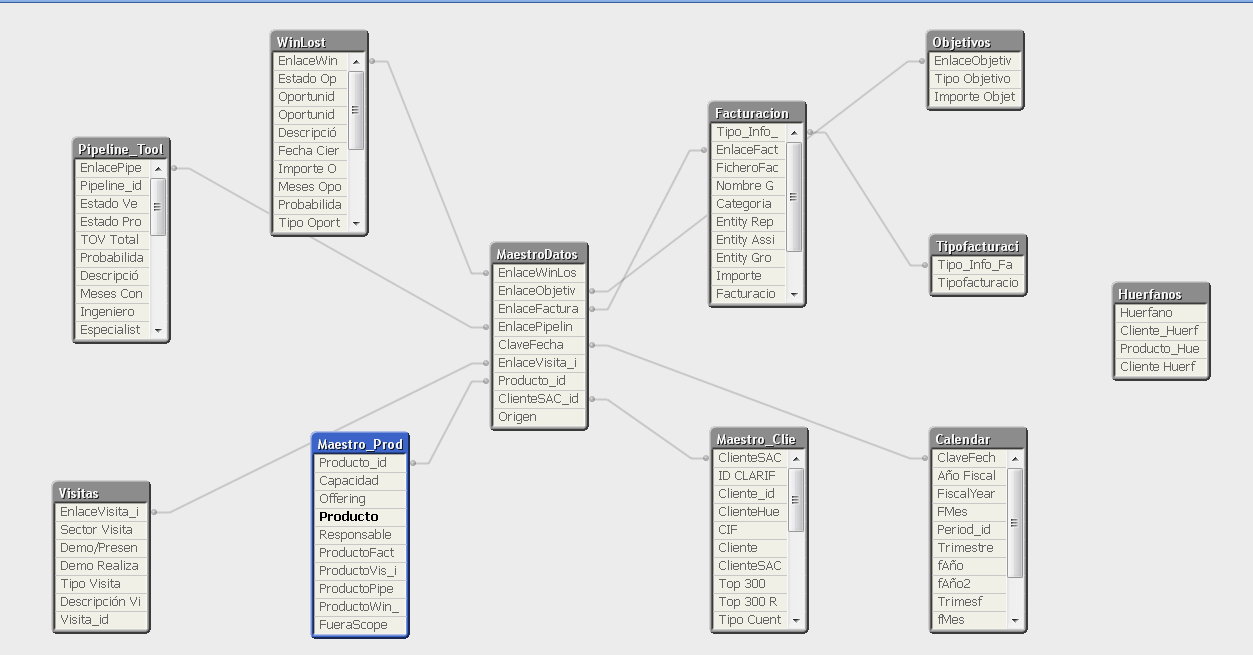
The one that I posted is just an example. Here is the real one. Product appears bold.
Of course I’d like to do that, that’d be the easiest way. No syntax, no headache.
Maybe extracting Product and Product_id from Product table like a select distinct Product_id resident Products?
 CELAMBARASAN
- Mark as New
- Bookmark
- Subscribe
- Mute
- Subscribe to RSS Feed
- Permalink
- Report Inappropriate Content
You could try something like this
Sum($(='{<Cliente=P({<Producto={' & Concat(DISTINCT Producto, '}>} Cliente) * P({<Producto={') & '}>} Cliente)>}') Valor)
 markmccoid
- Mark as New
- Bookmark
- Subscribe
- Mute
- Subscribe to RSS Feed
- Permalink
- Report Inappropriate Content
Since I too do not use the P or E sets too often, I would solve this the following way:
Sum ({<Cliente={"=COUNT({<Producto={'P001'}>} Cliente)>0"}>
*
<Cliente={"=COUNT({<Producto={'P004'}>} Cliente)>0"}>} Valor)
Using the intersection of the Clients that have each product.
It sounds like you want to have this be dynamic based on the selection in the Producto field. If that is the case you could put the following in a variable:
='SUM({' & Concat(Distinct {<Producto=Producto>} '<Cliente={"=COUNT({<Producto={' & chr(39) & Producto, chr(39) & '}>} Cliente)>0"}>*') & chr(39) & '}>} Cliente)>0"}>} Valor)'
- Mark as New
- Bookmark
- Subscribe
- Mute
- Subscribe to RSS Feed
- Permalink
- Report Inappropriate Content
Christian
Yup, something like you said above should help :
select distinct
Product_id ,
Producto as List_Producto \\ rename it to avoid duplicate field name, or maybe drop Producto from source table
resident Products;
Best Regards, Bill