Unlock a world of possibilities! Login now and discover the exclusive benefits awaiting you.

- Qlik Community
- :
- All Forums
- :
- QlikView App Dev
- :
- Title Dimension Color
- Subscribe to RSS Feed
- Mark Topic as New
- Mark Topic as Read
- Float this Topic for Current User
- Bookmark
- Subscribe
- Mute
- Printer Friendly Page

- Mark as New
- Bookmark
- Subscribe
- Mute
- Subscribe to RSS Feed
- Permalink
- Report Inappropriate Content
Title Dimension Color
Hello everybody,
I was wondering if in a "graph table" I could change only the Domension name and not all the information "inside" that dimension.
for example:
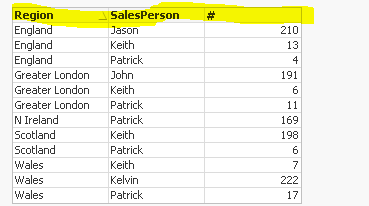
Thank you all beforehand!
- « Previous Replies
-
- 1
- 2
- Next Replies »

 alexandros17
- Mark as New
- Bookmark
- Subscribe
- Mute
- Subscribe to RSS Feed
- Permalink
- Report Inappropriate Content
Use "Label" in dimension tab, here it is my example

 morganaaron
- Mark as New
- Bookmark
- Subscribe
- Mute
- Subscribe to RSS Feed
- Permalink
- Report Inappropriate Content
Hi,
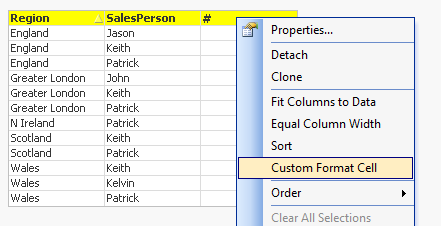
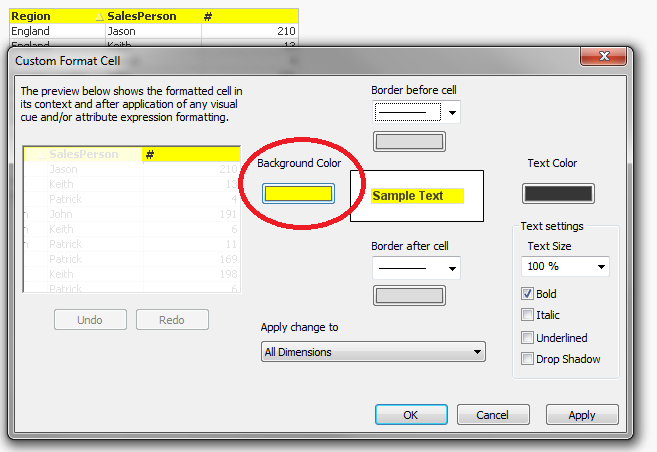
See attached. If you turn on advanced styling mode, then in your settings choose 'always show design menu' from the design tab of the user preferences, then right click the expression header and select 'custom format cell', you can change all the headers to a certain format.

 maternmi
- Mark as New
- Bookmark
- Subscribe
- Mute
- Subscribe to RSS Feed
- Permalink
- Report Inappropriate Content
Hi Aaron,
I downloaded your example but can not find where exactly I can change the color of the Header. Could you please post a screenshot?
Thank you in advance!
BR
Michael
morganaaron
- Mark as New
- Bookmark
- Subscribe
- Mute
- Subscribe to RSS Feed
- Permalink
- Report Inappropriate Content
Hi Michael,
You need to ensure you have chosen 'advanced' from the styling mode option on the General tab in the Document Properties (from the Settings menu option), after which if you go to the User Preferences menu from Settings, go to the Design tab and at the bottom right tick 'always show design menu items'. This will enable the "custom format cell" option when you right click on objects. Then follow the steps below! It's best to do it on the expression header, as the dimension headers often don't implement the change.
maternmi
- Mark as New
- Bookmark
- Subscribe
- Mute
- Subscribe to RSS Feed
- Permalink
- Report Inappropriate Content
Hi Aaron,
Thank you for your reply. Unfortunately I can not see your screenshot. Could you please post it as attachment?
Best regards,
Michael
alexandros17
- Mark as New
- Bookmark
- Subscribe
- Mute
- Subscribe to RSS Feed
- Permalink
- Report Inappropriate Content
Here it is, it Works!
morganaaron
- Mark as New
- Bookmark
- Subscribe
- Mute
- Subscribe to RSS Feed
- Permalink
- Report Inappropriate Content
Attached!

 maternmi
- Mark as New
- Bookmark
- Subscribe
- Mute
- Subscribe to RSS Feed
- Permalink
- Report Inappropriate Content
Thanks Aaron! I can Change now the Color of the Header.
Very simple 
maternmi
- Mark as New
- Bookmark
- Subscribe
- Mute
- Subscribe to RSS Feed
- Permalink
- Report Inappropriate Content
Hi Aaron,
by the way are you working in Supply Chain Area, aren't you? Is there any possibility to communicate directly with each other in QV-Community?
BR
Michael
- « Previous Replies
-
- 1
- 2
- Next Replies »