Unlock a world of possibilities! Login now and discover the exclusive benefits awaiting you.

- Qlik Community
- :
- All Forums
- :
- QlikView App Dev
- :
- Using themes or QVT-files
- Subscribe to RSS Feed
- Mark Topic as New
- Mark Topic as Read
- Float this Topic for Current User
- Bookmark
- Subscribe
- Mute
- Printer Friendly Page

 pacoli2013
- Mark as New
- Bookmark
- Subscribe
- Mute
- Subscribe to RSS Feed
- Permalink
- Report Inappropriate Content
Using themes or QVT-files
Hello,
I created a concept document. And then I created a QVT using document properties / layout / theme maker
Settings :
Source = Document
Property groups = object type specific
Object type specific = all chosen
Set default for new documents
When I watch in the new folder Themes, where I want to save QVT-files I have a new QVT, called TechConcept-Document: so far so good
When I create / open a new Qlikview Document I got a sheet Main.
Going to document properties / layout / I have an option Apply Theme.
Clicking this option I choose the new QVT called TechConcept-Document, nothing happens. A reload doesn’t change that. Using the Apply theme option in the Sheet properties has the same result.
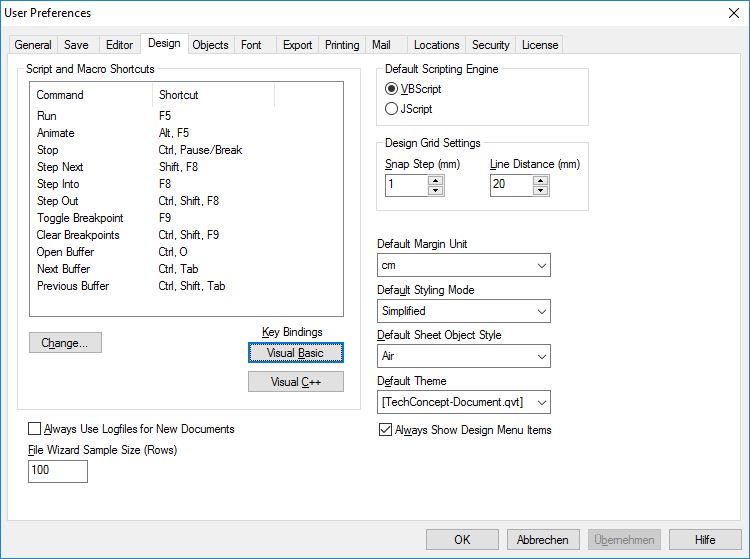
When I watch the User settings in the tab Design, the default theme is the QVT file TechConcept-Document I applied.
So the apply worked, I’m new working with themes but I would have expected that the sheets of my concept and the script behind my concept were be loaded and that I could see the objects.
In the future I want to use different QVT-files for different Qlikview Documents. Or a special sheet in different documents.
I have added my QVT, my Concept.qvw, a Screenshot of the User Settings and a new testdocument
Hope someone can help me or telling me what I have to do to get my total concept in the new Qlikview Application, with the result that the concept objects and script are in the new document.
Thanks in advance
Court