Unlock a world of possibilities! Login now and discover the exclusive benefits awaiting you.

- Qlik Community
- :
- All Forums
- :
- QlikView App Dev
- :
- Why does Qlik Sense show nulls when (I think) ther...
- Subscribe to RSS Feed
- Mark Topic as New
- Mark Topic as Read
- Float this Topic for Current User
- Bookmark
- Subscribe
- Mute
- Printer Friendly Page

- Mark as New
- Bookmark
- Subscribe
- Mute
- Subscribe to RSS Feed
- Permalink
- Report Inappropriate Content
Why does Qlik Sense show nulls when (I think) there are NONE
Hi all,
I am new to Qlik Sense. I've built an app based on data from MS SQL Server "Adventure Works" data set.
I am looking at sales data (SalesOrderHeader and SalesOrderDetail) that I loaded as a fact table in Qlik.
And each sales fact has a matching category (from product dimension record) and each fact has a matching order_date.year (from the order header table).
There seems to be inconsistent results (no doubt it is user error / comprehension of intended behavior).
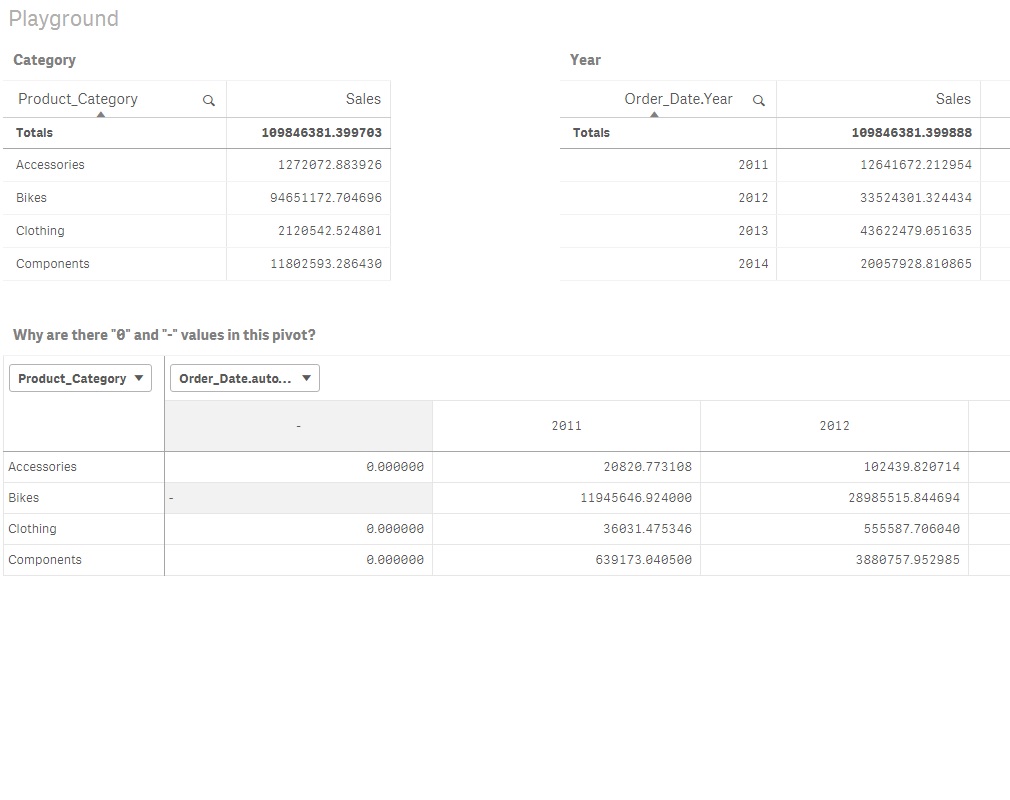
I have 2 simple tables where Qlik shows (as I expected) no nulls.
But I have a pivot table of category | year | sales and it DOES SHOW "-" and "0" values.
QUESTION 1
Why would pivot table show nulls when, as far as I know, there are NONE.
QUESTION 2
If I want to HIDE these nulls, do I have to change the behavior FOR EACH VISUALIZATION or is there a system wide setting?
I'm going to try to attach a picture showing the behavior as well as my QVF file (see pivot at bottom).
Here's a link to my QVF file on my onedrive:
https://1drv.ms/u/s!AowcxCxSBDc7jYlVXKToaaA9dZASkA
Thanks,
Steven