Unlock a world of possibilities! Login now and discover the exclusive benefits awaiting you.

Announcements
April 13–15 - Dare to Unleash a New Professional You at Qlik Connect 2026: Register Now!
- Qlik Community
- :
- All Forums
- :
- QlikView App Dev
- :
- adding a string in expression
Options
- Subscribe to RSS Feed
- Mark Topic as New
- Mark Topic as Read
- Float this Topic for Current User
- Bookmark
- Subscribe
- Mute
- Printer Friendly Page
Turn on suggestions
Auto-suggest helps you quickly narrow down your search results by suggesting possible matches as you type.
Showing results for

Not applicable
2013-12-11
04:46 AM
- Mark as New
- Bookmark
- Subscribe
- Mute
- Subscribe to RSS Feed
- Permalink
- Report Inappropriate Content
adding a string in expression
Hi all,
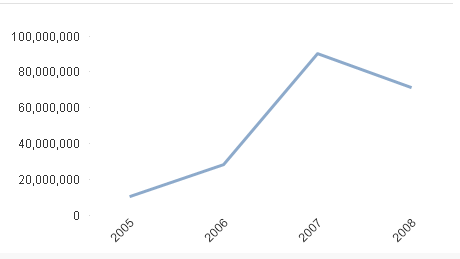
here am showing the total sales as 100,000,000.
I need this to show as 100M that is in millions, like

Thanks in advance
770 Views
6 Replies
Not applicable
2013-12-11
04:49 AM
Author
- Mark as New
- Bookmark
- Subscribe
- Mute
- Subscribe to RSS Feed
- Permalink
- Report Inappropriate Content
Hi Remya
in tab "Numbers", you can check box Millions
best regards
chris
668 Views
Not applicable
2013-12-11
04:52 AM
Author
- Mark as New
- Bookmark
- Subscribe
- Mute
- Subscribe to RSS Feed
- Permalink
- Report Inappropriate Content
Hi
I did that already but its not showing like "100M" as in the second chart i mentioned.
668 Views

 Sokkorn
Master
2013-12-11
04:52 AM
- Mark as New
- Bookmark
- Subscribe
- Mute
- Subscribe to RSS Feed
- Permalink
- Report Inappropriate Content
Hi Remya,
Just right click on your chart -> Properties -> Number
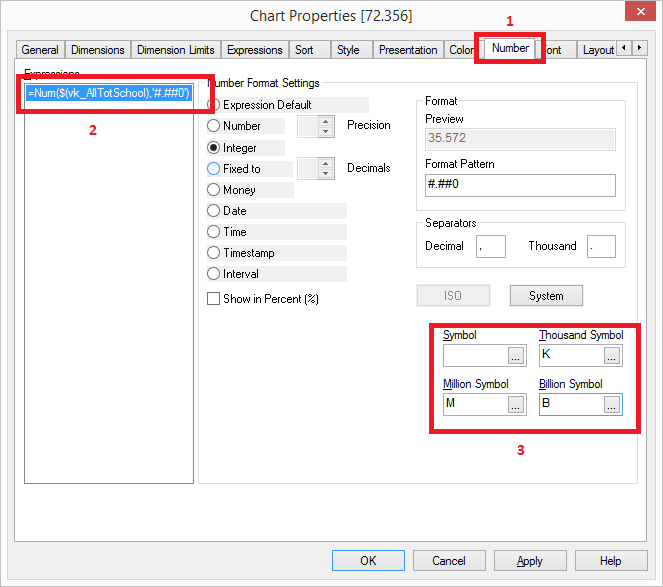
Regards,
Sokkorn
668 Views
Not applicable
2013-12-11
04:57 AM
Author
- Mark as New
- Bookmark
- Subscribe
- Mute
- Subscribe to RSS Feed
- Permalink
- Report Inappropriate Content
I did that, it will be like this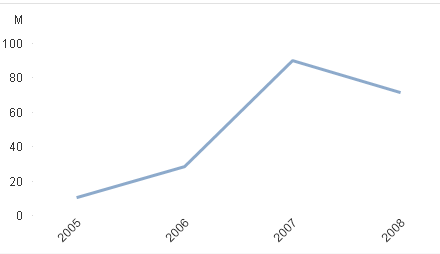
668 Views
Anonymous
Not applicable
2013-12-12
05:06 AM
Author
- Mark as New
- Bookmark
- Subscribe
- Mute
- Subscribe to RSS Feed
- Permalink
- Report Inappropriate Content
A very quick and dirty solution is to divide your expression by 1,000,000 and then put an 'M' on the end of the number format pattern in Chart Properties -> Number
Cheers,
Adam
668 Views
Anonymous
Not applicable
2013-12-12
05:09 AM
Author
- Mark as New
- Bookmark
- Subscribe
- Mute
- Subscribe to RSS Feed
- Permalink
- Report Inappropriate Content
Although saying that, I just tested it and the 'M' doesn't show on the axis.
668 Views