Unlock a world of possibilities! Login now and discover the exclusive benefits awaiting you.

- Qlik Community
- :
- All Forums
- :
- QlikView App Dev
- :
- change the title settings for 84 charts
- Subscribe to RSS Feed
- Mark Topic as New
- Mark Topic as Read
- Float this Topic for Current User
- Bookmark
- Subscribe
- Mute
- Printer Friendly Page

 ali_hijazi
- Mark as New
- Bookmark
- Subscribe
- Mute
- Subscribe to RSS Feed
- Permalink
- Report Inappropriate Content
change the title settings for 84 charts
Hello
got a qvw document that has 84 line bar charts
it is requested that I update the title settings (background color and font)
is there a way to update them with one shot?
please advise
 martynlloyd
- Mark as New
- Bookmark
- Subscribe
- Mute
- Subscribe to RSS Feed
- Permalink
- Report Inappropriate Content
Don't know a way to do that, but I do know how to create 84 charts using a single object if that helps?
( by use of variables and conditional dimensions and expressions...)
Also, for future maintenance, I recommend you use a variable for color.
Regards.
 stigchel
- Mark as New
- Bookmark
- Subscribe
- Mute
- Subscribe to RSS Feed
- Permalink
- Report Inappropriate Content
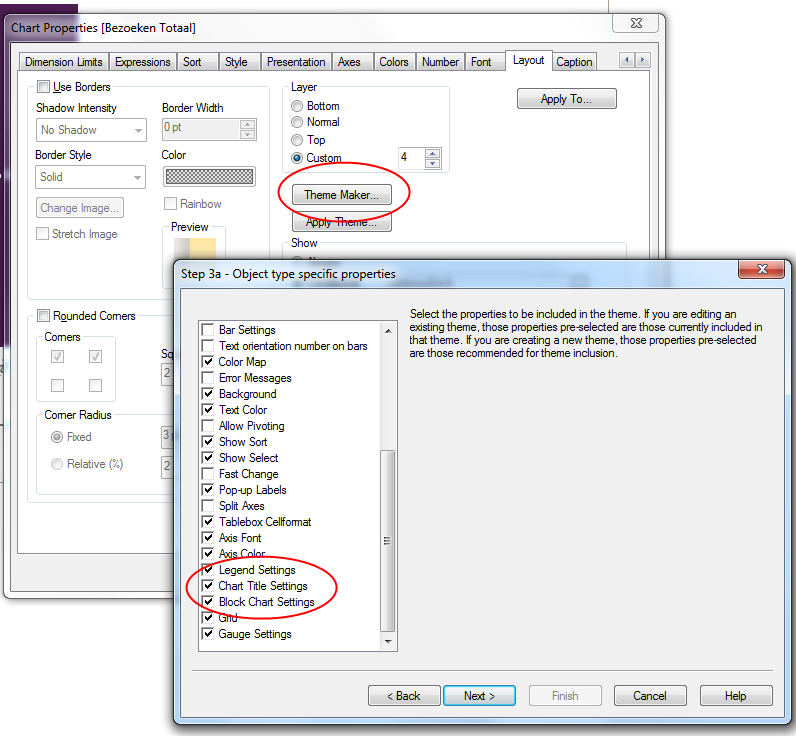
Have you thought about the theme maker wizard? Choose one of the charts you've manually changed and then in the properties of this chart/layout tab click theme maker > make a new theme. Now depending on whether you mean the chart title or the caption title choose object type specific or caption border. After that you can specify which properties to include and then for which objects they should apply. After setting all this you can apply a theme to a single object or the sheet (with all objects). See the help for more details.