Unlock a world of possibilities! Login now and discover the exclusive benefits awaiting you.

- Qlik Community
- :
- All Forums
- :
- QlikView App Dev
- :
- create last day of a month
- Subscribe to RSS Feed
- Mark Topic as New
- Mark Topic as Read
- Float this Topic for Current User
- Bookmark
- Subscribe
- Mute
- Printer Friendly Page

- Mark as New
- Bookmark
- Subscribe
- Mute
- Subscribe to RSS Feed
- Permalink
- Report Inappropriate Content
create last day of a month
Hi,
I hope someone of you could help me.
I Need to create a datefield but I dont have everything needed.
I have a month-field (txnper = '2') and I have a year-field (txnyear = '2016'). This are not datefields.
How can i create from this two fields a new one called txndate with entry of the last day from February 2016 (29.02.2016)
I got through many Posts here, but I could find anyone, which has not a dateformat as base.
Thanks in advance.
Chris
Accepted Solutions

 sunny_talwar
- Mark as New
- Bookmark
- Subscribe
- Mute
- Subscribe to RSS Feed
- Permalink
- Report Inappropriate Content
Try this:
Date(MonthEnd(MakeDate(txnyear, txnper)), 'DD.MM.YYYY') as Date
UPDATE: I would also add Floor in there to make sure that this is truly date
Date(Floor(MonthEnd(MakeDate(txnyear, txnper))), 'DD.MM.YYYY') as Date
sunny_talwar
- Mark as New
- Bookmark
- Subscribe
- Mute
- Subscribe to RSS Feed
- Permalink
- Report Inappropriate Content
Try this:
Date(MonthEnd(MakeDate(txnyear, txnper)), 'DD.MM.YYYY') as Date
UPDATE: I would also add Floor in there to make sure that this is truly date
Date(Floor(MonthEnd(MakeDate(txnyear, txnper))), 'DD.MM.YYYY') as Date
 Chanty4u
- Mark as New
- Bookmark
- Subscribe
- Mute
- Subscribe to RSS Feed
- Permalink
- Report Inappropriate Content
IF(Floor( month-field ) = Floor(MonthEnd( year-field )),Value,0) as LastDay
chk below

 jonathandienst
- Mark as New
- Bookmark
- Subscribe
- Mute
- Subscribe to RSS Feed
- Permalink
- Report Inappropriate Content
When loading the txnper/txnyear fields, add this line to the load:
LOAD
....
Date(Floor(MonthEnd(MakeDate(txnyear, txnper)))) as txndate,
....
MakeDate - create a date of the 1st of the relevant period
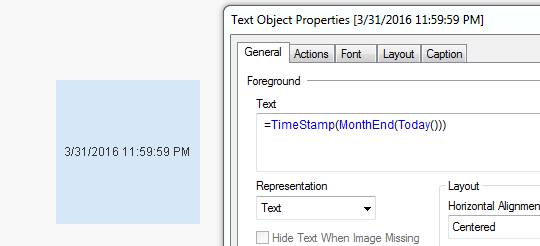
MonthEnd - get the last day (including time to the last second) of the month
Floor - drop the time portion
Date - format the date using the default date format set in your environment (DateFormat variable)
 Kushal_Chawda
- Mark as New
- Bookmark
- Subscribe
- Mute
- Subscribe to RSS Feed
- Permalink
- Report Inappropriate Content
=date(monthend(date#(txnper &'-'&txnyear,'MM-YYYY')),'DD/MM/YYYY')
- Mark as New
- Bookmark
- Subscribe
- Mute
- Subscribe to RSS Feed
- Permalink
- Report Inappropriate Content
Truely Date means?
No Time Involvement, is it?
sunny_talwar
- Mark as New
- Bookmark
- Subscribe
- Mute
- Subscribe to RSS Feed
- Permalink
- Report Inappropriate Content
Yes, MonthEnd includes time as well
- Mark as New
- Bookmark
- Subscribe
- Mute
- Subscribe to RSS Feed
- Permalink
- Report Inappropriate Content
Okay, got it
- Mark as New
- Bookmark
- Subscribe
- Mute
- Subscribe to RSS Feed
- Permalink
- Report Inappropriate Content
thank you so much for all your help.
Chris
- Mark as New
- Bookmark
- Subscribe
- Mute
- Subscribe to RSS Feed
- Permalink
- Report Inappropriate Content
Hi,
Here you are your solution:
MonthEnd(AddMonths(MakeDate(Year(Today()),Month(Today())),0))
It return the last day of current month
I hope it help you!