Unlock a world of possibilities! Login now and discover the exclusive benefits awaiting you.

- Qlik Community
- :
- All Forums
- :
- QlikView App Dev
- :
- help with splitting value by date
- Subscribe to RSS Feed
- Mark Topic as New
- Mark Topic as Read
- Float this Topic for Current User
- Bookmark
- Subscribe
- Mute
- Printer Friendly Page

 hopkinsc
- Mark as New
- Bookmark
- Subscribe
- Mute
- Subscribe to RSS Feed
- Permalink
- Report Inappropriate Content
help with splitting value by date
Hi all,
i need some help with splitting a single value across multiple days.
I have attached an example and here is what i am trying to do..
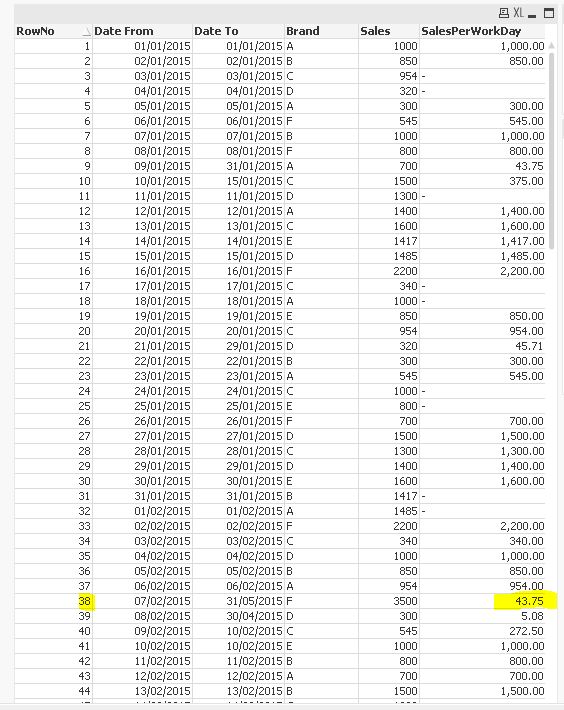
in the example, if you look at row 38 it has a value of 3500 and a date range of 07/02/2015-31/05/2015.
what i want is to create a new field which has the division of 3500 across the date range which is 113 days but i also only want it to take working days into consideration and it will also need to take the days per month into consideration, e.g the new field will only be against the dates within the date range.
so the above example would be 3500 / 80 (working days) = 43.75
so i would want the new field populated for the dates of 07/02/2015-31/05/2015 (but only the working days)
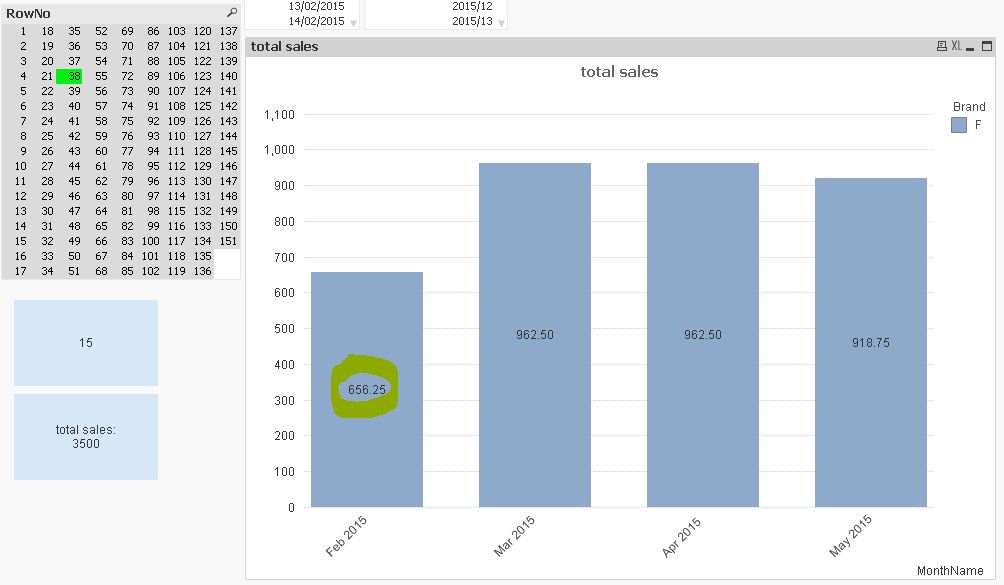
with 43.75. if i was then to select the month of Feb i would expect to see a total of 656.25 in the new field.
Can anyone help with this please?
- Tags:
- new_to_qlikview
Accepted Solutions

 sunny_talwar
- Mark as New
- Bookmark
- Subscribe
- Mute
- Subscribe to RSS Feed
- Permalink
- Report Inappropriate Content
Try this script:
Data:
LOAD *,
RowNo() as RowNo,
Sales/DayDiff as SalesPerDay;
LOAD *,
NetWorkDays([Date From], [Date To]) as DayDiff;
LOAD [Date From],
[Date To],
Brand,
Sales
FROM
[Sample.xlsx]
(ooxml, embedded labels, table is Sheet1);
Join(Data)
LOAD *,
MonthName(Date) as MonthYear
Where not Match(WeekDay(Date), 'Sun', 'Sat');
LOAD RowNo,
Date([Date From] + IterNo() - 1) as Date
Resident Data
While [Date From] + IterNo() - 1 <= [Date To];
Output:
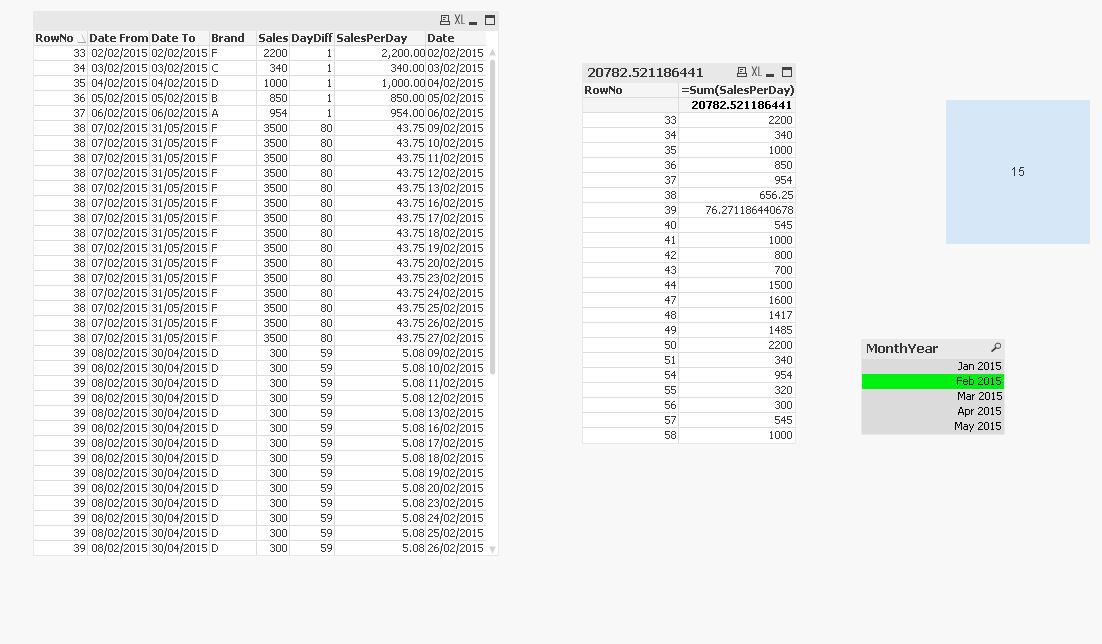
Attaching the qvw for your reference.
Best,
Sunny
hopkinsc
- Mark as New
- Bookmark
- Subscribe
- Mute
- Subscribe to RSS Feed
- Permalink
- Report Inappropriate Content
Can anyone help with this please?

- Mark as New
- Bookmark
- Subscribe
- Mute
- Subscribe to RSS Feed
- Permalink
- Report Inappropriate Content
ýou already have the right way in your textobject.
you can use your datefields and calculate the dersired value
=Sales/NetWorkDays([Date From],[Date To])
But you Need to use at least a straight table instead of table box
Or is there something different you want to achieve? then explain
sunny_talwar
- Mark as New
- Bookmark
- Subscribe
- Mute
- Subscribe to RSS Feed
- Permalink
- Report Inappropriate Content
Try this script:
Data:
LOAD *,
RowNo() as RowNo,
Sales/DayDiff as SalesPerDay;
LOAD *,
NetWorkDays([Date From], [Date To]) as DayDiff;
LOAD [Date From],
[Date To],
Brand,
Sales
FROM
[Sample.xlsx]
(ooxml, embedded labels, table is Sheet1);
Join(Data)
LOAD *,
MonthName(Date) as MonthYear
Where not Match(WeekDay(Date), 'Sun', 'Sat');
LOAD RowNo,
Date([Date From] + IterNo() - 1) as Date
Resident Data
While [Date From] + IterNo() - 1 <= [Date To];
Output:
Attaching the qvw for your reference.
Best,
Sunny
 MarcoWedel
- Mark as New
- Bookmark
- Subscribe
- Mute
- Subscribe to RSS Feed
- Permalink
- Report Inappropriate Content
Hi,
one solution could be:
Data:
LOAD *,
    Sales/NetWorkDays([Date From],[Date To]) as SalesPerWorkDay,
    RowNo() as RowNo
FROM [https://community.qlik.com/servlet/JiveServlet/download/798788-170274/Sample.xlsx] (ooxml, embedded labels, table is Sheet1);

tabCalendar:
LOAD *,
    Day(Date) as Day,
    WeekDay(Date) as WeekDay,
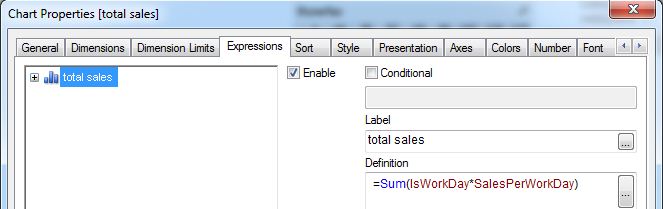
    Dual(If(NetWorkDays(Date,Date),'Yes','No'),NetWorkDays(Date,Date)) as IsWorkDay,
    Week(Date) as Week,
    WeekName(Date) as WeekName,
    Month(Date) as Month,
    MonthName(Date) as MonthName,
    Dual('Q'&Ceil(Month(Date)/3),Ceil(Month(Date)/3)) as Quarter,
    QuarterName(Date) as QuarterName,
    Year(Date) as Year,
    WeekYear(Date) as WeekYear;
LOAD Date(MinDate+IterNo()-1) as Date
While MinDate+IterNo()-1 <= MaxDate;
LOAD Min([Date From]) as MinDate,
    Max([Date To]) as MaxDate
Resident Data;

tabLink:
IntervalMatch (Date)
LOAD [Date From],[Date To]
Resident Data;
hope this helps
regards
Marco