Unlock a world of possibilities! Login now and discover the exclusive benefits awaiting you.

- Qlik Community
- :
- All Forums
- :
- QlikView App Dev
- :
- how to get the consecutive rank when there are sam...
- Subscribe to RSS Feed
- Mark Topic as New
- Mark Topic as Read
- Float this Topic for Current User
- Bookmark
- Subscribe
- Mute
- Printer Friendly Page

 fashid
- Mark as New
- Bookmark
- Subscribe
- Mute
- Subscribe to RSS Feed
- Permalink
- Report Inappropriate Content
how to get the consecutive rank when there are same ranks in column using rank function
Hi,
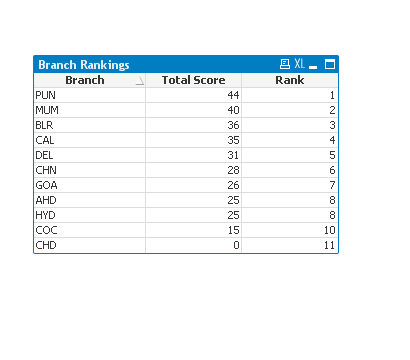
I have a table which has a rank function in it .
two rows have the same rank 8.
After that there is rank 10 but i need that to be 9 and the last one to be 10.
Could it be possible.
Regards,
Nadeem
- « Previous Replies
-
- 1
- 2
- Next Replies »

 sunny_talwar
- Mark as New
- Bookmark
- Subscribe
- Mute
- Subscribe to RSS Feed
- Permalink
- Report Inappropriate Content
Then look at Michael's second solution.

- Mark as New
- Bookmark
- Subscribe
- Mute
- Subscribe to RSS Feed
- Permalink
- Report Inappropriate Content
That's exactly what my second version is doing 
fashid
- Mark as New
- Bookmark
- Subscribe
- Mute
- Subscribe to RSS Feed
- Permalink
- Report Inappropriate Content
Hi Michael,
It was cool solution thanks
I used
=RowNo(total)-rangesum(above(total if(num(rank(total Column(1),1))=above(num(rank(total Column(1),1))),1,0),0,RowNo(total)))
as the score was being calculated in the chart .
Difficult to understand the expression through  .
.
Many thanks to everybody helping me in this solution.
Regards
Nadeem
fashid
- Mark as New
- Bookmark
- Subscribe
- Mute
- Subscribe to RSS Feed
- Permalink
- Report Inappropriate Content
Hi Michael,
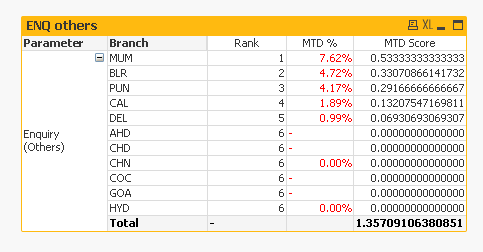
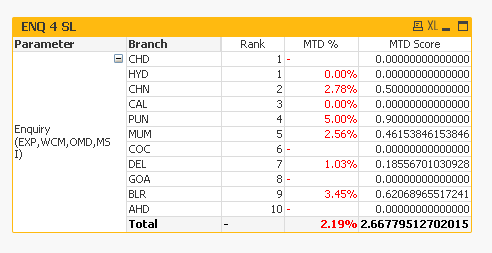
I applied the logic in another chart but i am getting wrong ranks.
In the charts with the caption ENQ others and ENQ 4 SL i am getting wrong results.
In the charts with the caption conversion and CFR i am getting correct rank
I have used the same logic.but somehow unable to get the desired result
Could you please help me on this .
Regards,
Nadeem
sunny_talwar
- Mark as New
- Bookmark
- Subscribe
- Mute
- Subscribe to RSS Feed
- Permalink
- Report Inappropriate Content
Here is your potential issue (0s are not actual 0s)
fashid
- Mark as New
- Bookmark
- Subscribe
- Mute
- Subscribe to RSS Feed
- Permalink
- Report Inappropriate Content
Ok Many Thanks friend I used the round function to sort it.
sunny_talwar
- Mark as New
- Bookmark
- Subscribe
- Mute
- Subscribe to RSS Feed
- Permalink
- Report Inappropriate Content
Awesome
- « Previous Replies
-
- 1
- 2
- Next Replies »