Unlock a world of possibilities! Login now and discover the exclusive benefits awaiting you.

- Qlik Community
- :
- All Forums
- :
- QlikView App Dev
- :
- pie charts setting default color
- Subscribe to RSS Feed
- Mark Topic as New
- Mark Topic as Read
- Float this Topic for Current User
- Bookmark
- Subscribe
- Mute
- Printer Friendly Page

- Mark as New
- Bookmark
- Subscribe
- Mute
- Subscribe to RSS Feed
- Permalink
- Report Inappropriate Content
pie charts setting default color
hi
i have created a pie chart.. normally when we select one data value the pie chart becomes one individual color cz it represent only one value.. is there any possibility that i can fix the pie chart (normally when we select detach the pie chart values wont change/ move) but when i select a particular value except that particular segment, the other segments has to change in to a default color(ash color)
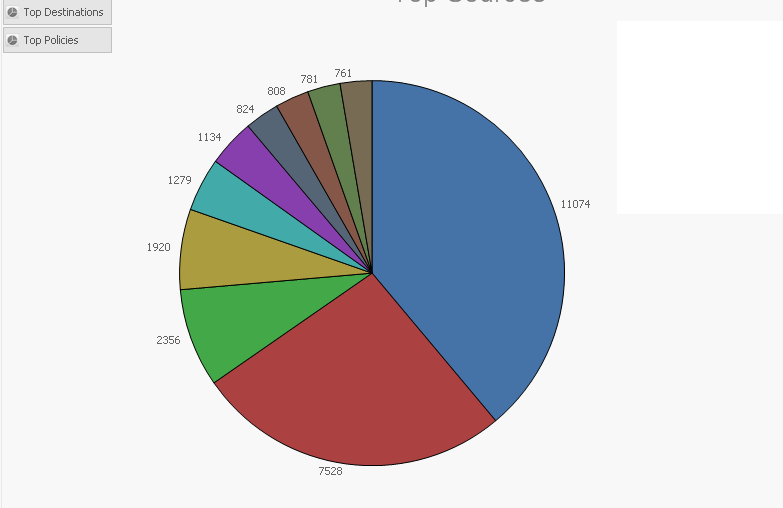
this image shows my present display 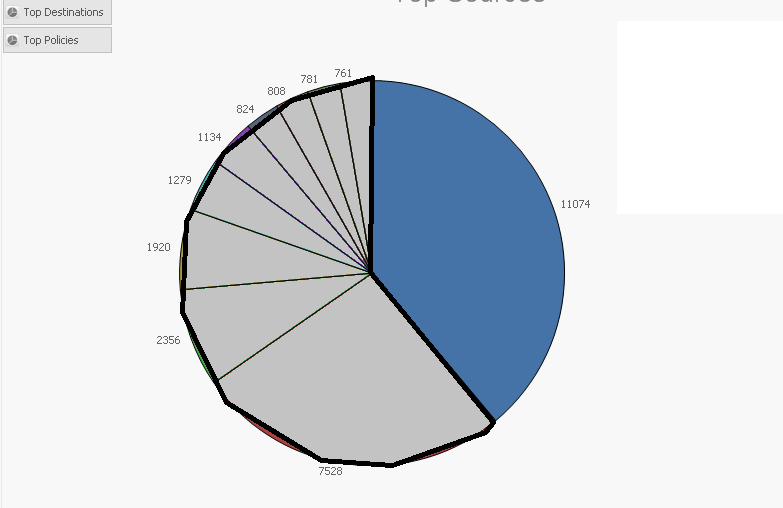 if i select the blue area with the value 11074 i want my pie chart to be displayed as the below image..
if some one can help me in this it would be really appreciated..
thank you in advance 
- « Previous Replies
- Next Replies »
- Mark as New
- Bookmark
- Subscribe
- Mute
- Subscribe to RSS Feed
- Permalink
- Report Inappropriate Content
hi Rob
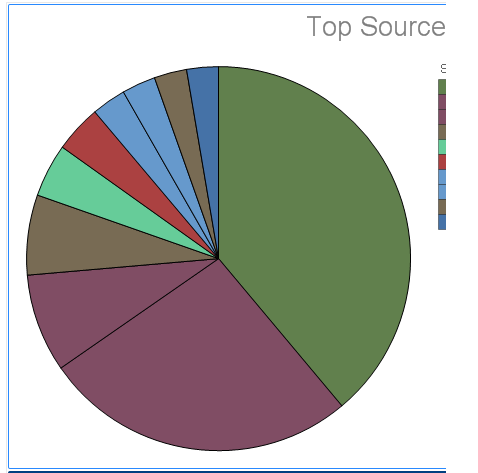
sorry for the late reply but this is how it looks after applying the above mentioned equation 

 SergeyMak
- Mark as New
- Bookmark
- Subscribe
- Mute
- Subscribe to RSS Feed
- Permalink
- Report Inappropriate Content
What equation and for what purposes you had added?
Sergey
- Mark as New
- Bookmark
- Subscribe
- Mute
- Subscribe to RSS Feed
- Permalink
- Report Inappropriate Content
=if(Source=Source, color( mod(FieldIndex('Source',Source)-1,18)+1 ), LightGray())
Rob will this equation work for a bar chart??
- Mark as New
- Bookmark
- Subscribe
- Mute
- Subscribe to RSS Feed
- Permalink
- Report Inappropriate Content
hi Sergey
this is the equation
=if(Customer=Customer
,color(mod(
Match(
Customer
,$(=chr(39) & concat(Customer,chr(39) & ',' & chr(39)) & chr(39))
)
-1,18)+1)
, LightGray())
i tried this equation cz colors are repeating in the pie chart

 rwunderlich
- Mark as New
- Bookmark
- Subscribe
- Mute
- Subscribe to RSS Feed
- Permalink
- Report Inappropriate Content
I'm missing something about the settings in your QVW. I'm sorry, I can't help you further without a copy of the actual QVW.
-Rob
- Mark as New
- Bookmark
- Subscribe
- Mute
- Subscribe to RSS Feed
- Permalink
- Report Inappropriate Content
thanks Rob you helped me a lot.. i am sorry that i can not attach my qvw... will this equation work to a bar chart as well??
rwunderlich
- Mark as New
- Bookmark
- Subscribe
- Mute
- Subscribe to RSS Feed
- Permalink
- Report Inappropriate Content
Give it a try
- Mark as New
- Bookmark
- Subscribe
- Mute
- Subscribe to RSS Feed
- Permalink
- Report Inappropriate Content
i did try it but when i select a bar the positions changes.. for ex-sample if i select the 3rd bar it shifts to the 1st bar position n the rest the order changes... that's why i asked whether it will work with bar charts also
- Mark as New
- Bookmark
- Subscribe
- Mute
- Subscribe to RSS Feed
- Permalink
- Report Inappropriate Content
Hi Rob,
I am using the below expression for my chart. This will help me to bring data when ever I click the appropriate button. But I am not able to use brushing concept ( let me know where to put this {1}) in my expression. Can you please help me here?
=if(Period=1, Count({$<d_date= {">=$(=date(interval(DAte(now()) - 7,'D'),'MM/DD/YYYY'))<=$(=date(now(),'MM/DD/YYYY'))"}>}minerva_order_id),
if(Period = 2,Count({$<d_date = {">=$(=date(interval(DAte(now()) - 30,'D'),'MM/DD/YYYY'))<=$(=date(now(),'MM/DD/YYYY'))"}>}
minerva_order_id),
if(Period = 4,Count({$<d_date = {">=$(=date(interval(DAte(now()) - 28,'D'),'MM/DD/YYYY'))<=$(=date(now(),'MM/DD/YYYY'))"}>}
minerva_order_id),
if(Period = 3,Count({$<d_date = {">=$(=date(interval(DAte(now()) - 91,'D'),'MM/DD/YYYY'))<=$(=date(now(),'MM/DD/YYYY'))"}>}
minerva_order_id),
if(Period = 5,Count({$<d_date = {">=$(=date(interval(DAte(now()) - 365,'D'),'MM/DD/YYYY'))<=$(=date(now(),'MM/DD/YYYY'))"}>}
minerva_order_id),
Count({$<d_date= {">=$(=date(interval(date(vStartdate) - 0,'D'),'MM/DD/YYYY'))<=$(=date(vEnddate,'MM/DD/YYYY'))"}>}
minerva_order_id))))))
Using this in the expression attribute
=if(overriden_reason=overriden_reason, color(FieldIndex('overriden_reason',overriden_reason)), RGB(230,230,230))
Regards,
Nandha
- « Previous Replies
- Next Replies »