Unlock a world of possibilities! Login now and discover the exclusive benefits awaiting you.

- Qlik Community
- :
- All Forums
- :
- QlikView App Dev
- :
- "No Numeric Values on X-Axis" pop-up... How to rid...
Options
- Subscribe to RSS Feed
- Mark Topic as New
- Mark Topic as Read
- Float this Topic for Current User
- Bookmark
- Subscribe
- Mute
- Printer Friendly Page
Turn on suggestions
Auto-suggest helps you quickly narrow down your search results by suggesting possible matches as you type.
Showing results for

Not applicable
2012-05-16
03:25 PM
- Mark as New
- Bookmark
- Subscribe
- Mute
- Subscribe to RSS Feed
- Permalink
- Report Inappropriate Content
"No Numeric Values on X-Axis" pop-up... How to rid?
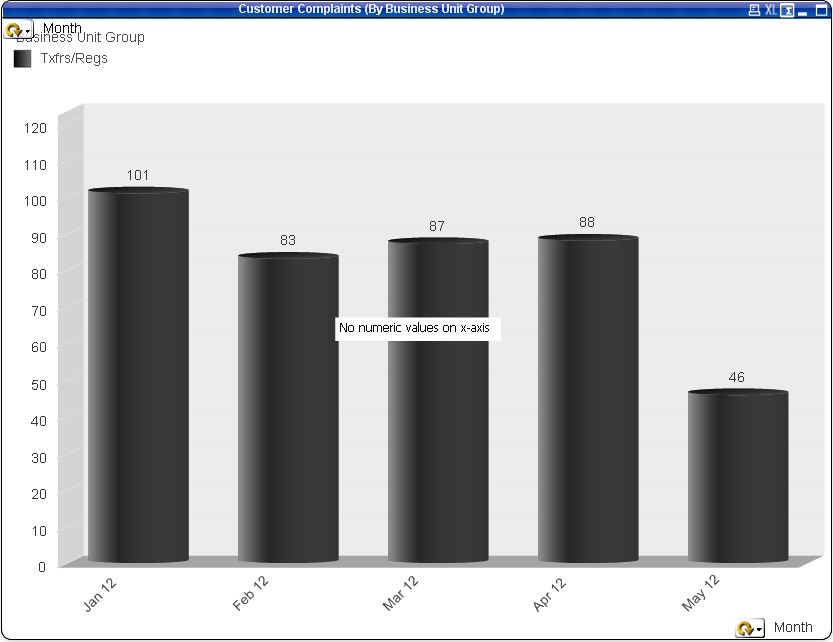
See below. I have two charts layered on top of one another. I don't want to show the x-axis on the top layer because it sometimes overlaps when I change the filters. How to I eliminate the warning you see in the middle of the chart?
1,422 Views
1 Solution
Accepted Solutions
Not applicable
2012-05-16
03:36 PM
Author
- Mark as New
- Bookmark
- Subscribe
- Mute
- Subscribe to RSS Feed
- Permalink
- Report Inappropriate Content
Silly me.. All I had to do was make the x-axis font white in the background chart and now it's perfect.
465 Views
1 Reply
Not applicable
2012-05-16
03:36 PM
Author
- Mark as New
- Bookmark
- Subscribe
- Mute
- Subscribe to RSS Feed
- Permalink
- Report Inappropriate Content
Silly me.. All I had to do was make the x-axis font white in the background chart and now it's perfect.
466 Views