Unlock a world of possibilities! Login now and discover the exclusive benefits awaiting you.

- Qlik Community
- :
- All Forums
- :
- QlikView App Dev
- :
- Re: set analysis in multi-layer fact table
- Subscribe to RSS Feed
- Mark Topic as New
- Mark Topic as Read
- Float this Topic for Current User
- Bookmark
- Subscribe
- Mute
- Printer Friendly Page

 markovalexsey
- Mark as New
- Bookmark
- Subscribe
- Mute
- Subscribe to RSS Feed
- Permalink
- Report Inappropriate Content
set analysis in multi-layer fact table
Hi Experts,
Need bit of help.
There is such a multi-layer fact table, in which the sales history and the current balance (stock) are combined.
I Need to calculate the balance (stock) of supplier 1 in house 1 for sales in different months.
Example 1:
January sales: sales of brand 1 supplier 1 in house 1,
result when January is selected: stock = 3
Example 2:
sales: sales of brand 2 supplier 2 in the house 2,
result when you select February: remainder = 15
In my case, it only works if I choose the current month.
I have tried many different ways of writing the set analysis but can't seem to get the correct syntax.
Regards
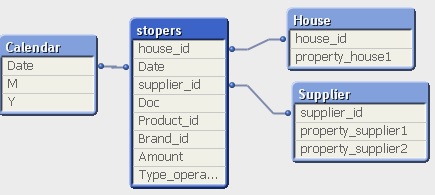
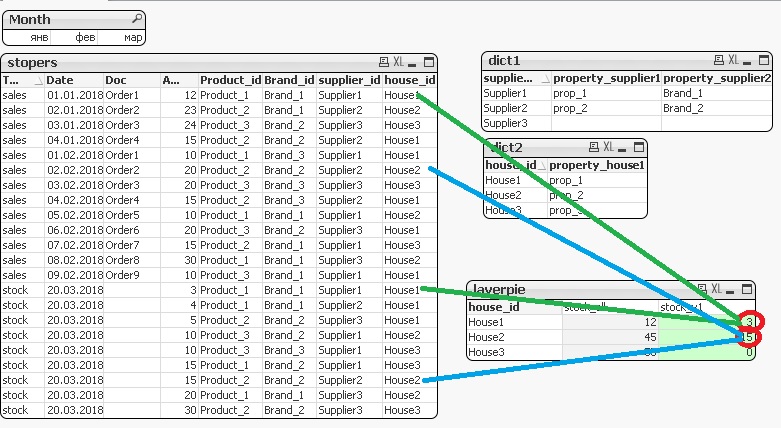
the expression in the chart:
Sum ({<Type_operation={'stock'}>} if(Brand_id = property_supplier2 AND property_house1 = property_supplier1 , Amount, 0))
but only works when selecting March

 tresB
tresB
- Mark as New
- Bookmark
- Subscribe
- Mute
- Subscribe to RSS Feed
- Permalink
- Report Inappropriate Content
Not really sure what you are exactly trying to achieve. To hint - why this doesn't work: since you use 'stock' as type operation fixed in expression, the expression would not return any value when for selections that don't have 'stock' data. I.e. for your feb and jan selection there is no 'stock' in available data, hence it returns nothing.
markovalexsey
- Mark as New
- Bookmark
- Subscribe
- Mute
- Subscribe to RSS Feed
- Permalink
- Report Inappropriate Content
yes, you are right, choosing January, operations with the 'stock' outside the selected period,
but it is necessary that the operations were checked in January, and displayed amount 'stock' and in any case
tresB
- Mark as New
- Bookmark
- Subscribe
- Mute
- Subscribe to RSS Feed
- Permalink
- Report Inappropriate Content
It is still not very clear to me. However, I guess you might try using p().
