Unlock a world of possibilities! Login now and discover the exclusive benefits awaiting you.

- Qlik Community
- :
- All Forums
- :
- QlikView App Dev
- :
- values not populating
- Subscribe to RSS Feed
- Mark Topic as New
- Mark Topic as Read
- Float this Topic for Current User
- Bookmark
- Subscribe
- Mute
- Printer Friendly Page

- Mark as New
- Bookmark
- Subscribe
- Mute
- Subscribe to RSS Feed
- Permalink
- Report Inappropriate Content
values not populating
dear all,
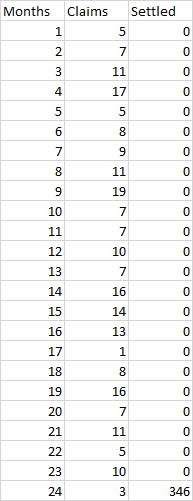
I have a data like shown below. that data is for 24 months which shows claims and settled claims. but the problem is , for settled I am getting total value at the 24 month, rest is showin zero. my requirement is it should populate data for each month
how to do it?
I

 sagarkharpude
- Mark as New
- Bookmark
- Subscribe
- Mute
- Subscribe to RSS Feed
- Permalink
- Report Inappropriate Content
can you share the data.

 PrashantSangle
- Mark as New
- Bookmark
- Subscribe
- Mute
- Subscribe to RSS Feed
- Permalink
- Report Inappropriate Content
What was the logic to calculate settle???
Is there any field available in your source to identify settled value for year?
provide more details
Regards
Please appreciate our Qlik community members by giving Kudos for sharing their time for your query. If your query is answered, please mark the topic as resolved 🙂
 stonecold111
- Mark as New
- Bookmark
- Subscribe
- Mute
- Subscribe to RSS Feed
- Permalink
- Report Inappropriate Content
Populate means... What data it should populate... what is the expression you are using for settled??
- Mark as New
- Bookmark
- Subscribe
- Mute
- Subscribe to RSS Feed
- Permalink
- Report Inappropriate Content
heres d logic:
(ROUND(Sum({<[Common Sales Date]={">=$(=vCommonMinDate)<=$(=vCommonMaxDate)"},MIS={"$(v_MIS_Range_Max)"}>} [Sales Quantity])))
//v_Mis_range_max =if(GetSelectedCount(MIS)=0,24, max(MIS))
// MIS is months
stonecold111
- Mark as New
- Bookmark
- Subscribe
- Mute
- Subscribe to RSS Feed
- Permalink
- Report Inappropriate Content
when there are no selections made, it will just display only for MIS=36. that's y it is not populating data.
try to remove that and see or else
just use [Sales Quantity]
stonecold111
- Mark as New
- Bookmark
- Subscribe
- Mute
- Subscribe to RSS Feed
- Permalink
- Report Inappropriate Content
sorry MIS=24
stonecold111
- Mark as New
- Bookmark
- Subscribe
- Mute
- Subscribe to RSS Feed
- Permalink
- Report Inappropriate Content
(ROUND(Sum({<[Common Sales Date]={">=$(=vCommonMinDate)<=$(=vCommonMaxDate)"}>}[Sales Quantity]))
Use this
stonecold111
- Mark as New
- Bookmark
- Subscribe
- Mute
- Subscribe to RSS Feed
- Permalink
- Report Inappropriate Content
round([Saes Quantity]) is the best option