Unlock a world of possibilities! Login now and discover the exclusive benefits awaiting you.

- Qlik Community
- :
- All Forums
- :
- QlikView App Dev
- :
- want to display selected month along with previous...
- Subscribe to RSS Feed
- Mark Topic as New
- Mark Topic as Read
- Float this Topic for Current User
- Bookmark
- Subscribe
- Mute
- Printer Friendly Page

 chinnu123
- Mark as New
- Bookmark
- Subscribe
- Mute
- Subscribe to RSS Feed
- Permalink
- Report Inappropriate Content
want to display selected month along with previous month in straight table
Hi Community,
I am facing problem for displaying previous month along with selected month.
For example I have a field names like ABC,BBC,Jan,Feb,Mar,Apr,May,Jun,Jul,Aug,Sep,Oct,Nov,Dec.
Here I took month as list box and if i select April i need to get only Mar & Apr remaining month fields must be hide
Like this format ABC BBC Mar Apr
Can any one give the suggestions whether it is possible or not..
Thanks in Advance
Regards,
Chinnu.
- Tags:
- new_to_qlikview
- « Previous Replies
-
- 1
- 2
- Next Replies »
Accepted Solutions

 sunny_talwar
- Mark as New
- Bookmark
- Subscribe
- Mute
- Subscribe to RSS Feed
- Permalink
- Report Inappropriate Content
 sunny_talwar
- Mark as New
- Bookmark
- Subscribe
- Mute
- Subscribe to RSS Feed
- Permalink
- Report Inappropriate Content
Month name are field names in your database? or is it value within a Month fieldname? If they are all field name are you using a different expression for each individual month?

 Qrishna
- Mark as New
- Bookmark
- Subscribe
- Mute
- Subscribe to RSS Feed
- Permalink
- Report Inappropriate Content
Post some Sample data or a demo document.
chinnu123
- Mark as New
- Bookmark
- Subscribe
- Mute
- Subscribe to RSS Feed
- Permalink
- Report Inappropriate Content
Hi sunny,
They are feild names. yes i am using different expressions for each individual month
sunny_talwar
- Mark as New
- Bookmark
- Subscribe
- Mute
- Subscribe to RSS Feed
- Permalink
- Report Inappropriate Content
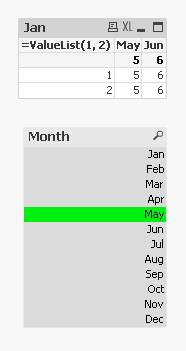
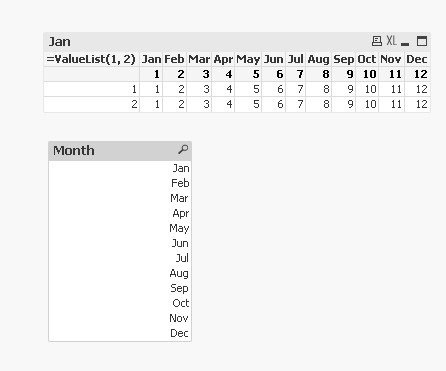
May be use this as conditional show/hide expression for each of your month
For Month of April =SubStringCount(Concat(DISTINCT Month, '|'), 'Mar') = 1 or SubStringCount(Concat(DISTINCT Month, '|'), 'Apr') = 1
For Month of Mar =SubStringCount(Concat(DISTINCT Month, '|'), 'Feb') = 1 or SubStringCount(Concat(DISTINCT Month, '|'), 'Mar') = 1
and like that for all months

 nizamsha
- Mark as New
- Bookmark
- Subscribe
- Mute
- Subscribe to RSS Feed
- Permalink
- Report Inappropriate Content
try like this might be helpful u have to Nullify the selection because when u selected the particular month data model will display data only for the particular month but u r force fully telling that u want to display the data for last month too then as i know i will nullify
Current Month
sum({$<Year={"$(=Max(Year))"},MonthID={"$(=Max(MonthID))"}>})
sum({$<Year={"$(=Max(Year))"},MonthID={"$(=Max(MonthID)-1)"},Month=>})
chinnu123
- Mark as New
- Bookmark
- Subscribe
- Mute
- Subscribe to RSS Feed
- Permalink
- Report Inappropriate Content
Its not working sunny it displaying other months too
sunny_talwar
- Mark as New
- Bookmark
- Subscribe
- Mute
- Subscribe to RSS Feed
- Permalink
- Report Inappropriate Content
Do you have a condition for all your expressions? Let me work on a sample I guess
sunny_talwar
- Mark as New
- Bookmark
- Subscribe
- Mute
- Subscribe to RSS Feed
- Permalink
- Report Inappropriate Content
With a month Selected:
With nothing selected:
chinnu123
- Mark as New
- Bookmark
- Subscribe
- Mute
- Subscribe to RSS Feed
- Permalink
- Report Inappropriate Content
Sunny as per your qvw if we select feb it showing feb and mar but as per my scenario if we select feb jan and feb must be display in the same way if we select Jan dec and jan must be display
Hope you understand
Thanks in Advance

- « Previous Replies
-
- 1
- 2
- Next Replies »