Unlock a world of possibilities! Login now and discover the exclusive benefits awaiting you.

- Qlik Community
- :
- All Forums
- :
- QlikView App Dev
- :
- what are layers we have in qlikview?
Options
- Subscribe to RSS Feed
- Mark Topic as New
- Mark Topic as Read
- Float this Topic for Current User
- Bookmark
- Subscribe
- Mute
- Printer Friendly Page
Turn on suggestions
Auto-suggest helps you quickly narrow down your search results by suggesting possible matches as you type.
Showing results for

Anonymous
Not applicable
2015-02-05
11:03 AM
- Mark as New
- Bookmark
- Subscribe
- Mute
- Subscribe to RSS Feed
- Permalink
- Report Inappropriate Content
what are layers we have in qlikview?
what are layers we have in qlikview?
hi if may be my question wrong ,pls forgive me and correct me ?
- Tags:
- new_to_qlikview
2,563 Views
3 Replies

 rubenmarin
MVP
2015-02-05
11:05 AM
- Mark as New
- Bookmark
- Subscribe
- Mute
- Subscribe to RSS Feed
- Permalink
- Report Inappropriate Content
Hi, when objects are overlapping, it sets wich object gets on top.
If more than one object has the same layer, the most recent active object will be on top.
1,876 Views

 giakoum
Partner - Master II
2015-02-05
11:55 AM
- Mark as New
- Bookmark
- Subscribe
- Mute
- Subscribe to RSS Feed
- Permalink
- Report Inappropriate Content
you need to elaborate:
layers of architecture?
layers of application portfolio?
layers in the client?
Please try to be more specific.
1,876 Views
 maxgro
MVP
2015-02-05
02:09 PM
- Mark as New
- Bookmark
- Subscribe
- Mute
- Subscribe to RSS Feed
- Permalink
- Report Inappropriate Content
if you mean object layer you can find it here
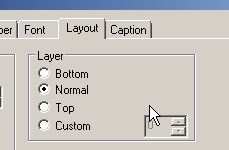
from QlikView Help
Layer
In the Layer group an object can be defined as residing in one of three layers:
| Bottom | A sheet object with the Bottom layer property can never obscure sheet objects in the Normal and Top layers. It can only be placed on top of other sheet objects in the Bottom layer. |
| Normal | When created, sheet objects reside in the Normal (middle) layer. A sheet object in the Normal layer can never be obscured by sheet objects in the Bottom layer and can never obscure sheet objects in the Top layer. |
| Top | A sheet object in the Top layer can never be obscured by sheet objects in the Normal and Bottom layers. Only other sheet objects in the Top layer can be placed on top of it. |
| Custom | The Top, Normal and Bottom layers correspond to internally numbered layers 1, 0 and -1 respectively. In fact all values between -128 and 127 are accepted. Choose this option to enter a value of your choice. |
1,876 Views