Unlock a world of possibilities! Login now and discover the exclusive benefits awaiting you.

- Qlik Community
- :
- All Forums
- :
- QlikView
- :
- how to do percent to total/subtotal
- Subscribe to RSS Feed
- Mark Topic as New
- Mark Topic as Read
- Float this Topic for Current User
- Bookmark
- Subscribe
- Mute
- Printer Friendly Page

- Mark as New
- Bookmark
- Subscribe
- Mute
- Subscribe to RSS Feed
- Permalink
- Report Inappropriate Content
how to do percent to total/subtotal
hello
in the picture below.. I have a column called total units.
with sample data u can see dresses+skirts I have a formula
=pick(Dimensionality(),null(),sum(sales)/sum(Total sales), sum(sales)/sum(Total <[2bc]> sales))
this give me percent to the total sales 700...
question 1.. how do I get it to percent to subtotal (dress is 600)
question 2 how do I get cut and sew total sales 600 to percent to grand total of 700?
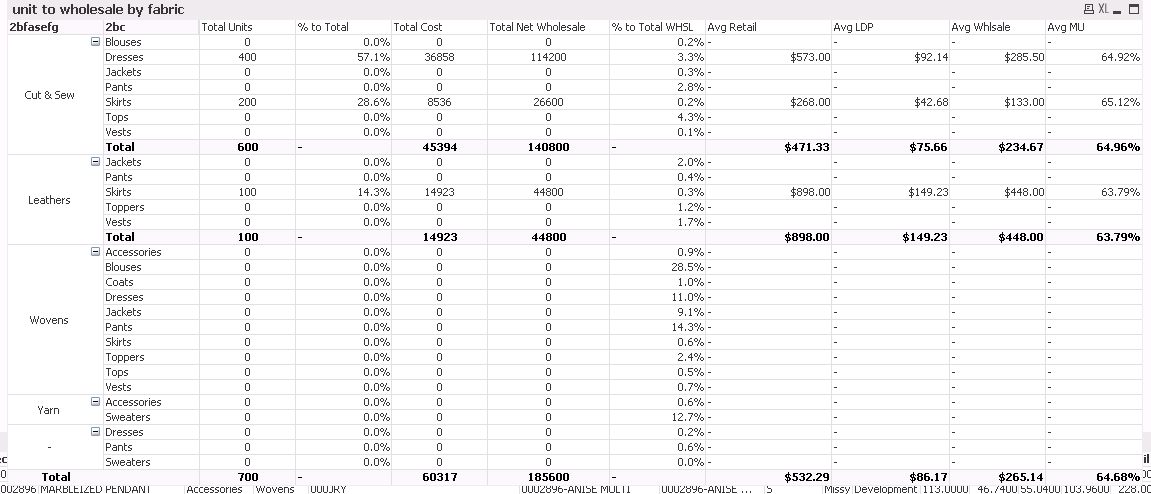
issue 2 is
if u look at the wholesale percent to total column.. its giving me percents for ALL the body class.. even though only 3 have sales units in it...
im not sure how to get it for data with only sales.. below is the formula I used
=pick(Dimensionality(),null(),sum([2gsp])/sum(Total [2gsp]), sum([2gsp])/sum(Total <[2bc]> [2gsp]))
thanks to all
Accepted Solutions

 sunny_talwar
- Mark as New
- Bookmark
- Subscribe
- Mute
- Subscribe to RSS Feed
- Permalink
- Report Inappropriate Content
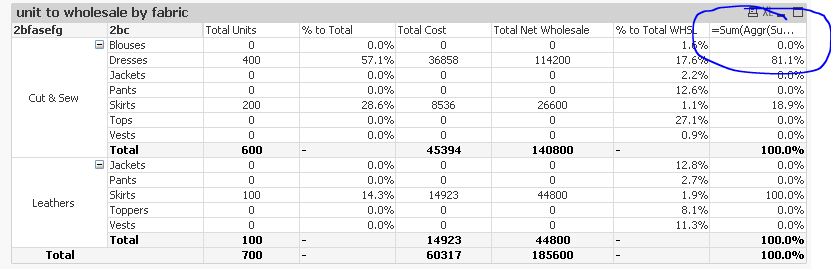
My bad, I think you needed this:
=Sum(Aggr(Sum({<[style],[stylecol]>} sales) * Sum(Aggr(Sum([2gsp]), [style])),[style], [stylecol]))/Sum(TOTAL <[2bfasefg]> Aggr(Sum({<[style],[stylecol]>} sales) * Sum(Aggr(Sum([2gsp]), [style])),[style], [stylecol]))
sunny_talwar
- Mark as New
- Bookmark
- Subscribe
- Mute
- Subscribe to RSS Feed
- Permalink
- Report Inappropriate Content
For first issue, may be this:
=Pick(Dimensionality(), Sum(sales)/Sum(Total sales), Sum(sales)/Sum(TOTAL <[2bc]> sales))
For issue 2
What is your expression for Total Net Wholesale columne?
- Mark as New
- Bookmark
- Subscribe
- Mute
- Subscribe to RSS Feed
- Permalink
- Report Inappropriate Content
the wholesale one is
=Sum(Aggr(Sum({<[style],[stylecol]>} sales) * Sum(Aggr(Sum([2gsp]), [style])),[style], [stylecol]))
sunny_talwar
- Mark as New
- Bookmark
- Subscribe
- Mute
- Subscribe to RSS Feed
- Permalink
- Report Inappropriate Content
May be this:
=Sum(Aggr(Sum({<[style],[stylecol]>} sales) * Sum(Aggr(Sum([2gsp]), [style])),[style], [stylecol]))/Sum(TOTAL <[2bc]> Aggr(Sum({<[style],[stylecol]>} sales) * Sum(Aggr(Sum([2gsp]), [style])),[style], [stylecol]))
- Mark as New
- Bookmark
- Subscribe
- Mute
- Subscribe to RSS Feed
- Permalink
- Report Inappropriate Content
hello
its strange..
when I do my current formula
=pick(Dimensionality(),null(),sum([2gsp])/sum(Total [2gsp]), sum([2gsp])/sum(Total <[2bc]> [2gsp]))
the screen shows all data
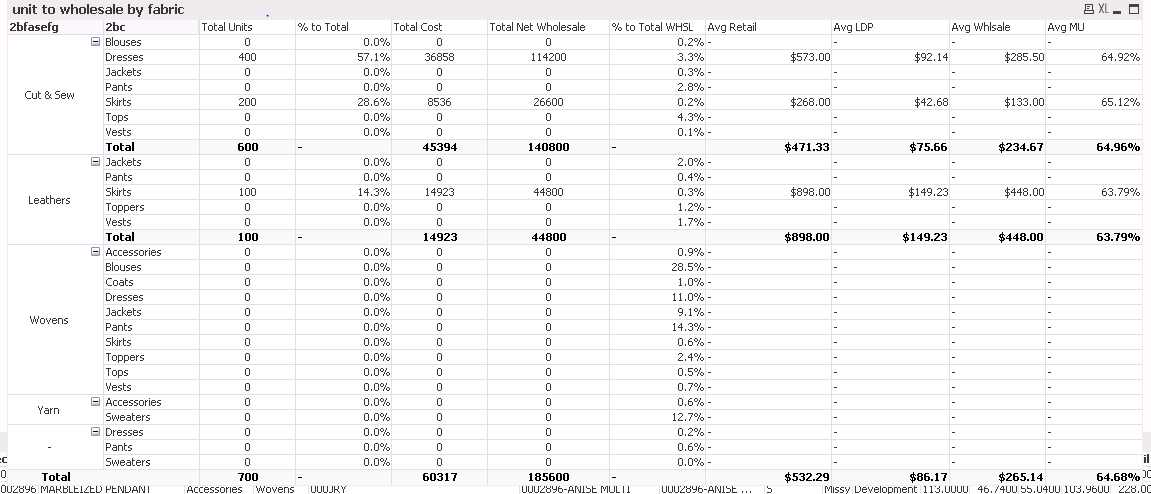
but when I uses your formula
1 the answer isnt quite right... see the first line it says 100% total when it should be able 80 something
2 it forces all the blank or zero sum stuff to hide...when it should just show zero like the original formula

thanks and happy holidays
sunny_talwar
- Mark as New
- Bookmark
- Subscribe
- Mute
- Subscribe to RSS Feed
- Permalink
- Report Inappropriate Content
My bad, I think you needed this:
=Sum(Aggr(Sum({<[style],[stylecol]>} sales) * Sum(Aggr(Sum([2gsp]), [style])),[style], [stylecol]))/Sum(TOTAL <[2bfasefg]> Aggr(Sum({<[style],[stylecol]>} sales) * Sum(Aggr(Sum([2gsp]), [style])),[style], [stylecol]))
- Mark as New
- Bookmark
- Subscribe
- Mute
- Subscribe to RSS Feed
- Permalink
- Report Inappropriate Content
u my good man are a genius..
and I realize I had suppress zero values..
that's why..
genius
thanks so much and happy holidays
sunny_talwar
- Mark as New
- Bookmark
- Subscribe
- Mute
- Subscribe to RSS Feed
- Permalink
- Report Inappropriate Content
Thanks my friend. Happy holidays to you too ... 