Unlock a world of possibilities! Login now and discover the exclusive benefits awaiting you.

- Qlik Community
- :
- Forums
- :
- Analytics & AI
- :
- QlikView
- :
- Documents
- :
- QlikView JDBC Connector
- Subscribe to RSS Feed
- Mark as New
- Mark as Read
- Bookmark
- Subscribe
- Printer Friendly Page
- Report Inappropriate Content
QlikView JDBC Connector

 rbecher
- Mark as New
- Bookmark
- Subscribe
- Mute
- Subscribe to RSS Feed
- Permalink
- Report Inappropriate Content
QlikView JDBC Connector

Hi all,
the product JDBC Connector reached end-of-life because it's technically outdated. Support of it ends 2018-12-31.
The successor product is the TIQ Java Service Connector and can be obtained here:
https://www.tiq-solutions.de/en/tiq-java-service-connector/
Best regards,
Ralf
--------------------------------
Hi everyone,
this is a demo version of our JDBC Connector for QlikView. It will enable a lot of non-ODBC/OLEDB sources for loading data into QlikView.
Also, it would give much more performance on QV 9 loads (Oracle, mysql etc.) and could speed up on complex network environments (like VPN, firewalls, WAN).
Please try it out and give us some feedback!
Installation instructions:
- install the JDBC Connector and config the JDBC driver (mostly a .jar file)
- connect with JDBC URL (e.g. jdbc:oracle:thin:@localhost:1521:ex)
- example connect statement for Oracle (will be included by connect popup):
CUSTOM CONNECT TO "Provider=JDBCConnector_x64.dll;jdbc:oracle:thin:@localhost:1521:ex;XUserId=SbKdMaFNRLOA;XPassword=aWELJaFNRbTA;";
Missing feature (waiting for QV support):
- no select option for database/owner on table wizzard
Thanks to my colleague Sven "Benno" Uhlig who brought up this idea and implementation!
Ralf
UPDATE:
This is a new version which supports DDL and DML statements too. You will get a result set if a DML statement was executed with the update count.
Just try script calls like this:
DATA:
SQL CREATE TABLE test2 (col1 INT)
;
SQL insert into test2 (col1) values (1)
;
SQL update test2 set col1=2
;
SQL drop table test2
;
UPDATE:
New version comes with an installer and config dialogs. See also: http://www.tiq-solutions.de/display/enghome/ENJDBC for a list of possible JDBC sources.
rbecher
- Mark as Read
- Mark as New
- Bookmark
- Permalink
- Report Inappropriate Content
I'm proud to announce our first commercial release of the JDBC Connector:
Download Installer: http://bit.ly/xYazjT
Connect to a whole new Java world!


- Mark as Read
- Mark as New
- Bookmark
- Permalink
- Report Inappropriate Content
Am trying to connect to hive. However after I select the JDBCConnector.dll (32) and click the connect. I get the following error massage-
"QvConnect 11.00 IR has encountered a problem and needs to close. We are sorry for the inconvenience."
I am using Version 11.00.11154.0 IR. Can anyone help with this.
Thanks
rbecher
- Mark as Read
- Mark as New
- Bookmark
- Permalink
- Report Inappropriate Content
@wingy168 please contact me directly for support: ralf.becher@tiq-solutions.de
- Mark as Read
- Mark as New
- Bookmark
- Permalink
- Report Inappropriate Content
Hi Ralf,
We are working on qlikview version 10 and a 32 bit machine.
we have the connector available on this page and the jar files that you have listed under the 0.8.0 version of yours.
after updating all the jar files in the JDBC connector and updating the classpath with the location of the JAR files, we tried connecting HIVE and got the error saying
No suitable driver available for jdbc:hive://<IP>:<port>/default.
can you please help us with the same, do tell us if you need anything further on this from our side.
would really appriciate If you can answer the query here only.
Regards!!
Kamlesh
rbecher
- Mark as Read
- Mark as New
- Bookmark
- Permalink
- Report Inappropriate Content
rbecher
- Mark as Read
- Mark as New
- Bookmark
- Permalink
- Report Inappropriate Content
This is the new list of actual working JDBC data sources for QlikView:
- Hadoop HDFS and Hive
(Cloudera, MapR, Amazon EMR) - Cloudera Impala (via Beeswax API)
- SAP HANA
- SAP ERP/BW (via SAP JCo)
- Kx Systems KDB+
- Microsoft Windows SQL Azure
- Google Cloud SQL
- Neo4j Graph Database
- Apache Derby / Java DB
- encrypted CSV files
- COBOL files
- Pentaho Kettle Transformation Steps
For the most of them no alternative connectivity solution is provided for QlikView.
- Ralf

 avastani
- Mark as Read
- Mark as New
- Bookmark
- Permalink
- Report Inappropriate Content
is the trial version still valid? i tried downloading and running the exe, no luck
rbecher
- Mark as Read
- Mark as New
- Bookmark
- Permalink
- Report Inappropriate Content
Please contact me directly to solve any install problem.
contact me by email: ralf.becher@tiq-solutions.de
- Mark as Read
- Mark as New
- Bookmark
- Permalink
- Report Inappropriate Content
Hi Ralf,
I am working on QlikView version 11 SR2 and a 32 bit machine.
I downloaded JDBC Connector via this link.
http://www.tiq-solutions.de/display/enghome/ENJDBC
I have Oracle 11g Release 2 and I used the following jar file.
C:\app\Administrator\product\11.2.0\client_1\jdbc\lib\ojdbc6.jar
Java path is C:\Program Files\Java\jre1.6.0_01\bin.
In QlikView, JDBC screen, typed the URL as,
jdbc:oracle:thin:@IPAddress:1521:SID
And I typed user name and password also.
But, the message shows "No suitable driver found for "jdbc:oracle:thin:@IPAddress:1521:SID".
I see this message via http://market.qlik.com/qlikview-jdbc-connector.html,
Possible JDBC data sources:
- Derby / Java DB
- encrypted CSV files
- Hadoop Hive
- Neo4j Graph Database
- Microsoft Windows SQL Azure
- COBOL files
- FoxPro / DBF files
I can't connect with Oracle?
With regards,
Hnin
rbecher
- Mark as Read
- Mark as New
- Bookmark
- Permalink
- Report Inappropriate Content
Hi Hnin,
usually this works without any problem. You could specify the Driver Class name in the config dialog:
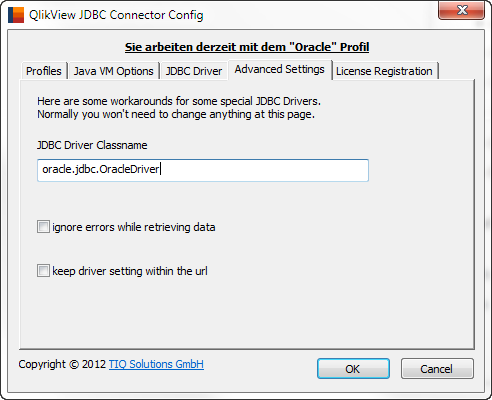
Could you contact me by email to fix this: ralf.becher@tiq-solutions.de
- Ralf