Unlock a world of possibilities! Login now and discover the exclusive benefits awaiting you.

- Qlik Community
- :
- All Forums
- :
- QlikView
- :
- Re: Ad-hoc reporting, set analysis
- Subscribe to RSS Feed
- Mark Topic as New
- Mark Topic as Read
- Float this Topic for Current User
- Bookmark
- Subscribe
- Mute
- Printer Friendly Page

 aisolomatin
- Mark as New
- Bookmark
- Subscribe
- Mute
- Subscribe to RSS Feed
- Permalink
- Report Inappropriate Content
Ad-hoc reporting, set analysis
Hi, there!
Need your help with issue: I need to make expression, that will calc a Sum(Value) for max DateReport.
But if DateReport has added to table as Dimension, then I need to get Sum(Value) for current DateReport.
Here example. I try to use expression
=If(Dimensionality()=0,
Sum({<DateReport={"$(=Max(Date(DateReport)))"}>}Value),
Sum(Value)).
But problem is that it works fine for first table, but doesn't work for second.
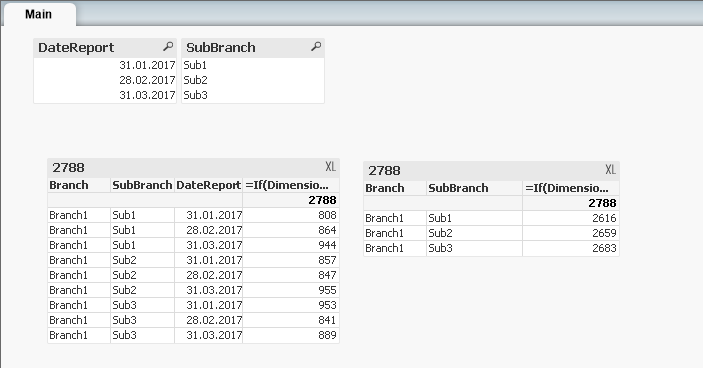
Second table should look like this:
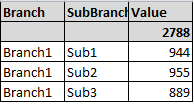
I need to use it in Ad-hoc reporting, so I have one table with all Dimensions (users choose Dimensions for table by themselves), and I need one expression.
- « Previous Replies
- Next Replies »
aisolomatin
- Mark as New
- Bookmark
- Subscribe
- Mute
- Subscribe to RSS Feed
- Permalink
- Report Inappropriate Content
Still no, because if I remove Dimension [DateReport] from table. the result will be like this:
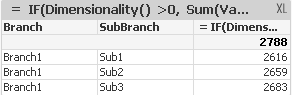
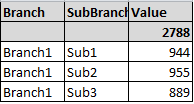
But I need like this (sum for max(Datereport)):


- Mark as New
- Bookmark
- Subscribe
- Mute
- Subscribe to RSS Feed
- Permalink
- Report Inappropriate Content
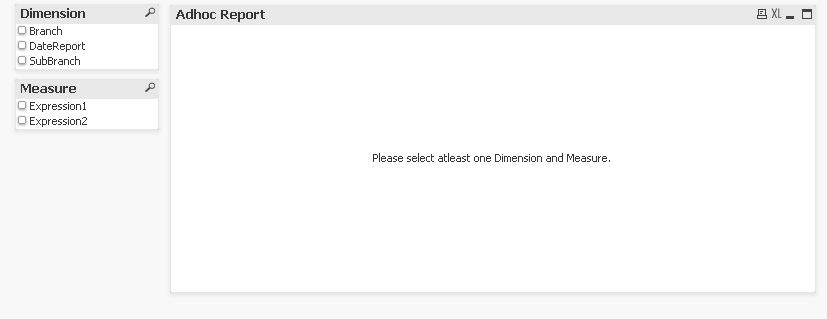
Check this May be?

 vishsaggi
- Mark as New
- Bookmark
- Subscribe
- Mute
- Subscribe to RSS Feed
- Permalink
- Report Inappropriate Content
Ahhh. I got it now. Its is like more dynamic addition of Dimensions. Need to work on it. I am out now will try once i come back.
vishsaggi
- Mark as New
- Bookmark
- Subscribe
- Mute
- Subscribe to RSS Feed
- Permalink
- Report Inappropriate Content
Check this?

- « Previous Replies
- Next Replies »