Unlock a world of possibilities! Login now and discover the exclusive benefits awaiting you.

- Qlik Community
- :
- All Forums
- :
- QlikView
- :
- Add x-axis reference line
- Subscribe to RSS Feed
- Mark Topic as New
- Mark Topic as Read
- Float this Topic for Current User
- Bookmark
- Subscribe
- Mute
- Printer Friendly Page

- Mark as New
- Bookmark
- Subscribe
- Mute
- Subscribe to RSS Feed
- Permalink
- Report Inappropriate Content
Add x-axis reference line
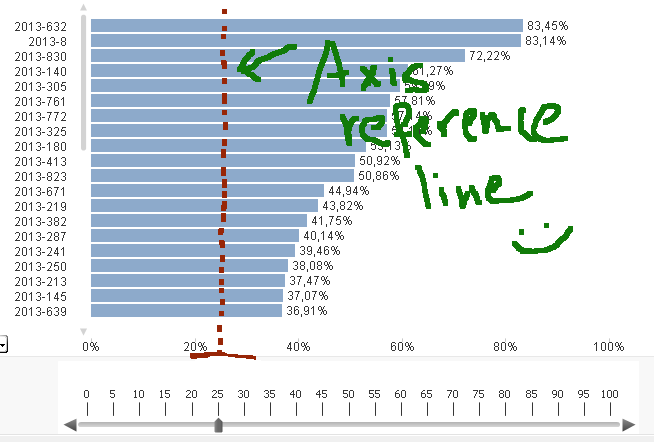
My question: What are the steps to create an x-axis reference line like this (but not by hand  😞
😞
Thanks,
daniel.
- Tags:
- x_axis
Accepted Solutions

 swuehl
- Mark as New
- Bookmark
- Subscribe
- Mute
- Subscribe to RSS Feed
- Permalink
- Report Inappropriate Content
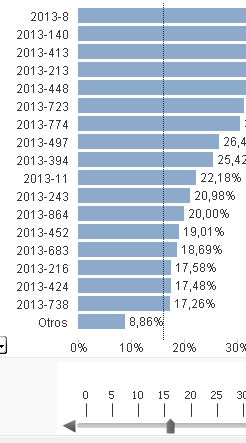
As far as I see, you are using a horizontal bar style on style properties tab.
So what you want is not a x-axis reference line, but a standard y-value reference.
Just create a slider on a variable vSlider, then go to the presentation tab of your bar chart and create a reference.
Just input vSlider as expression for the reference.
Check also attached.
- Mark as New
- Bookmark
- Subscribe
- Mute
- Subscribe to RSS Feed
- Permalink
- Report Inappropriate Content
Go to Properties - Presentation - Reference lines (right, just below the middle) - click Add
Hope that's what you mean...
swuehl
- Mark as New
- Bookmark
- Subscribe
- Mute
- Subscribe to RSS Feed
- Permalink
- Report Inappropriate Content
As far as I see, you are using a horizontal bar style on style properties tab.
So what you want is not a x-axis reference line, but a standard y-value reference.
Just create a slider on a variable vSlider, then go to the presentation tab of your bar chart and create a reference.
Just input vSlider as expression for the reference.
Check also attached.
- Mark as New
- Bookmark
- Subscribe
- Mute
- Subscribe to RSS Feed
- Permalink
- Report Inappropriate Content
Runs like a charm, both answers are right and at same minute. I check as solution the most detailed one.