Unlock a world of possibilities! Login now and discover the exclusive benefits awaiting you.

- Qlik Community
- :
- All Forums
- :
- QlikView
- :
- Adding Custom Dimension
- Subscribe to RSS Feed
- Mark Topic as New
- Mark Topic as Read
- Float this Topic for Current User
- Bookmark
- Subscribe
- Mute
- Printer Friendly Page

- Mark as New
- Bookmark
- Subscribe
- Mute
- Subscribe to RSS Feed
- Permalink
- Report Inappropriate Content
Adding Custom Dimension
Hi All
In attached QV how do I add custom Variance (Q1-14 - Q2-14) column. Here Q1-14, Q2-14 are dimensions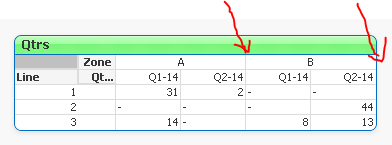
Thanks
Accepted Solutions

 pokassov
- Mark as New
- Bookmark
- Subscribe
- Mute
- Subscribe to RSS Feed
- Permalink
- Report Inappropriate Content
Hi Satish!
If I understood you correctly, you can:
1. change your expression
if(SecondaryDimensionality()=2,Sum(Amt), Sum({$<QtrHead={'$(=MinString(QtrHead))'}>} Amt)-Sum({$<QtrHead={'$(=MaxString(QtrHead))'}>} Amt))
2. set on the Presentation tab "Show Partial Sums"

And then you will be able to see your chart in the following way:


 buzzy996
- Mark as New
- Bookmark
- Subscribe
- Mute
- Subscribe to RSS Feed
- Permalink
- Report Inappropriate Content
on expression tab u can create "Q1-14 ,Q2-14 ..etc"and play with rows & columns to move
- Mark as New
- Bookmark
- Subscribe
- Mute
- Subscribe to RSS Feed
- Permalink
- Report Inappropriate Content
Hi Shiva
I appreciate your reply.
In this case dimensions are not static
pokassov
- Mark as New
- Bookmark
- Subscribe
- Mute
- Subscribe to RSS Feed
- Permalink
- Report Inappropriate Content
Hi Satish!
If I understood you correctly, you can:
1. change your expression
if(SecondaryDimensionality()=2,Sum(Amt), Sum({$<QtrHead={'$(=MinString(QtrHead))'}>} Amt)-Sum({$<QtrHead={'$(=MaxString(QtrHead))'}>} Amt))
2. set on the Presentation tab "Show Partial Sums"
And then you will be able to see your chart in the following way:
- Mark as New
- Bookmark
- Subscribe
- Mute
- Subscribe to RSS Feed
- Permalink
- Report Inappropriate Content
Dear friend
I appreciate your answer, it's really helpful
Thanks