Unlock a world of possibilities! Login now and discover the exclusive benefits awaiting you.

- Qlik Community
- :
- All Forums
- :
- QlikView
- :
- Aggr Function - wrong output
- Subscribe to RSS Feed
- Mark Topic as New
- Mark Topic as Read
- Float this Topic for Current User
- Bookmark
- Subscribe
- Mute
- Printer Friendly Page

- Mark as New
- Bookmark
- Subscribe
- Mute
- Subscribe to RSS Feed
- Permalink
- Report Inappropriate Content
Aggr Function - wrong output
HI,
I have created the following expressions which are displayed in a Stacked Bar.
1) Inventory <= 10 Days
Sum(if(Aggr((Sum ([CLosing_STK Value]) + Sum ([Intran_STK Value])) / (Sum ([Avg Value])/30),[Territory Name]) <= 10,1,0))
2) Inventory Between 10 to 30 Days
sum(if((Aggr((Sum ([CLosing_STK Value]) + Sum ([Intran_STK Value])) / (Sum ([Avg Value])/30),[Territory Name]) > 10) and
(Aggr((Sum ([CLosing_STK Value]) + Sum ([Intran_STK Value])) / (Sum ([Avg Value])/30),[Territory Name]) <= 30),1,0))
3) Inventory > 30 Days
sum(if(Aggr((Sum ([CLosing_STK Value]) + Sum ([Intran_STK Value])) / (Sum ([Avg Value])/30),[Territory Name]) > 30,1,0))
Expression No.2 and 3 are displaying correct value whereas Expression 1 does not. It shows a higher value.'
Am i doing something wrong ? Is there any other way to display the output.
Thanks in advance.
- Mark as New
- Bookmark
- Subscribe
- Mute
- Subscribe to RSS Feed
- Permalink
- Report Inappropriate Content
Hi
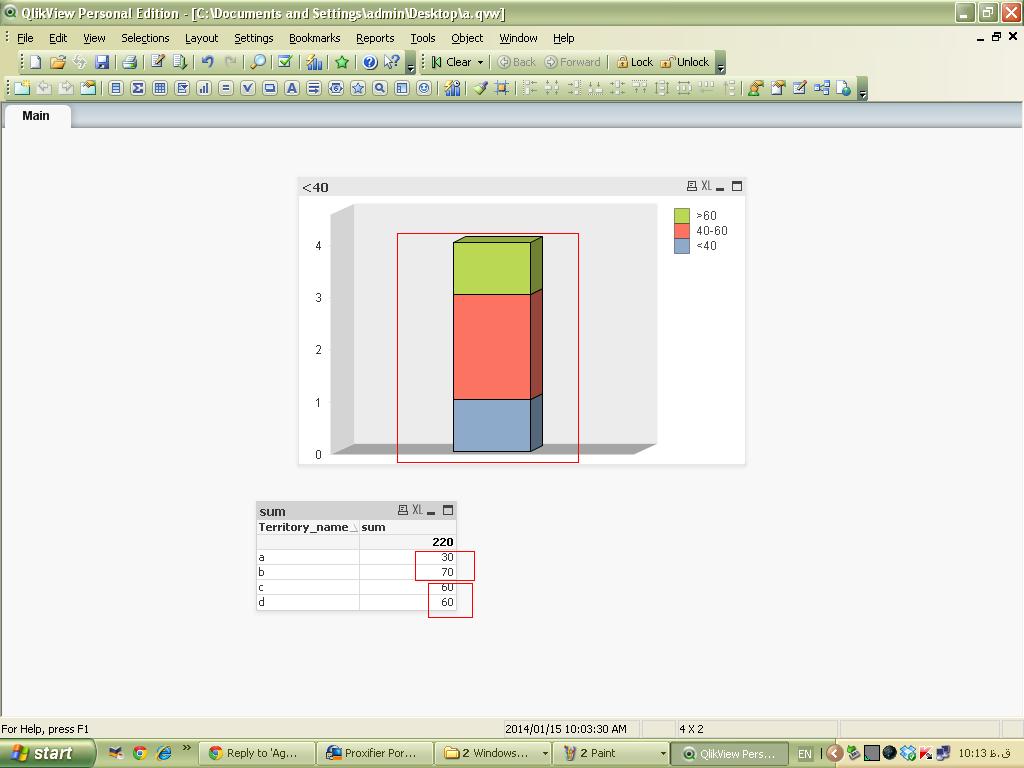
I'm not sure that understand what you mean completely but I test it on some sample data and it works correctly
but maybe my attachment helps you
- Mark as New
- Bookmark
- Subscribe
- Mute
- Subscribe to RSS Feed
- Permalink
- Report Inappropriate Content
HI Behnaz,
Thanks for you reply.
The issue was - it was counting Null value also, which is in 'Inventory <= 10 Days'. I need to count the values which are Zero. But not which are NULL.