Unlock a world of possibilities! Login now and discover the exclusive benefits awaiting you.

- Qlik Community
- :
- All Forums
- :
- QlikView
- :
- All customers by Salesman
- Subscribe to RSS Feed
- Mark Topic as New
- Mark Topic as Read
- Float this Topic for Current User
- Bookmark
- Subscribe
- Mute
- Printer Friendly Page

- Mark as New
- Bookmark
- Subscribe
- Mute
- Subscribe to RSS Feed
- Permalink
- Report Inappropriate Content
All customers by Salesman
Hi,
I have set that all our customers have a mark of a salesman to whom they belong.
I want to make a table in which a click on listbox salesman id will show all the selected salesman customers and in another table i would like to see those customers activity by sales: cost sum net sum margin, etc. But i don't know how to do if a customer did't buy anything on the selected date(Year, moth or even day) how to show all 0 values for him. Now by default if the customer doesn't buy anythinbg he is not shown.
Accepted Solutions
- Mark as New
- Bookmark
- Subscribe
- Mute
- Subscribe to RSS Feed
- Permalink
- Report Inappropriate Content
I don't understand why but loosen tables did the job...

 lironbaram
- Mark as New
- Bookmark
- Subscribe
- Mute
- Subscribe to RSS Feed
- Permalink
- Report Inappropriate Content
in the chart properties
go to presention tab
there on the buttom part
uncheck the box suprress zero values
- Mark as New
- Bookmark
- Subscribe
- Mute
- Subscribe to RSS Feed
- Permalink
- Report Inappropriate Content
No it is something different i know this feature. I think i have troubles in my table linkings.
I also try to do a new, lost customers formulas but i think i have some more problems
- Mark as New
- Bookmark
- Subscribe
- Mute
- Subscribe to RSS Feed
- Permalink
- Report Inappropriate Content
I finaly manged to get back to this project. I still fail to achieve what i want. Here is the image for autolinking in my tables and the code itself: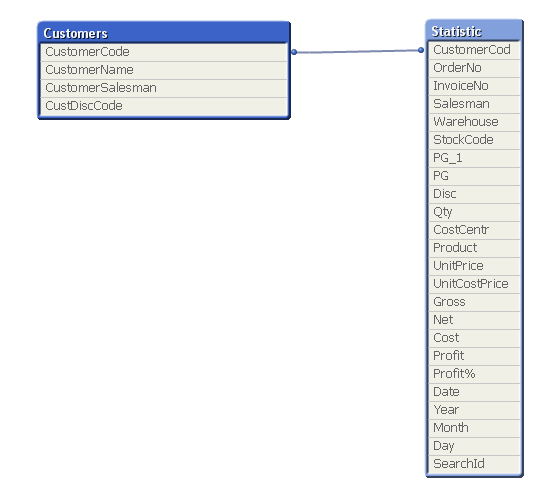
Customers:
load
Text(SL01001) As CustomerCode,
SL01002 As CustomerName,
SL01035 AS CustomerSalesman,
SL01036 As CustDiscCode;
SQL SELECT SL01001, SL01002, SL01035, SL01036 FROM SL01$(CompanyNo)00;
Statistic:
load
Text(ST03009) As OrderNo,
Text(ST03014) As InvoiceNo,
Text(ST03007) As Salesman,
Text(ST03029) As Warehouse,
Text(ST03017) As StockCode,
Text(ST03018) As PG_1,
Mid(Trim(ST03018),1,2) As PG,
ST03022 As Disc,
ST03020 As Qty,
If(Len(ST03011) = 2,ST03011,If(Len(ST03011)=3,'without',If(Len(ST03011) = 8,Mid(ST03011,7,2),If(Len(ST03011) = 14,Mid(ST03011,13,2),'without')))) As CostCentr,
ST03021 As UnitPrice,
ST03023 As UnitCostPrice,
Text(ST03001) As CustomerCode,
Round(ST03020 * ST03021,0.01) As Gross,
Round((ST03020 * ST03021) * (1 - ST03022/100),0.01) As Net,
ST03020 * ST03023 As Cost,
((ST03020 * ST03021) * (1 - ST03022/100)) - (ST03020 * ST03023) As Profit,
((((ST03020 * ST03021) * (1 - ST03022/100)) - (ST03020 * ST03023))/(ST03020 * ST03023))*100 As Profit%,
ST03015 As Date,
year(ST03015) as Year,
month(ST03015) as Month,
day(ST03015) as Day,
ST03036 As SearchId;
SQL SELECT ST03001, ST03009, ST03014, ST03007, ST03029, ST03017, ST03018, ST03022, ST03020, ST03011, ST03021, ST03023, ST03015, ST03036
FROM ST03$(CompanyNo)00 WHERE Substring(ST03001,1,4) <> 'INTR' AND ST03017 <> 'BONUS';
What i want to achieve is to show all the customers from customers table coresponding to customerssalesman field that i click on the listbox and also A Year. If a customer didn't have any sales in selected year then the output shoudb be 00 as well. For example now i have a salesman with number 225 and in customers table this salesman has 505 customers corresponing to him. I i choose 225 and year 2012 my final table is reduced to 156 customers that had some sales in 2012 Year. How should i achieve to show all his 505 customers with sales data? I tried using joins and keeps(Left Keep(Customers) LOAD * Resident Statistic;) in the very end but the result was always the same. Can somebody help
- Mark as New
- Bookmark
- Subscribe
- Mute
- Subscribe to RSS Feed
- Permalink
- Report Inappropriate Content
I don't understand why but loosen tables did the job...
- Mark as New
- Bookmark
- Subscribe
- Mute
- Subscribe to RSS Feed
- Permalink
- Report Inappropriate Content
also uncheck the supress missing values box
somtimes it cause problem same issue was identified in QV 9 version.... personal exp
cross check by unit testing
total count
then unchecking supress zero values box
then unchecking missing values box
hope tht solves ur proiblem......