Unlock a world of possibilities! Login now and discover the exclusive benefits awaiting you.

- Qlik Community
- :
- All Forums
- :
- QlikView
- :
- Allow unsafe macro
- Subscribe to RSS Feed
- Mark Topic as New
- Mark Topic as Read
- Float this Topic for Current User
- Bookmark
- Subscribe
- Mute
- Printer Friendly Page

 johnan
- Mark as New
- Bookmark
- Subscribe
- Mute
- Subscribe to RSS Feed
- Permalink
- Report Inappropriate Content
Allow unsafe macro
Hi, we have a serversolution and the user is getting access by AD. We have some QV's with built macro.
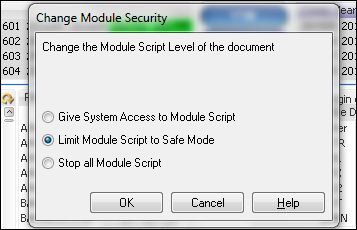
The thing is when you for the first time open the document as a user with Macro, you got 3 choices. Block or Run and run for this user (or something). If you choose wrong you will never get that option again. Can someone tell me how i can change that so you can change next time you open the document again?
Thanx
John
Accepted Solutions

 tamilarasu
- Mark as New
- Bookmark
- Subscribe
- Mute
- Subscribe to RSS Feed
- Permalink
- Report Inappropriate Content
tamilarasu
- Mark as New
- Bookmark
- Subscribe
- Mute
- Subscribe to RSS Feed
- Permalink
- Report Inappropriate Content
Hi John,
Press Ctrl + Shift + M.
johnan
- Mark as New
- Bookmark
- Subscribe
- Mute
- Subscribe to RSS Feed
- Permalink
- Report Inappropriate Content
Okay, so the user can do this when openened the document with the IE-plugin?
tamilarasu
- Mark as New
- Bookmark
- Subscribe
- Mute
- Subscribe to RSS Feed
- Permalink
- Report Inappropriate Content
Yes. The above screen shot captured from the IE after opening the document.
johnan
- Mark as New
- Bookmark
- Subscribe
- Mute
- Subscribe to RSS Feed
- Permalink
- Report Inappropriate Content
Okay, i will test this. Maybe i have to change some security setting on the document on the server?
tamilarasu
- Mark as New
- Bookmark
- Subscribe
- Mute
- Subscribe to RSS Feed
- Permalink
- Report Inappropriate Content
1. Make sure you allow "System access"in the document. (After opening the document press Ctrl + M, bottom left drop down, you can see the options)
2. Make sure you are granting System Access to your macros in the server through QEMC.
System -> Setup -> QlikView Servers -> expand and click -> Seucrity tab -> Add tick mark for "Allow macro execution on server".
That's all.
johnan
- Mark as New
- Bookmark
- Subscribe
- Mute
- Subscribe to RSS Feed
- Permalink
- Report Inappropriate Content
Worked, thanx 
tamilarasu
- Mark as New
- Bookmark
- Subscribe
- Mute
- Subscribe to RSS Feed
- Permalink
- Report Inappropriate Content
No problem John. Have a good day!!
