Unlock a world of possibilities! Login now and discover the exclusive benefits awaiting you.

- Qlik Community
- :
- All Forums
- :
- QlikView
- :
- Alternate States and Zoom
- Subscribe to RSS Feed
- Mark Topic as New
- Mark Topic as Read
- Float this Topic for Current User
- Bookmark
- Subscribe
- Mute
- Printer Friendly Page

 nicogene
- Mark as New
- Bookmark
- Subscribe
- Mute
- Subscribe to RSS Feed
- Permalink
- Report Inappropriate Content
Alternate States and Zoom
Dear all,
In the example in attachment, we have used 2 states in same formula:
=sum( {[Peer1]+[Peer2]<Indice=$::Indice>} ([AuM]))
But on the chart, is's not possible to realize a zoom.
Many thanks in advance for your help.
Kindest regards,
Nicolas.

- Mark as New
- Bookmark
- Subscribe
- Mute
- Subscribe to RSS Feed
- Permalink
- Report Inappropriate Content
Try with:
=sum( {[Peer1]+[Peer2]<Indice=$::Indice, ManCo=$::ManCo>} ([AuM]))
Marc.
nicogene
- Mark as New
- Bookmark
- Subscribe
- Mute
- Subscribe to RSS Feed
- Permalink
- Report Inappropriate Content
Dear Marc,
Thanks for your response.
Unfortunately, it does not work.
Kind regards,
Nicolas.
- Mark as New
- Bookmark
- Subscribe
- Mute
- Subscribe to RSS Feed
- Permalink
- Report Inappropriate Content
Nicolas,
Please elaborate your requirement. What do you mean with 'zoom'?
Marc.
nicogene
- Mark as New
- Bookmark
- Subscribe
- Mute
- Subscribe to RSS Feed
- Permalink
- Report Inappropriate Content
Dear Marc,
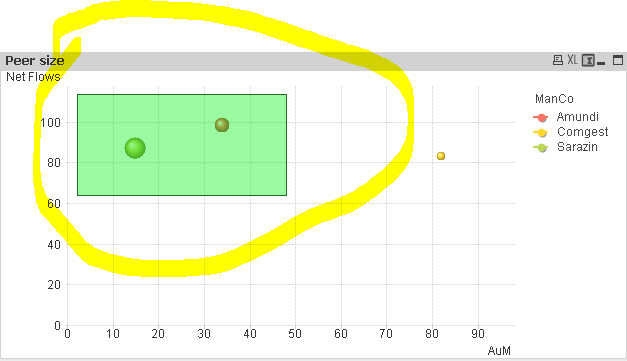
For example, I would like to select only 2 bubbles on the chart and the result will be 2 bubbles with the adpatation of the scale.
A screenshot is available in attachment.
This is the normal behaviour of QlikView but with the functionality of 'Alternate States', it doesn't work.
Many thanks for your help.
Kind regards,
Nicolas.