Unlock a world of possibilities! Login now and discover the exclusive benefits awaiting you.

- Qlik Community
- :
- All Forums
- :
- QlikView
- :
- Always one selected Property
- Subscribe to RSS Feed
- Mark Topic as New
- Mark Topic as Read
- Float this Topic for Current User
- Bookmark
- Subscribe
- Mute
- Printer Friendly Page

- Mark as New
- Bookmark
- Subscribe
- Mute
- Subscribe to RSS Feed
- Permalink
- Report Inappropriate Content
Always one selected Property
Hi Community,
I have a list box with always one selected value that property is not working for this object in access point
Any ideas will be helpful
- Tags:
- qlikview_deployment

 Peter_Cammaert
- Mark as New
- Bookmark
- Subscribe
- Mute
- Subscribe to RSS Feed
- Permalink
- Report Inappropriate Content
What do you mean? It isn't set when you reload/publish your document? You can unselect the single pre-selected value? Or you're able to select multiple values in the AP?
What version of QlikView Server are you using?
Peter

 Clever_Anjos
- Mark as New
- Bookmark
- Subscribe
- Mute
- Subscribe to RSS Feed
- Permalink
- Report Inappropriate Content
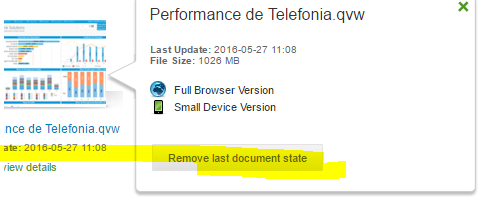
Before opening the app please remove last state

 novolouy
- Mark as New
- Bookmark
- Subscribe
- Mute
- Subscribe to RSS Feed
- Permalink
- Report Inappropriate Content
Hi Sruti,
Do you mean that after deploying the report the "Always one selected" propery is lost?
This may be because you are doing a "Limited Load" (when you perform a Debug run with the limited load option selected):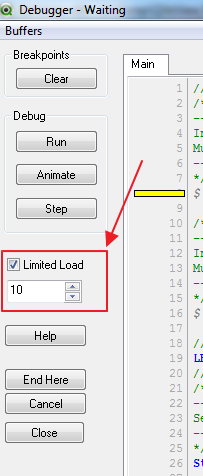
If you reduced the data too much, it is possible that the "List Box" was left with no data, and the option of "Always one selected" will be lost.
Please check if this is not the case and let me know.
Regards
- Mark as New
- Bookmark
- Subscribe
- Mute
- Subscribe to RSS Feed
- Permalink
- Report Inappropriate Content
Hi Novolouy,
There is no limited load in the qvw as you suspected
- Mark as New
- Bookmark
- Subscribe
- Mute
- Subscribe to RSS Feed
- Permalink
- Report Inappropriate Content
Hi Clever anjos,
Tried removing last state, but no luck....
- Mark as New
- Bookmark
- Subscribe
- Mute
- Subscribe to RSS Feed
- Permalink
- Report Inappropriate Content
Hi Peter,
Yes, the property is not set when in publish ...i am able to select multiple values...and i am using 11.2 SR 13 version

 PrashantSangle
- Mark as New
- Bookmark
- Subscribe
- Mute
- Subscribe to RSS Feed
- Permalink
- Report Inappropriate Content
Hi,
You have to set the always one selected property before publishing document.
select one value in list box then go to property > General > check always one selected.
Regards
Please appreciate our Qlik community members by giving Kudos for sharing their time for your query. If your query is answered, please mark the topic as resolved 🙂
- Mark as New
- Bookmark
- Subscribe
- Mute
- Subscribe to RSS Feed
- Permalink
- Report Inappropriate Content
Hi Max,
I have seted that property and published but it's not working in access point. one more thing is document is having section access

 NickHoff
- Mark as New
- Bookmark
- Subscribe
- Mute
- Subscribe to RSS Feed
- Permalink
- Report Inappropriate Content
Hello Sruti,
We are on the latest SR on Qlikview 11 and have been noticing this when we move an application to QA or Production. The always one selected option appears not to be working, but if the user goes to reset document state, then shortly after pushes view in full browser the always one selected works. I'm going to assume this is an AJAX issue that was introduced with the last update because it didn't occur prior to SR 11.2. ver 13