Unlock a world of possibilities! Login now and discover the exclusive benefits awaiting you.

- Qlik Community
- :
- All Forums
- :
- QlikView
- :
- Apply Map
- Subscribe to RSS Feed
- Mark Topic as New
- Mark Topic as Read
- Float this Topic for Current User
- Bookmark
- Subscribe
- Mute
- Printer Friendly Page

- Mark as New
- Bookmark
- Subscribe
- Mute
- Subscribe to RSS Feed
- Permalink
- Report Inappropriate Content
Apply Map
Hi Experts,
How to use Apply Map? Can anyone share sample app
Please find attached sample data
Sheet1- Product Name
Sheet2 - Product Name to Map with Name
Thanks
- Tags:
- apply map excel
Accepted Solutions

 jagan
jagan
- Mark as New
- Bookmark
- Subscribe
- Mute
- Subscribe to RSS Feed
- Permalink
- Report Inappropriate Content
Hi,
Try like this
ProductsMapping:
MAPPING LOAD [Product name],
Name
FROM
[Apply Map.xlsx]
(ooxml, embedded labels, table is Sheet2);
Data:
LOAD [Product ID],
[Product name] AS ActualProductName,
ApplyMap('ProductsMapping', [Product name], 'NA') AS [Product name],
[Start Date],
[End Date]
FROM
[Apply Map.xlsx]
(ooxml, embedded labels, table is Sheet1);
Regards,
Jagan.

 Digvijay_Singh
- Mark as New
- Bookmark
- Subscribe
- Mute
- Subscribe to RSS Feed
- Permalink
- Report Inappropriate Content
Load Sheet 2 table;
Create new mapping table as -
Name_Map:
Mapping load
Product Name,
Name
Resident <Name of your Sheet2 Table Here>;
Then use this as below while loading Sheet1;
Load
Product ID,
Product Name,
Applymap('Name_Map',Product Name,'Unknown') as Name,
Start Date,
End Date
From <Sheet1>
You may change sequence in different ways but the whole idea is to load mapping table first using the already loaded table and use the info in subsequent loading as I used above. If No name corresponding to Product Name then 'Unknown' value will be loaded.

 settu_periasamy
- Mark as New
- Bookmark
- Subscribe
- Mute
- Subscribe to RSS Feed
- Permalink
- Report Inappropriate Content
Hi,
Directory;
MAP:
Mapping LOAD [Product name],
Name
FROM
[Apply Map.xlsx]
(ooxml, embedded labels, table is Sheet2);
Final:
LOAD [Product ID],
[Product name],
Date#([Start Date],'M/D/YYYY') as [Start Date],
Date#([End Date],'M/D/YYYY') as [End Date],
ApplyMap('MAP',[Product name],'Unknown') as Name
FROM
[Apply Map.xlsx]
(ooxml, embedded labels, table is Sheet1);

 tamilarasu
- Mark as New
- Bookmark
- Subscribe
- Mute
- Subscribe to RSS Feed
- Permalink
- Report Inappropriate Content
Hi,
Try like below,
ProductMapping:
Mapping LOAD [Product name],
     Name
FROM
[Apply Map.xlsx]
(ooxml, embedded labels, table is Sheet2);

Product:
LOAD [Product ID],
  [Product name],
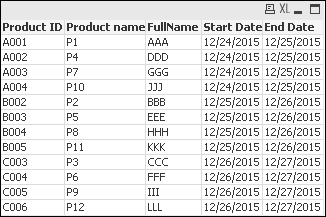
     Applymap('ProductMapping',[Product name], null()) as FullName,
     [Start Date],
     [End Date]
FROM
[Apply Map.xlsx]
(ooxml, embedded labels, table is Sheet1);
jagan
- Mark as New
- Bookmark
- Subscribe
- Mute
- Subscribe to RSS Feed
- Permalink
- Report Inappropriate Content
Hi,
Try like this
ProductsMapping:
MAPPING LOAD [Product name],
Name
FROM
[Apply Map.xlsx]
(ooxml, embedded labels, table is Sheet2);
Data:
LOAD [Product ID],
[Product name] AS ActualProductName,
ApplyMap('ProductsMapping', [Product name], 'NA') AS [Product name],
[Start Date],
[End Date]
FROM
[Apply Map.xlsx]
(ooxml, embedded labels, table is Sheet1);
Regards,
Jagan.
jagan
- Mark as New
- Bookmark
- Subscribe
- Mute
- Subscribe to RSS Feed
- Permalink
- Report Inappropriate Content
Hi,
You can also try join
Data:
LOAD [Product ID],
[Product name] AS ActualProductName,
[Product name],
[Start Date],
[End Date]
FROM
[Apply Map.xlsx]
(ooxml, embedded labels, table is Sheet1);
LEFT JOIN(Data)
LOAD [Product name],
Name
FROM
[Apply Map.xlsx]
(ooxml, embedded labels, table is Sheet2);
- Mark as New
- Bookmark
- Subscribe
- Mute
- Subscribe to RSS Feed
- Permalink
- Report Inappropriate Content
Hi,
PFB
Product:
Mapping
LOAD [Product name],
Name
FROM
(ooxml, embedded labels, table is Sheet2);
Details:
LOAD [Product ID],
[Product name],
[Start Date],
[End Date],
ApplyMap('Product',[Product name],'NA') as ProdcutDesc
FROM
(ooxml, embedded labels, table is Sheet1);
Regards,
Sub2u444