Unlock a world of possibilities! Login now and discover the exclusive benefits awaiting you.

- Qlik Community
- :
- All Forums
- :
- QlikView
- :
- Arranging a stacked bar chart
- Subscribe to RSS Feed
- Mark Topic as New
- Mark Topic as Read
- Float this Topic for Current User
- Bookmark
- Subscribe
- Mute
- Printer Friendly Page

 ale_nilo84
- Mark as New
- Bookmark
- Subscribe
- Mute
- Subscribe to RSS Feed
- Permalink
- Report Inappropriate Content
Arranging a stacked bar chart
Hi everyone,
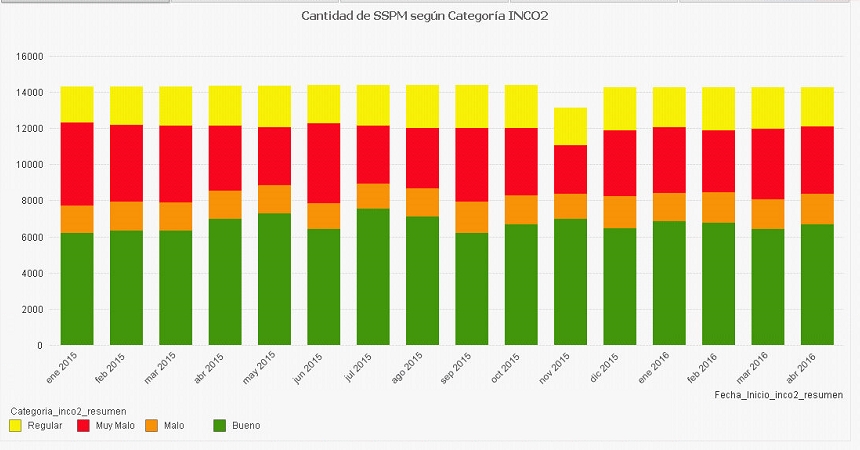
I am a beginner in Qlikview and i want to make a question and see if you can help me .How can I arrange a stacked bar chart in the folllowing order by category from Very bad , bad , regular and good?.
In the attached image, the categories are in spanish.
Regards from Chile
Accepted Solutions

 swuehl
- Mark as New
- Bookmark
- Subscribe
- Mute
- Subscribe to RSS Feed
- Permalink
- Report Inappropriate Content
Try to create the correct order of your categories when creating them in the script:
either create a load order that is correct, e.g. by creating an INLINE table before you are loading your categories:
LOAD * INLINE [
Category
Very bad
Bad
Regular
Good
];
Then load your other tables. You can drop the INLINE table at the end of your script, if you want.
Then set the sort order of Category to load order on Sort tab of your chart.
or create a dual value when creating / loading your Categories:
LOAD
Dual(Category, Match(Category, 'Very bad','Bad','Regular','Good')+1 ) as Category,
...
Then sort the Category values numeric.
Hope this helps,
Stefan
swuehl
- Mark as New
- Bookmark
- Subscribe
- Mute
- Subscribe to RSS Feed
- Permalink
- Report Inappropriate Content
Try to create the correct order of your categories when creating them in the script:
either create a load order that is correct, e.g. by creating an INLINE table before you are loading your categories:
LOAD * INLINE [
Category
Very bad
Bad
Regular
Good
];
Then load your other tables. You can drop the INLINE table at the end of your script, if you want.
Then set the sort order of Category to load order on Sort tab of your chart.
or create a dual value when creating / loading your Categories:
LOAD
Dual(Category, Match(Category, 'Very bad','Bad','Regular','Good')+1 ) as Category,
...
Then sort the Category values numeric.
Hope this helps,
Stefan
ale_nilo84
- Mark as New
- Bookmark
- Subscribe
- Mute
- Subscribe to RSS Feed
- Permalink
- Report Inappropriate Content
Perfect, thank you very much for the help
