Unlock a world of possibilities! Login now and discover the exclusive benefits awaiting you.

- Qlik Community
- :
- All Forums
- :
- QlikView
- :
- Average problem
- Subscribe to RSS Feed
- Mark Topic as New
- Mark Topic as Read
- Float this Topic for Current User
- Bookmark
- Subscribe
- Mute
- Printer Friendly Page

 nboccassini
- Mark as New
- Bookmark
- Subscribe
- Mute
- Subscribe to RSS Feed
- Permalink
- Report Inappropriate Content
Average problem
Hi,
I have a problem on an average in a text box.
This is the data table
| SKILL | EMPLOY | A | B |
|---|---|---|---|
| SKILL1 | EMPL1 | 5 | 2 |
| SKILL1 | EMPL2 | 6 | 3 |
| SKILL2 | EMPL1 | 4 | 1 |
| SKILL2 | EMPL2 | 8 | 5 |
| SKILL3 | EMPL1 | 3 | 2 |
| SKILL3 | EMPL2 | 4 | 1 |
I need to calculate the average of A/B for each SKILL and count how many averages are <0,8 and show it in a text box.
Thanks.

 MK_QSL
- Mark as New
- Bookmark
- Subscribe
- Mute
- Subscribe to RSS Feed
- Permalink
- Report Inappropriate Content
Create a Straight Table
Dimension
SKILL
EMPLOY
Expression
SUM(A)/SUM(B)
or
Create a Straight Table
Dimension
SKILL
Expression
SUM(A)/SUM(B)
Create a Text Box and write below expression
=SUM(IF(Aggr(SUM(A)/SUM(B),SKILL)<0.8,1,0))
nboccassini
- Mark as New
- Bookmark
- Subscribe
- Mute
- Subscribe to RSS Feed
- Permalink
- Report Inappropriate Content
The expression may be correct, but the problem is I have more rows in my data model with the same value of EMPLOY, A and B so I need the expression must considers A/B only one time for each EMPLOY
MK_QSL
- Mark as New
- Bookmark
- Subscribe
- Mute
- Subscribe to RSS Feed
- Permalink
- Report Inappropriate Content
Provide sample data in excel along with the result your expecting...
 perumal_41
- Mark as New
- Bookmark
- Subscribe
- Mute
- Subscribe to RSS Feed
- Permalink
- Report Inappropriate Content
Hi
Try below expression .
Count ({<SKILL={"=SUM(A)/SUM(B)<0.8"}>}Distinct EMPLOY)
nboccassini
- Mark as New
- Bookmark
- Subscribe
- Mute
- Subscribe to RSS Feed
- Permalink
- Report Inappropriate Content
This is a qvw example. Note that in the FACT table EMPL,A and B may be duplicated
MK_QSL
- Mark as New
- Bookmark
- Subscribe
- Mute
- Subscribe to RSS Feed
- Permalink
- Report Inappropriate Content
=SUM(IF(Aggr(AVG(A/B),Skill)<=0.9,1,0))
 MarcoWedel
- Mark as New
- Bookmark
- Subscribe
- Mute
- Subscribe to RSS Feed
- Permalink
- Report Inappropriate Content
Hi,
another one:
=-SUM(Aggr(AVG(A/B),Skill)<0.9)
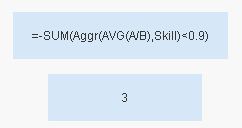
hope this helps
regards
Marco
