Unlock a world of possibilities! Login now and discover the exclusive benefits awaiting you.

- Qlik Community
- :
- All Forums
- :
- QlikView
- :
- Barchart Total
- Subscribe to RSS Feed
- Mark Topic as New
- Mark Topic as Read
- Float this Topic for Current User
- Bookmark
- Subscribe
- Mute
- Printer Friendly Page

- Mark as New
- Bookmark
- Subscribe
- Mute
- Subscribe to RSS Feed
- Permalink
- Report Inappropriate Content
Barchart Total
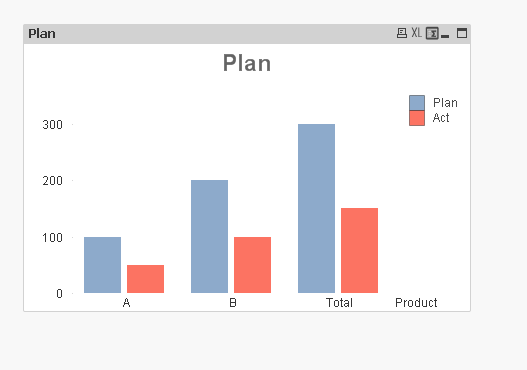
I face the following Problem: I have products with plan and actual. not all products have plandata.
In straight table I define for actual (if plandata>0, sum(actual)) and I define "sum of rows" and it's good (no totals)
In a barchart I need the totals but only for those products which had been defined a plandata.
But when I define totals, there is a total for all products. Even if I Change my Dimension If (product <>'C',Product,null()) it doesnot work
How can I achieve that I see the total Actual only for those products which had been planned In the attached sample, the total should Show 150 for Actual but not 350!
any idea?
Accepted Solutions

 sunny_talwar
- Mark as New
- Bookmark
- Subscribe
- Mute
- Subscribe to RSS Feed
- Permalink
- Report Inappropriate Content
This may be?
=if (column(1)>0,sum({<Plan = {"=Len(Trim(Plan)) > 0"}>}Act),null())
sunny_talwar
- Mark as New
- Bookmark
- Subscribe
- Mute
- Subscribe to RSS Feed
- Permalink
- Report Inappropriate Content
This may be?
=if (column(1)>0,sum({<Plan = {"=Len(Trim(Plan)) > 0"}>}Act),null())
 MK_QSL
- Mark as New
- Bookmark
- Subscribe
- Mute
- Subscribe to RSS Feed
- Permalink
- Report Inappropriate Content
Like this?