Unlock a world of possibilities! Login now and discover the exclusive benefits awaiting you.

- Qlik Community
- :
- All Forums
- :
- QlikView
- :
- Bizzarre
- Subscribe to RSS Feed
- Mark Topic as New
- Mark Topic as Read
- Float this Topic for Current User
- Bookmark
- Subscribe
- Mute
- Printer Friendly Page

 jduenyas
- Mark as New
- Bookmark
- Subscribe
- Mute
- Subscribe to RSS Feed
- Permalink
- Report Inappropriate Content
Bizzarre
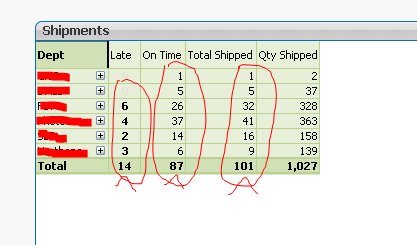
Did anyone see anything like this happening?
Total on columns are incorrect!!! 6+4+2+3 = 15 and not 14. And so are the other columns. (I am not concerned about the last column as it is correct.
- « Previous Replies
-
- 1
- 2
- Next Replies »

 sunny_talwar
- Mark as New
- Bookmark
- Subscribe
- Mute
- Subscribe to RSS Feed
- Permalink
- Report Inappropriate Content
Sum(Aggr(YourExpressions, YourPivotTableDimensions))
This should solve your issue
jduenyas
- Mark as New
- Bookmark
- Subscribe
- Mute
- Subscribe to RSS Feed
- Permalink
- Report Inappropriate Content
Thanks.
I have done that to no avail. Will have to investigate some more unless someone has a quick solution
sunny_talwar
- Mark as New
- Bookmark
- Subscribe
- Mute
- Subscribe to RSS Feed
- Permalink
- Report Inappropriate Content
That has always worked for me without failure. Would you be able to post a screenshot of your expression?
sunny_talwar
- Mark as New
- Bookmark
- Subscribe
- Mute
- Subscribe to RSS Feed
- Permalink
- Report Inappropriate Content
And possibly a screenshot of your dimensions

- Mark as New
- Bookmark
- Subscribe
- Mute
- Subscribe to RSS Feed
- Permalink
- Report Inappropriate Content
Hi Josh,
Are you counting distinct? Could you share your expression?
Regards!

 squeakie_pig
- Mark as New
- Bookmark
- Subscribe
- Mute
- Subscribe to RSS Feed
- Permalink
- Report Inappropriate Content
Check the Total Mode on the Expression tab.
It might be set to something other than the Expression total. You can't change it in pivot table mode, but change back to straight table and change it back to be what you need or the sum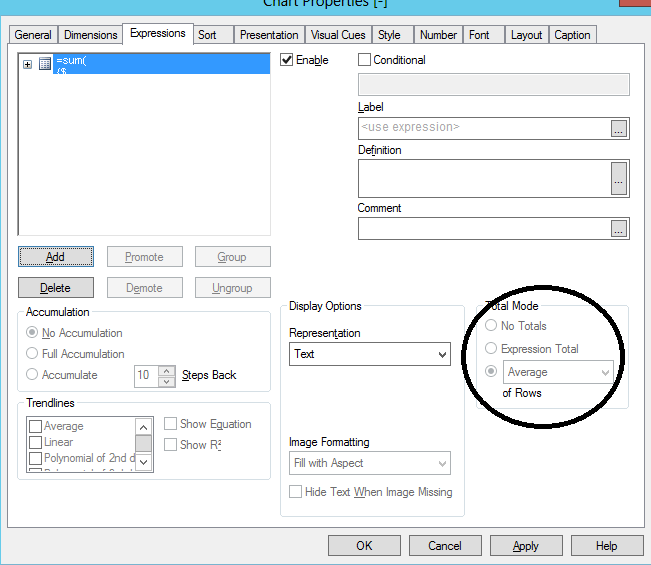
 ThornOfCrowns
- Mark as New
- Bookmark
- Subscribe
- Mute
- Subscribe to RSS Feed
- Permalink
- Report Inappropriate Content
Check for DISTICT / NODISTINCT values in your sum. I have found a QlikView-ism that sometimes discards identical rows from the sum.

 alexandros17
- Mark as New
- Bookmark
- Subscribe
- Mute
- Subscribe to RSS Feed
- Permalink
- Report Inappropriate Content
Convert the table into a straight table and see what happens:
The values should remain the same.
Now, in the expression tab select Sum of Rows instead of expression total.
What happens now? Are totals correct?
If the answer is yes then you are using expression with if conditions.
The only way to solve the problem is to aggregare every single line in order to let the total work correctly
Let me know
 Colin-Albert
- Mark as New
- Bookmark
- Subscribe
- Mute
- Subscribe to RSS Feed
- Permalink
- Report Inappropriate Content
Are the figures you are summing integers?
How are the values displayed if you set the number format to 4 decimal places?
Remember a pivot table does not sum the rows to get the total, but recalculates the expression ignoring the dimension at the total level.
To get the sum of rows you need to use sum(aggr(expression)) .
This post illustrates how totalling works in pivot tables Pivot Table: Sum of Rows? | Qlik Community
- « Previous Replies
-
- 1
- 2
- Next Replies »