Unlock a world of possibilities! Login now and discover the exclusive benefits awaiting you.

- Qlik Community
- :
- All Forums
- :
- QlikView
- :
- Block Chart Custom Labels
Options
- Subscribe to RSS Feed
- Mark Topic as New
- Mark Topic as Read
- Float this Topic for Current User
- Bookmark
- Subscribe
- Mute
- Printer Friendly Page
Turn on suggestions
Auto-suggest helps you quickly narrow down your search results by suggesting possible matches as you type.
Showing results for

 qlikvw2019
Contributor
2019-10-27
02:08 AM
- Mark as New
- Bookmark
- Subscribe
- Mute
- Subscribe to RSS Feed
- Permalink
- Report Inappropriate Content
Block Chart Custom Labels
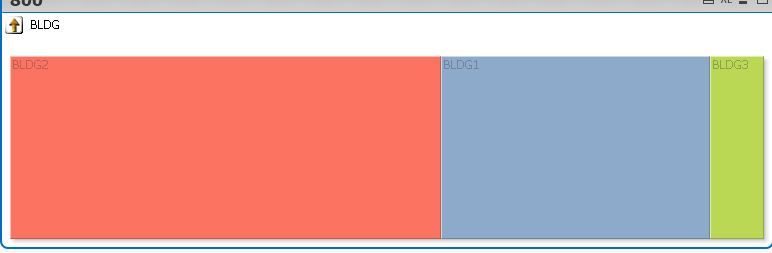
I have a block chart
How can i add customer lables to it such as
BLDG2
SIZE=800
1,359 Views
1 Solution
Accepted Solutions


2019-10-27
10:06 AM
- Mark as New
- Bookmark
- Subscribe
- Mute
- Subscribe to RSS Feed
- Permalink
- Report Inappropriate Content
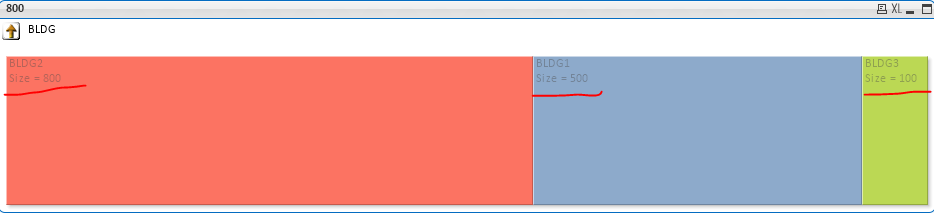
May be use this for each dimension under cyclic groups
For BLDG : BLDG & Chr(10) & 'Size = ' & Aggr(Max(ROOMSIZE), BLDG)
Ref, Image :
Best Anil, When applicable please mark the correct/appropriate replies as "solution" (you can mark up to 3 "solutions". Please LIKE threads if the provided solution is helpful
1,313 Views
3 Replies
2019-10-27
04:37 AM
- Mark as New
- Bookmark
- Subscribe
- Mute
- Subscribe to RSS Feed
- Permalink
- Report Inappropriate Content
Try to add Expression as Chr() and Dual() combination. Please post your expression and dimension, If it is Cyclic/Drill down(Please mention dimension names) of each, If any?
Best Anil, When applicable please mark the correct/appropriate replies as "solution" (you can mark up to 3 "solutions". Please LIKE threads if the provided solution is helpful
1,335 Views
qlikvw2019
Contributor
2019-10-27
09:05 AM
Author
- Mark as New
- Bookmark
- Subscribe
- Mute
- Subscribe to RSS Feed
- Permalink
- Report Inappropriate Content
Please see attached file
1,320 Views
2019-10-27
10:06 AM
- Mark as New
- Bookmark
- Subscribe
- Mute
- Subscribe to RSS Feed
- Permalink
- Report Inappropriate Content
May be use this for each dimension under cyclic groups
For BLDG : BLDG & Chr(10) & 'Size = ' & Aggr(Max(ROOMSIZE), BLDG)
Ref, Image :
Best Anil, When applicable please mark the correct/appropriate replies as "solution" (you can mark up to 3 "solutions". Please LIKE threads if the provided solution is helpful
1,314 Views
