Unlock a world of possibilities! Login now and discover the exclusive benefits awaiting you.

- Qlik Community
- :
- All Forums
- :
- QlikView
- :
- Bottom 5 values using dimension limits
- Subscribe to RSS Feed
- Mark Topic as New
- Mark Topic as Read
- Float this Topic for Current User
- Bookmark
- Subscribe
- Mute
- Printer Friendly Page

- Mark as New
- Bookmark
- Subscribe
- Mute
- Subscribe to RSS Feed
- Permalink
- Report Inappropriate Content
Bottom 5 values using dimension limits
Hi Members,
Can we show bottom 5 values using dimension limits ?
I don not want to use aggr function in dimensions and metrics.
Thanks
Khushboo

 lironbaram
- Mark as New
- Bookmark
- Subscribe
- Mute
- Subscribe to RSS Feed
- Permalink
- Report Inappropriate Content
hi
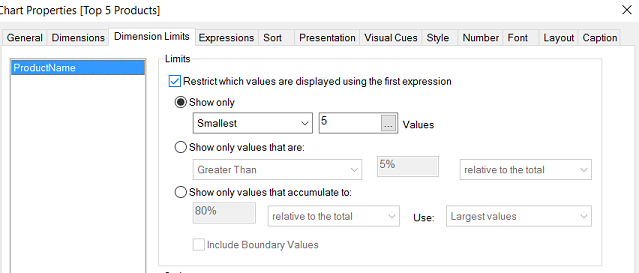
yes you just need to use the dimension limit , and make sure the first expression is the one you want to filter by
then just select to display the smallest 5 values
as displayed in the picture
- Mark as New
- Bookmark
- Subscribe
- Mute
- Subscribe to RSS Feed
- Permalink
- Report Inappropriate Content
When i try to do that i get no data to display error in my chart.
Is the reason because my lowest values is 1 and I have more than 5 products with volume 1?
lironbaram
- Mark as New
- Bookmark
- Subscribe
- Mute
- Subscribe to RSS Feed
- Permalink
- Report Inappropriate Content
hi
no this shouldn't be the reason it will randomly select 5 values from the list
- Mark as New
- Bookmark
- Subscribe
- Mute
- Subscribe to RSS Feed
- Permalink
- Report Inappropriate Content
Hi ,
My dimension is a cyclic group , for other dimension it is coming, but for product it is coming as no data to display.
Is it because few products have 0 value in fact table?
- Mark as New
- Bookmark
- Subscribe
- Mute
- Subscribe to RSS Feed
- Permalink
- Report Inappropriate Content
Hi Liron,
Checked this is the reason. Presence of 0 values in fact tables .
Hence bottom 5 values are 0.
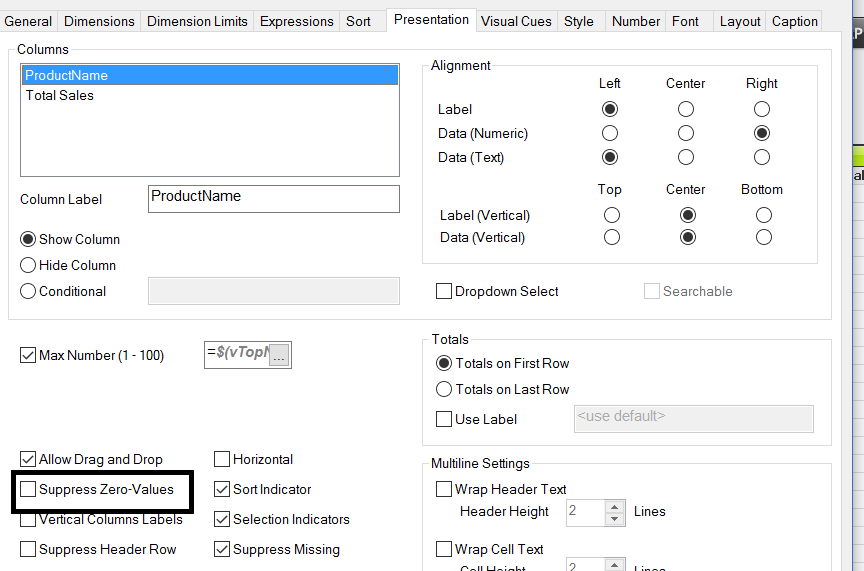
If i remove suppress 0 values from the presentation tab, we get the results.
lironbaram
- Mark as New
- Bookmark
- Subscribe
- Mute
- Subscribe to RSS Feed
- Permalink
- Report Inappropriate Content
hi ok
so no problem
go to the presentation tab in the chart properties , and un-check the "suppress zero values"