Unlock a world of possibilities! Login now and discover the exclusive benefits awaiting you.

- Qlik Community
- :
- All Forums
- :
- QlikView
- :
- Bucket Problem
- Subscribe to RSS Feed
- Mark Topic as New
- Mark Topic as Read
- Float this Topic for Current User
- Bookmark
- Subscribe
- Mute
- Printer Friendly Page

- Mark as New
- Bookmark
- Subscribe
- Mute
- Subscribe to RSS Feed
- Permalink
- Report Inappropriate Content
Bucket Problem
Hello Qlikview Users
I have the following kind of data
Bucket Value
0-30 325
31-60 600
61-180 258
181-365 254
365+ 222
I am showing the above data in Bar Chart where Bucket i my dimension and Expression is sum({<Ph_status='Commisioned',Net Collectable = {">$(vgreat)"}>}Net Collectable)
Now my reqirment is that when i click on 0-30 value(in list box) the value of that bucket should hide and the other bucket value should be seen.
Please help me out.....
Thanks in Advance
- Tags:
- new_to_qlikview

 orital81
- Mark as New
- Bookmark
- Subscribe
- Mute
- Subscribe to RSS Feed
- Permalink
- Report Inappropriate Content
Hi Sumitthakur,
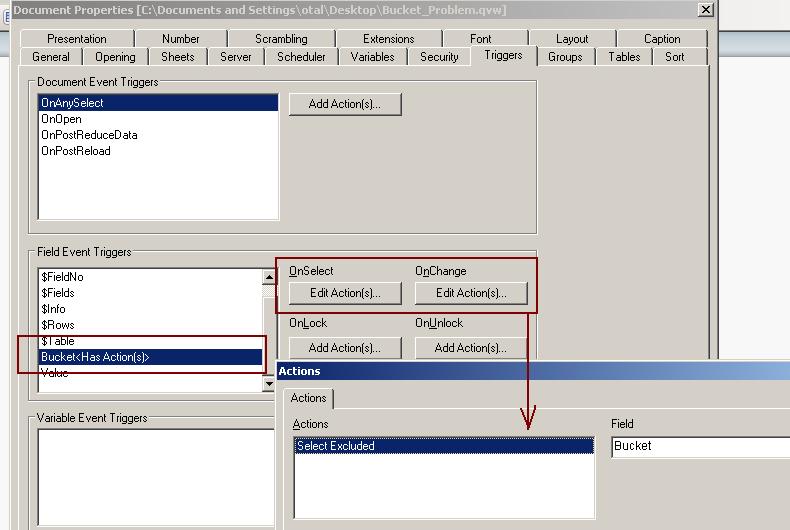
You can easily apply this by using Select Excluded trigger on Bucket field
Click on Settings->Document->Triggers
Go to Field Event Triggers
Add Select Excluded action as a trigger On Select and On Change
See screenshot and also attached qvw file