Unlock a world of possibilities! Login now and discover the exclusive benefits awaiting you.

- Qlik Community
- :
- All Forums
- :
- QlikView
- :
- Calculated Dimension - STRANGE BEHAVIOUR
- Subscribe to RSS Feed
- Mark Topic as New
- Mark Topic as Read
- Float this Topic for Current User
- Bookmark
- Subscribe
- Mute
- Printer Friendly Page

- Mark as New
- Bookmark
- Subscribe
- Mute
- Subscribe to RSS Feed
- Permalink
- Report Inappropriate Content
Calculated Dimension - STRANGE BEHAVIOUR
I'm noticing a very strange behaviour while defining a calculated dimension in a line chart. Please see the following screenshots and let me know if you have any idea of this strange behaviour.
I'm writing this in calculated dimension (numDate)
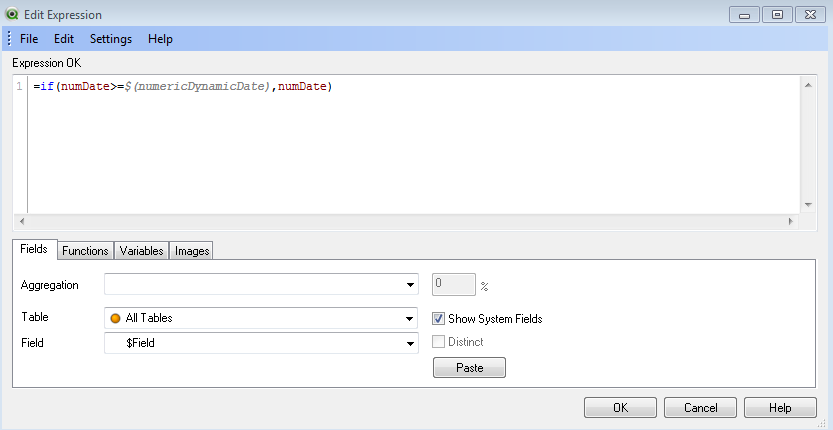
But the output display is seen as :

Here it can be seen that less than 40721.33055 is being shown. How is this possible?
I have the one more similar sample but the output display is absolutely correct in that case.
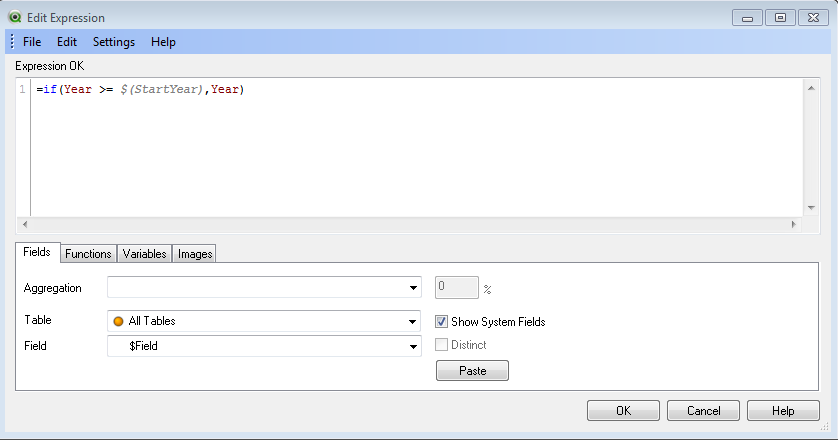
Correct output can be seen as follows:
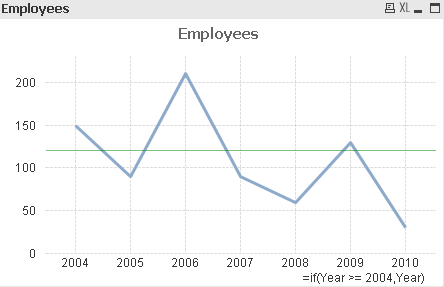
Can anyone explain this behaviour?? Unfortunately I can't share my qlikview files and data due to privacy issues.
- Tags:
- new_to_qlikview

 quwok
quwok
- Mark as New
- Bookmark
- Subscribe
- Mute
- Subscribe to RSS Feed
- Permalink
- Report Inappropriate Content
Your value is being read as a number, you'll need to set it to the date number format.

 Frank_Hartmann
- Mark as New
- Bookmark
- Subscribe
- Mute
- Subscribe to RSS Feed
- Permalink
- Report Inappropriate Content
Try this in script
Date(Date#(numDate)) AS numDate
- Mark as New
- Bookmark
- Subscribe
- Mute
- Subscribe to RSS Feed
- Permalink
- Report Inappropriate Content
Hi
Thanks for the reply. But if the values are being read as a number, still the comparison operator should work fine. In fact I intentionally converted my dates to Num(Dates) so that numbers are compared instead of dates
- Mark as New
- Bookmark
- Subscribe
- Mute
- Subscribe to RSS Feed
- Permalink
- Report Inappropriate Content
Hi Frank
I would like to know what's wrong in comparing two numbers here..??
quwok
- Mark as New
- Bookmark
- Subscribe
- Mute
- Subscribe to RSS Feed
- Permalink
- Report Inappropriate Content
Ah, the year made me think you are looking after the date. Having looked at your issue a bit closer, it seems that your decimal comma is causing an issue with the comma of the if statement.
Your expression:
=if(numDate>=40721,330555556,numDate)
is read as
if numDate>=40721 then 330555556 else numDate
hence every number that is smaller than 40721 is shown.
- Mark as New
- Bookmark
- Subscribe
- Mute
- Subscribe to RSS Feed
- Permalink
- Report Inappropriate Content
I thinik that's the actual reason.
I resolved it by converting number to Date.
Thanks...!!!!