Unlock a world of possibilities! Login now and discover the exclusive benefits awaiting you.

- Qlik Community
- :
- All Forums
- :
- QlikView
- :
- Calculating expression containing two aggregated e...
- Subscribe to RSS Feed
- Mark Topic as New
- Mark Topic as Read
- Float this Topic for Current User
- Bookmark
- Subscribe
- Mute
- Printer Friendly Page

- Mark as New
- Bookmark
- Subscribe
- Mute
- Subscribe to RSS Feed
- Permalink
- Report Inappropriate Content
Calculating expression containing two aggregated expressions
Hi,
I am having some difficulties calculating an expression.
I have a table looking like this:
number of hours | date | project id | task id | employee id |
The table contains daily working hours of employees for tasks that are a part of a certain project.
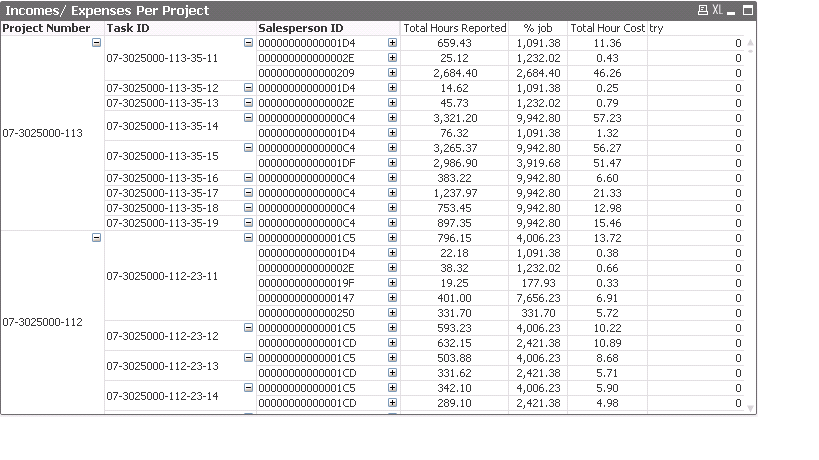
I would like to display the cost of each project by calculating for each employee, the number of hours spent on a project for a month, divided by the total number of hours worked by the employee that same month. After I get that I would want to multiply the result by the employee's salary for that month, and then summarize all results to get the total cost of a project.
I tried using this:
=sum((Aggr(sum([Employee Task Minutes])/sum({$<[Task ID]=, [Project Number]=>}[Employee Task Minutes]), YYYYMM))*vHourCost*vMonthlyHours)
This, unfortunately, does not work.
Does anyone have an idea for this?
Thanks,
Yaniv
- Mark as New
- Bookmark
- Subscribe
- Mute
- Subscribe to RSS Feed
- Permalink
- Report Inappropriate Content
Can you upload the sample application
- Mark as New
- Bookmark
- Subscribe
- Mute
- Subscribe to RSS Feed
- Permalink
- Report Inappropriate Content
I added a photo showing the wanted pivot table. The 'Total hours reported' column shows the hours reported for that task, now I want to get the total number of hours reported by the employee for the months that project was reported as being worked on.