Unlock a world of possibilities! Login now and discover the exclusive benefits awaiting you.

- Qlik Community
- :
- All Forums
- :
- QlikView
- :
- Can we hide QVWs in Accesspoint
- Subscribe to RSS Feed
- Mark Topic as New
- Mark Topic as Read
- Float this Topic for Current User
- Bookmark
- Subscribe
- Mute
- Printer Friendly Page

- Mark as New
- Bookmark
- Subscribe
- Mute
- Subscribe to RSS Feed
- Permalink
- Report Inappropriate Content
Can we hide QVWs in Accesspoint
I have some misc QVWs that generate QVDs in SourceDocuments and I want to make those files invisible to users. Can we do it?
- Tags:
- access_point
- access_point_security
- design
- developer
- dimension
- excel
- export
- hide
- qlikview_scripting
- qvd
- qvws
- script
- scripting
- section_access
Accepted Solutions
- Mark as New
- Bookmark
- Subscribe
- Mute
- Subscribe to RSS Feed
- Permalink
- Report Inappropriate Content
Found a solution in other discussion....
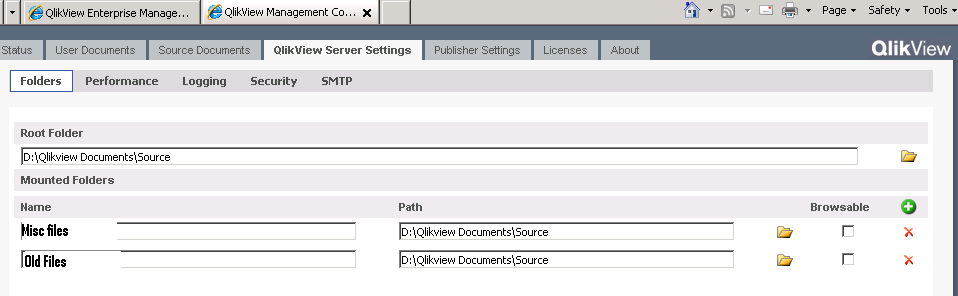
All we have to do is push them into defined folders and add them as Mounted Folders in QVMC \ QVS Settings \ Folders
add foldername under "Name" and path to folder under "Path"(remember: path to folder not files)
and uncheck the Browsable checkbox.
- Mark as New
- Bookmark
- Subscribe
- Mute
- Subscribe to RSS Feed
- Permalink
- Report Inappropriate Content
Found a solution in other discussion....
All we have to do is push them into defined folders and add them as Mounted Folders in QVMC \ QVS Settings \ Folders
add foldername under "Name" and path to folder under "Path"(remember: path to folder not files)
and uncheck the Browsable checkbox.