Unlock a world of possibilities! Login now and discover the exclusive benefits awaiting you.

- Qlik Community
- :
- All Forums
- :
- QlikView
- :
- Cannot exactly show all month data in time slide.
- Subscribe to RSS Feed
- Mark Topic as New
- Mark Topic as Read
- Float this Topic for Current User
- Bookmark
- Subscribe
- Mute
- Printer Friendly Page

- Mark as New
- Bookmark
- Subscribe
- Mute
- Subscribe to RSS Feed
- Permalink
- Report Inappropriate Content
Cannot exactly show all month data in time slide.
Hi All,
Thanks for you noticing this question as attachment. It can't show all momth in time slide. And this is a common problem I have seen in QlikView, because there is a control in the time slider that allows you to set the number of tick marks and how frequently to include a label. Since this is a dynamic number that increments by 1 each month, I have not found a great automated solution.
For now, I am just manually updating the number of tick-marks each month. Could you please tell me how to automaticlly change the number of tick-marks? Thanks very much. 
Best regards,
Yvonne

- Mark as New
- Bookmark
- Subscribe
- Mute
- Subscribe to RSS Feed
- Permalink
- Report Inappropriate Content
Can anyone help me ?? Thanks.

 kaushiknsolanki
- Mark as New
- Bookmark
- Subscribe
- Mute
- Subscribe to RSS Feed
- Permalink
- Report Inappropriate Content
Hi,
Is it possible for you to upload thw qvw file.
Regards,
Kaushik Solanki
- Mark as New
- Bookmark
- Subscribe
- Mute
- Subscribe to RSS Feed
- Permalink
- Report Inappropriate Content
HI Kaushik,
Thanks for replying this message. I can update the qvw file normally. But the time slide is abnormal. I need to adjust it every month in the property. It is very inconvenience that more and more qvw file will be produced. So I want to search automatically method to update the number of tick-marks of time slide. Is it a Qlikview defect? Thanks.
Best regards,
Yvonne
kaushiknsolanki
- Mark as New
- Bookmark
- Subscribe
- Mute
- Subscribe to RSS Feed
- Permalink
- Report Inappropriate Content
Hi,
Can you please explain what do you mean by "more and more qvw file will be produced".
Will you upload the qvw file.
Regards,
Kaushik Solanki
- Mark as New
- Bookmark
- Subscribe
- Mute
- Subscribe to RSS Feed
- Permalink
- Report Inappropriate Content
Hi Kaushik,
In our company, we will make more and more qvw report not just this one. So I need to manually change the number of tick-marks one by one.
Usually, I need to change the number in the "Use Custom Scale" of Major Units.
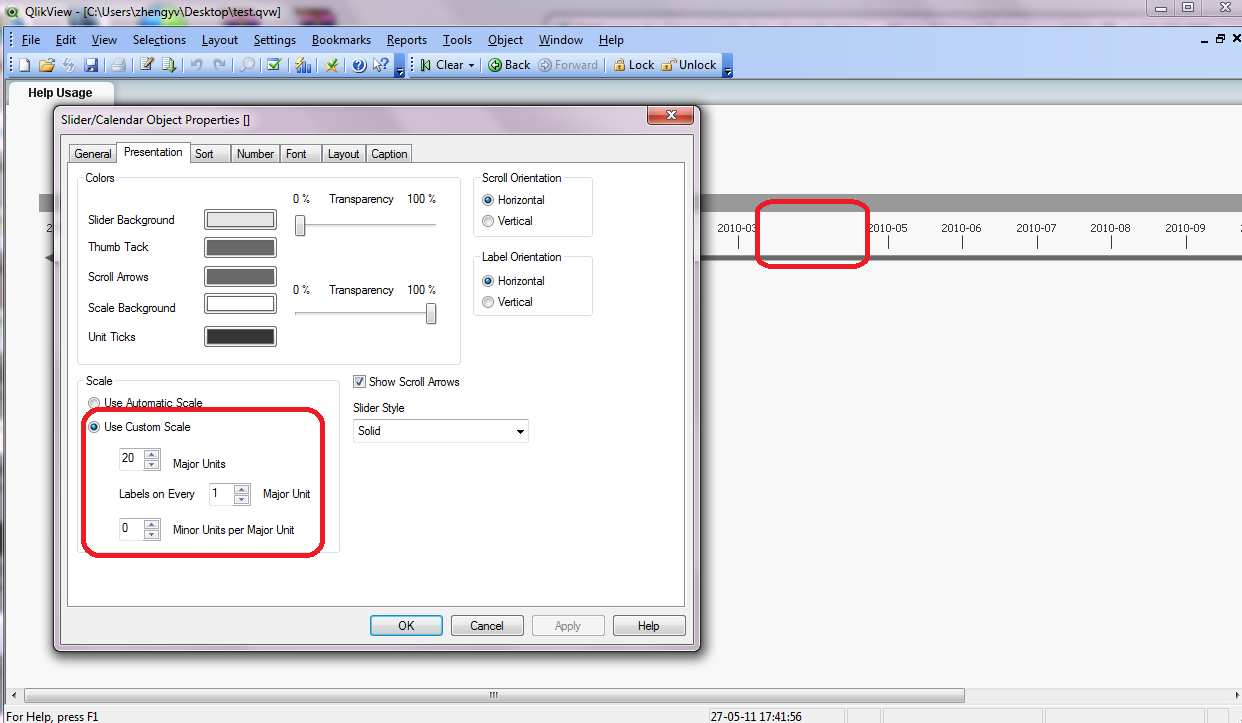
The file has been uploaded.
Best regards,
Yvonne
kaushiknsolanki
- Mark as New
- Bookmark
- Subscribe
- Mute
- Subscribe to RSS Feed
- Permalink
- Report Inappropriate Content
Hi,
First thing about your missing value on slider. It is becuase you have 21 Dates but you have given only 20 in major units, this the middle value i.e 2010-04 is not showing. Use 21 Major Units.
Secondly if you have many slider in one Qvw (report) then in that case it is possible to create a macro and assign ticks to every slider, but i think its not possible to update slider in every different QVW automatically.
Regards,
Kaushik Solanki
- Mark as New
- Bookmark
- Subscribe
- Mute
- Subscribe to RSS Feed
- Permalink
- Report Inappropriate Content
Hi Kaushik,
Thanks again for your noticing. Yes, this is a issue that the number of major units can't change automatically. For example, total number of months is 21 this month, and I change the data to 21. But next month, it will be 22, so I need to change the number to 22 manually.
It just one time slide in one qlikview.
Best regards,
Yvonne
kaushiknsolanki
- Mark as New
- Bookmark
- Subscribe
- Mute
- Subscribe to RSS Feed
- Permalink
- Report Inappropriate Content
Hi,
Stil you can achieve this using the Macro. As below
sub abc
set v1 = ActiveDocument.Variables("vGetTick") 'Variable which stores the ticks
Set v2 = ActiveDocument.Variables("vMaxYM") 'Varibale which stores =Max(Month)
Set v3 = ActiveDocument.Variables("vCurYM") 'Varibale which stores current month i.e. =Day(today(),'YYYY-MM")
val2 = v2.getcontent.string
val3 = v3.getcontent.string
val1 = v1.getcontent.string
msgbox val1
msgbox val2
msgbox val3
if val3 > val2 then
val = v1.getcontent.string +1
v1.setcontent val,true
end if
set slider = ActiveDocument.GetSheetObject("SL01") 'ID of the slider
set slprop=slider.GetProperties
set sl = slprop.Layout
sl.NumberOfMajorTicks = val
slider.SetProperties slprop
end sub
Load this macro on "On Open" trigger of the document.
The logic is. Get the max(monthYear) from field compare it with the current monthYear.. If the current monthYear is greater, then set the tick varibale to last tick + 1 and set that to slider.
Hope you understood what i want to say..
Regards,
Kaushik Solanki