Unlock a world of possibilities! Login now and discover the exclusive benefits awaiting you.

- Qlik Community
- :
- All Forums
- :
- QlikView
- :
- Change headers from en imported Excell file
- Subscribe to RSS Feed
- Mark Topic as New
- Mark Topic as Read
- Float this Topic for Current User
- Bookmark
- Subscribe
- Mute
- Printer Friendly Page

- Mark as New
- Bookmark
- Subscribe
- Mute
- Subscribe to RSS Feed
- Permalink
- Report Inappropriate Content
Change headers from en imported Excell file
Dear all,
I have an excel file which headers of the column tables are dates.
When I try to import the file, QV change the dates in a Text with date numbers as the header:
For example:
Load
[41640], // I need to change to JAN 14.
[41671],
[41699],
[41730]
From....
I Need to change those numbers in a Date format, like JAN 14, Feb 14, and so on.....
Can somebody help me?
Thanks in advance for any help provided.
Pat.
- Tags:
- new_to_qlikview

 sunny_talwar
- Mark as New
- Bookmark
- Subscribe
- Mute
- Subscribe to RSS Feed
- Permalink
- Report Inappropriate Content
Try doing this:
Are you using CrossTable() function in your script?
- Mark as New
- Bookmark
- Subscribe
- Mute
- Subscribe to RSS Feed
- Permalink
- Report Inappropriate Content
Thanks Sunny, but this is not the solution, What I want to do is changing the [41640] header in a month-year format "Jan-14".
 maxgro
- Mark as New
- Bookmark
- Subscribe
- Mute
- Subscribe to RSS Feed
- Permalink
- Report Inappropriate Content
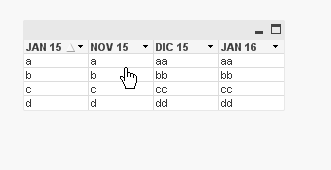
test data in the attachment, script below
Directory;
Data:
LOAD
[42309],
[42339],
[42005],
[42370]
FROM
[Nuovo Microsoft Excel Worksheet.xlsx]
(ooxml, embedded labels, table is Sheet1);
FOR i=1 to NoOfFields('Data')
LET vfield = FieldName($(i), Data);
LET vnewfield=Upper(Date($(vfield), 'MMM YY'));
trace $(vfield);
trace $(vnewfield);
RENAME Field [$(vfield)] to [$(vnewfield)];
NEXT;

 HirisH_V7
- Mark as New
- Bookmark
- Subscribe
- Mute
- Subscribe to RSS Feed
- Permalink
- Report Inappropriate Content
Hi,
Table:
CrossTable(Temp_Date, Sales)
LOAD Data,
[41640],
[41641],
[41642],
[41643],
[41644],
[41645],
[41646],
[41647]
FROM
[\CrossTable.xlsx]
(ooxml, embedded labels, table is Sheet1);
Temp:
Load
Data,
date(num#(Temp_Date),'DD/MM/YYYY') AS Date,
Sales
Resident Table;
Drop table Table;
Please Check the attachment .
I Hope this Helps.
Thanks,
Hirish
 MarcoWedel
- Mark as New
- Bookmark
- Subscribe
- Mute
- Subscribe to RSS Feed
- Permalink
- Report Inappropriate Content
Hi,
another solution could be:

tabDates:
CrossTable(MonthTemp, Value)
LOAD RecNo() as ID, * Inline [
41640 41671 41699 41730 41760 41791 41821 41852 41883 41913 41944 41974
1 2 3 4 5 6 7 8 9 10 11 12
13 14 15 16 17 18 19 20 21 22 23 24
25 26 27 28 29 30 31 32 33 34 35 36
](delimiter is spaces);

Left Join (tabDates)
LOAD Distinct
  MonthTemp,
  Date(Evaluate(MonthTemp), 'MMM YY') as MonthYear
Resident tabDates;

DROP Field MonthTemp;
hope this helps
regards
Marco