Unlock a world of possibilities! Login now and discover the exclusive benefits awaiting you.

- Qlik Community
- :
- All Forums
- :
- QlikView
- :
- Changing and limiting values in listbox (dynamical...
Options
- Subscribe to RSS Feed
- Mark Topic as New
- Mark Topic as Read
- Float this Topic for Current User
- Bookmark
- Subscribe
- Mute
- Printer Friendly Page
Turn on suggestions
Auto-suggest helps you quickly narrow down your search results by suggesting possible matches as you type.
Showing results for

 retko1985
Creator II
2018-04-09
08:24 AM
- Mark as New
- Bookmark
- Subscribe
- Mute
- Subscribe to RSS Feed
- Permalink
- Report Inappropriate Content
Changing and limiting values in listbox (dynamically)
Hello,
I have this data in column / listbox:
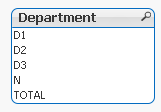
What I want is to replace each D with word 'Department ', so it will be 'Department 1' instead of 'D1'. And I also want to remove the values N and TOTAL, so I will have only Department values in a listbox.
I need it dynamically, since i don't know how many departments I will have.
Can someone help me?
Thank you.
913 Views
1 Solution
Accepted Solutions

 MK_QSL
MVP
2018-04-09
08:29 AM
- Mark as New
- Bookmark
- Subscribe
- Mute
- Subscribe to RSS Feed
- Permalink
- Report Inappropriate Content
Create List box using this expression
=Replace(IF(WildMatch(Department,'D*'),Department),'D','Department ')
2 Replies
MK_QSL
MVP
2018-04-09
08:29 AM
- Mark as New
- Bookmark
- Subscribe
- Mute
- Subscribe to RSS Feed
- Permalink
- Report Inappropriate Content
Create List box using this expression
=Replace(IF(WildMatch(Department,'D*'),Department),'D','Department ')

 saimahasan
Partner - Creator III
2018-04-10
06:01 AM
- Mark as New
- Bookmark
- Subscribe
- Mute
- Subscribe to RSS Feed
- Permalink
- Report Inappropriate Content
Hope this solves your problem.
860 Views
