Unlock a world of possibilities! Login now and discover the exclusive benefits awaiting you.

- Qlik Community
- :
- All Forums
- :
- QlikView
- :
- Coalesce Statement
- Subscribe to RSS Feed
- Mark Topic as New
- Mark Topic as Read
- Float this Topic for Current User
- Bookmark
- Subscribe
- Mute
- Printer Friendly Page

- Mark as New
- Bookmark
- Subscribe
- Mute
- Subscribe to RSS Feed
- Permalink
- Report Inappropriate Content
Coalesce Statement
Hi All,
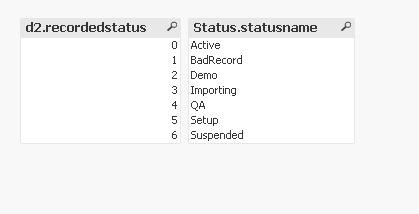
I have to apply the coalesce equivalent function on two fields situated in different tables in Qlik. I have tried different tactics such as
statusname&'_'&d2.recordedstatus as status and statusname as stats and d2.recordedstatus as stats but resulted in no fruition. Please guide me towards the right way of doing the coalesce function.
Thanks in advance.......
- « Previous Replies
-
- 1
- 2
- Next Replies »

 jonathandienst
- Mark as New
- Bookmark
- Subscribe
- Mute
- Subscribe to RSS Feed
- Permalink
- Report Inappropriate Content
Len(clientid) = 0 returns true for nulls and empty strings
IsNull(clientid) returns true for nulls only
Use whichever one best suits your requirements.
- Mark as New
- Bookmark
- Subscribe
- Mute
- Subscribe to RSS Feed
- Permalink
- Report Inappropriate Content
Are there other ways to write ISNULL in qlikview except the two
Len(clientid) = 0 returns true for nulls and empty strings
IsNull(clientid) returns true for nulls only
They both get me the same number of rows but not exactly producing the results needed.
Thanks,
jonathandienst
- Mark as New
- Bookmark
- Subscribe
- Mute
- Subscribe to RSS Feed
- Permalink
- Report Inappropriate Content
I suggest that you post a small example the illustrates the problem as well as the value you expect or require.
Those are the only two simple functions, but there may be other ways depending on the context (eg using SQL "NOT IS NULL" in a SQL SELECT statement).

 sunny_talwar
- Mark as New
- Bookmark
- Subscribe
- Mute
- Subscribe to RSS Feed
- Permalink
- Report Inappropriate Content
Have you tried Len(Trim(clientid))?
- Mark as New
- Bookmark
- Subscribe
- Mute
- Subscribe to RSS Feed
- Permalink
- Report Inappropriate Content
Thanks guys for all your help thus far. Below are the SQL functions I have to apply in Qlik.
select distinct d2.clientid, d1c.clientname, coalesce(statusname,d2.recordedstatus) as status, case when activeusercount is not null and activeusercount > 2 then 'yes' else 'no' end as "More than 2 users in 30 days", d1.testaccountflag
where d2.fkdimrbcapplication < 15
and usethisinstance = 1
and netsuiteid is null
order by 1
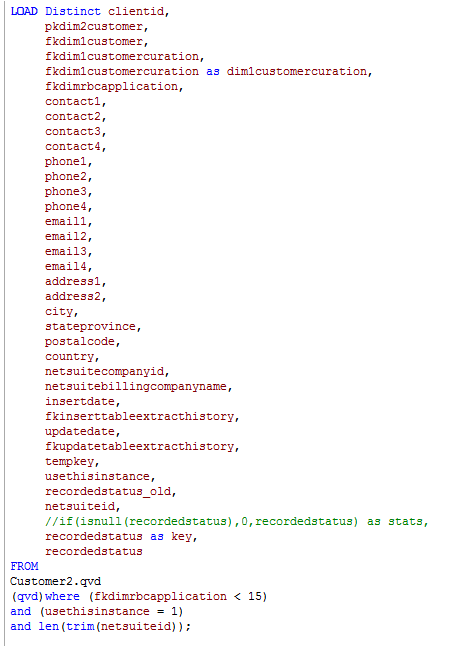
I'm attaching the filters I've written in Qlik. If you see something which jumps out at you guys please provide me with the corrections.
Is Order By only possible in Qlik when you're using Resident Load?
Thanks,


 swuehl
- Mark as New
- Bookmark
- Subscribe
- Mute
- Subscribe to RSS Feed
- Permalink
- Report Inappropriate Content
If you use in QV
WHERE Len(Trim(netsuidid))
then this is the opposite of (in SQL)
WHERE netsuid is null
You need to use
WHERE Len(Trim(netsuidid)) =0
edit:
or
WHERE IsNull(netsuidid)
if you want to check only for NULL
- Mark as New
- Bookmark
- Subscribe
- Mute
- Subscribe to RSS Feed
- Permalink
- Report Inappropriate Content
Thanks for the help Stefan. You had sent me the below filter earlier today. Is it wise to use this in scripting or as a calculated dimension in a chart. Both those two fields (statusname and recordedstatus) are located in different tables that's why I have opted to use it as a calculated dimension due to my lack of understanding in how to filter it out at the scripting level.
If(Len(Trim( statusname )) >0, statusname, recordedstatus) as status
- Mark as New
- Bookmark
- Subscribe
- Mute
- Subscribe to RSS Feed
- Permalink
- Report Inappropriate Content
Thanks all for your kind assistance!!!!!
- « Previous Replies
-
- 1
- 2
- Next Replies »