Unlock a world of possibilities! Login now and discover the exclusive benefits awaiting you.

- Qlik Community
- :
- All Forums
- :
- QlikView
- :
- Compare data range II
- Subscribe to RSS Feed
- Mark Topic as New
- Mark Topic as Read
- Float this Topic for Current User
- Bookmark
- Subscribe
- Mute
- Printer Friendly Page

 spividori
- Mark as New
- Bookmark
- Subscribe
- Mute
- Subscribe to RSS Feed
- Permalink
- Report Inappropriate Content
Compare data range II
Hi.
I am sorry to republish this discussion, but i need can be done with set analysis because the first items not taken the previous 5 values.
In the attached example, I need to calculate for each day of the dimension five days back and compare them with five days previous to the first 5.
For example, for the day 30/09 day should add 30,29,28,27,26 / 09 and compare them with the days 25,24,23,22,21 / 09.
In the example there are more clarification.
Regards.
- « Previous Replies
-
- 1
- 2
- Next Replies »
Accepted Solutions

 sunny_talwar
- Mark as New
- Bookmark
- Subscribe
- Mute
- Subscribe to RSS Feed
- Permalink
- Report Inappropriate Content
Try a script like this:
Table:
LOAD Fecha,
Imp,
month(Fecha) as Mes
FROM
RangoFechas.xls
(biff, embedded labels, table is Sheet1$);
FinalTable:
LOAD *,
[5d] - [5d ant] as diff;
LOAD *,
RangeSum(Imp, Peek('Imp'), Peek('Imp', -2), Peek('Imp', -3), Peek('Imp', -4)) as [5d],
RangeSum(Peek('Imp', -5), Peek('Imp', -6), Peek('Imp', -7), Peek('Imp', -8), Peek('Imp', -9)) as [5d ant]
Resident Table
Order By Fecha;
Drop Table Table;
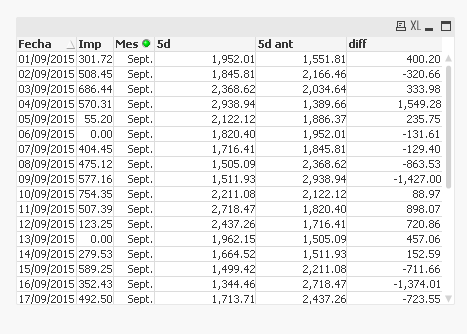
Output in Table box object:
sunny_talwar
- Mark as New
- Bookmark
- Subscribe
- Mute
- Subscribe to RSS Feed
- Permalink
- Report Inappropriate Content
I don't understand the issue? I though it was doing what you wanted? What is missing still?
spividori
- Mark as New
- Bookmark
- Subscribe
- Mute
- Subscribe to RSS Feed
- Permalink
- Report Inappropriate Content
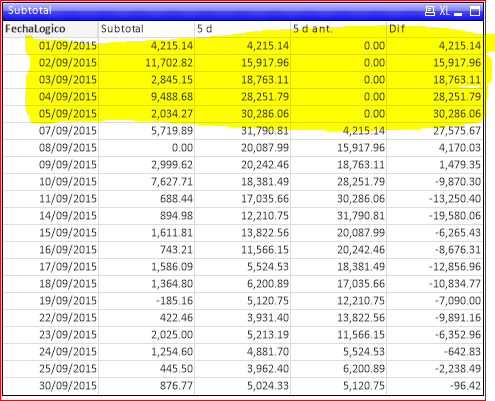
The problem is that when I apply in my application with the longer period the first values do not take the previous 5.
Regards.
sunny_talwar
- Mark as New
- Bookmark
- Subscribe
- Mute
- Subscribe to RSS Feed
- Permalink
- Report Inappropriate Content
May be a condition on all your expressions:
If(RangeSum(Above(Sum(Imp), 5, 5)) > 0, YourExpression)
sunny_talwar
- Mark as New
- Bookmark
- Subscribe
- Mute
- Subscribe to RSS Feed
- Permalink
- Report Inappropriate Content
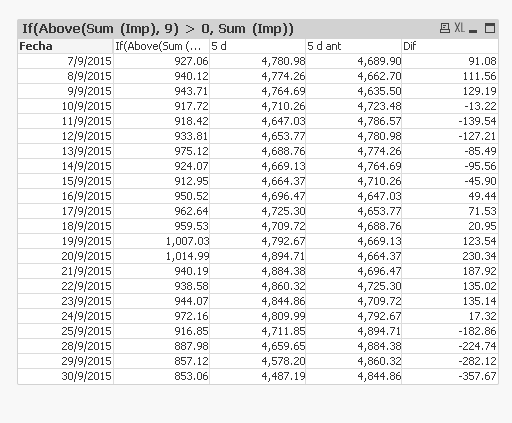
Try this instead:
If(Above(Sum (Imp), 9) > 0, yourExpression)
 !
!
spividori
- Mark as New
- Bookmark
- Subscribe
- Mute
- Subscribe to RSS Feed
- Permalink
- Report Inappropriate Content
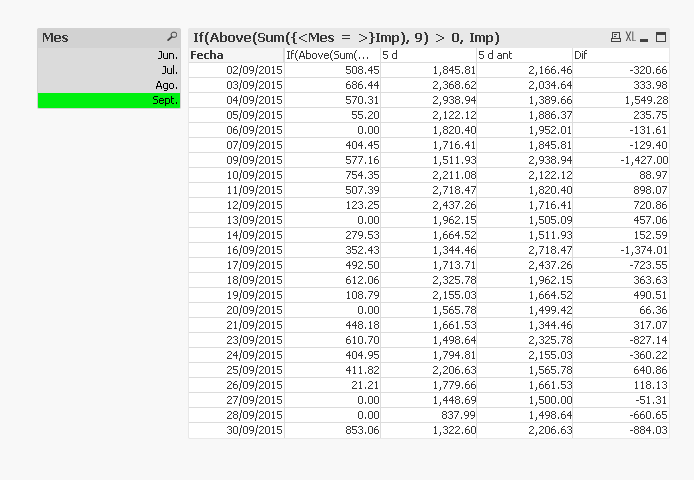
I added more data to the example and when I select Sept. it shows data from the 10/09 and I need to show the whole month.
Regards.

sunny_talwar
- Mark as New
- Bookmark
- Subscribe
- Mute
- Subscribe to RSS Feed
- Permalink
- Report Inappropriate Content
See attached:
spividori
- Mark as New
- Bookmark
- Subscribe
- Mute
- Subscribe to RSS Feed
- Permalink
- Report Inappropriate Content
See that there is dates not calculated.
01,08,15,22 y 29.
Regards.
sunny_talwar
- Mark as New
- Bookmark
- Subscribe
- Mute
- Subscribe to RSS Feed
- Permalink
- Report Inappropriate Content
Check this out:
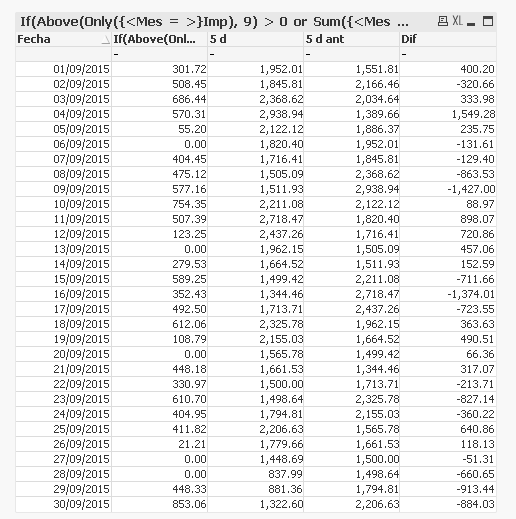
Would a script based solution work for you also?
sunny_talwar
- Mark as New
- Bookmark
- Subscribe
- Mute
- Subscribe to RSS Feed
- Permalink
- Report Inappropriate Content
Try a script like this:
Table:
LOAD Fecha,
Imp,
month(Fecha) as Mes
FROM
RangoFechas.xls
(biff, embedded labels, table is Sheet1$);
FinalTable:
LOAD *,
[5d] - [5d ant] as diff;
LOAD *,
RangeSum(Imp, Peek('Imp'), Peek('Imp', -2), Peek('Imp', -3), Peek('Imp', -4)) as [5d],
RangeSum(Peek('Imp', -5), Peek('Imp', -6), Peek('Imp', -7), Peek('Imp', -8), Peek('Imp', -9)) as [5d ant]
Resident Table
Order By Fecha;
Drop Table Table;
Output in Table box object:

- « Previous Replies
-
- 1
- 2
- Next Replies »